Cinematic Rain Couple Portrait — Two-Photo Identity Merge
♡ 78Combine two reference photos into one realistic cinematic couple portrait with exact identity preservation, rainy-night atmosphere, natural interaction, and premium photography.
#Couple Portrait#AI couple photo#AI photo editing#cinematic rain#couple portrait#romantic photography
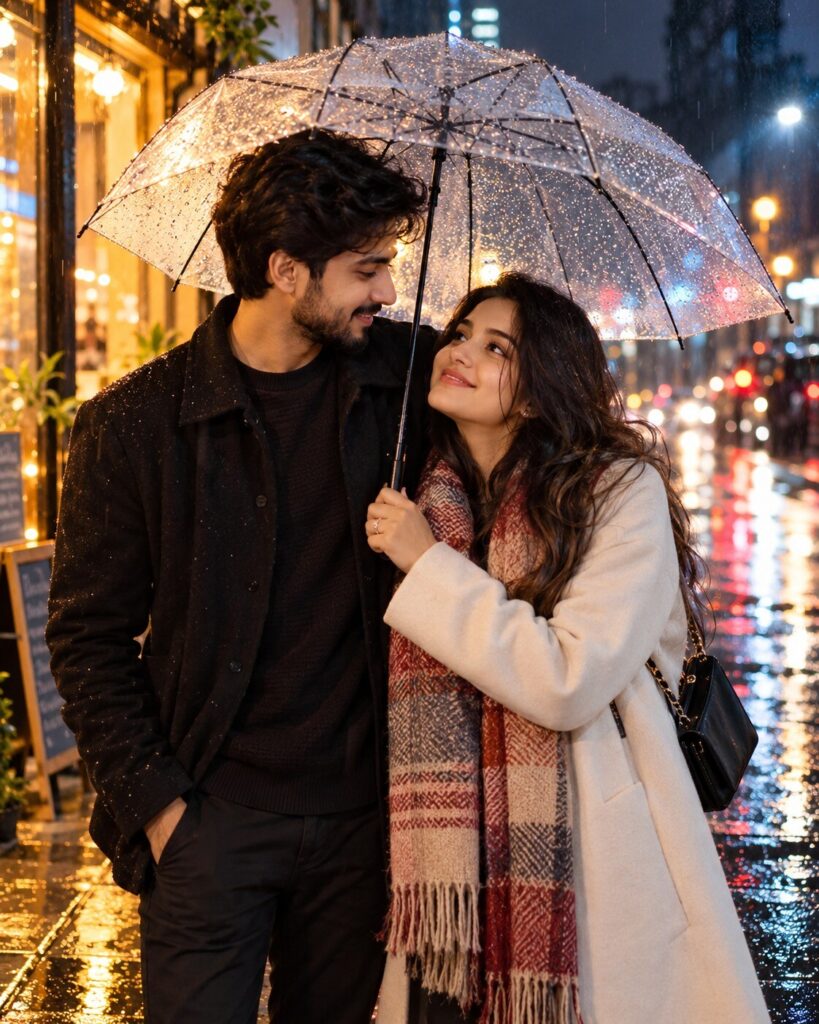
Combine the two uploaded reference images into one photorealistic couple portrait. Preserve the exact recognizable identity of both people independently, including facial structure, facial proportions, eyes, eyebrows, nose, lips, jawline, cheeks, skin tone, hairline, hairstyle, distinctive characteristics, natural age, body proportions and overall likeness. Place both people naturally together beneath a transparent umbrella on a rainy urban street at night. Match height, scale, perspective, eye level, lighting direction, color temperature and photographic characteristics. Wet pavement, warm storefront reflections, cool ambient sky light, realistic rain droplets, subtle mist, cinematic bokeh, natural skin texture, believable affectionate body language, authentic clothing interaction, professional nighttime photography, photorealistic rendering, no visible compositing.
Combine the two uploaded reference images into one photorealistic couple portrait. Preserve the exact recognizable identity of both people independently, including facial structure, facial proportions, eyes, eyebrows, nose, lips, jawline, cheeks, skin tone, hairline, hairstyle, distinctive characteristics, natural age, body proportions and overall likeness. Place both people naturally together beneath a transparent umbrella on a rainy urban street at night. Match height, scale, perspective, eye level, lighting direction, color temperature and photographic characteristics. Wet pavement, warm storefront reflections, cool ambient sky light, realistic rain droplets, subtle mist, cinematic bokeh, natural skin texture, believable affectionate body language, authentic clothing interaction, professional nighttime photography, photorealistic rendering, no visible compositing.
Create one photorealistic couple photograph from two uploaded reference images. Preserve both identities exactly, including facial structure, facial proportions, eyes, eyebrows, nose, lips, jawline, cheeks, skin tone, hairline, hairstyle, age and distinctive features. Place both people together under a transparent umbrella on a rainy urban street at night. Correctly match scale, height, perspective, lighting and body proportions. Warm storefront reflections on wet pavement, cool ambient light, realistic raindrops, subtle atmospheric mist, cinematic bokeh, natural skin texture, realistic clothing folds and believable affectionate interaction.
Use both uploaded reference images to create one realistic photograph of the two people together beneath a transparent umbrella on a rainy urban street at night. Preserve both individuals' exact recognizable identities and natural facial characteristics. Match their scale, perspective, lighting, skin tones, body proportions and photographic characteristics. Include realistic rain, wet pavement reflections, warm storefront lights, cool ambient illumination, subtle mist and cinematic background bokeh. Make the result appear to be one genuine photograph captured at the same moment.
identity drift, blended faces, averaged face, generic face, changed person, wrong facial structure, altered facial proportions, different eyes, different nose, different lips, different jawline, changed skin tone, changed hairstyle, altered age, beauty filter, plastic skin, excessive makeup, unrealistic body proportions, mismatched heights, floating body parts, extra fingers, missing fingers, malformed hands, duplicated person, duplicate face, pasted photograph, collage appearance, mismatched lighting, mismatched shadows, incorrect perspective, distorted umbrella, artificial rain, excessive fog, neon cyberpunk, oversaturated colors, excessive HDR, cartoon, anime, illustration, CGI, 3D render, text, watermark, logo
Works with
✦GPT Image✦Nano Banana✦Midjourney✦FLUX
Comments