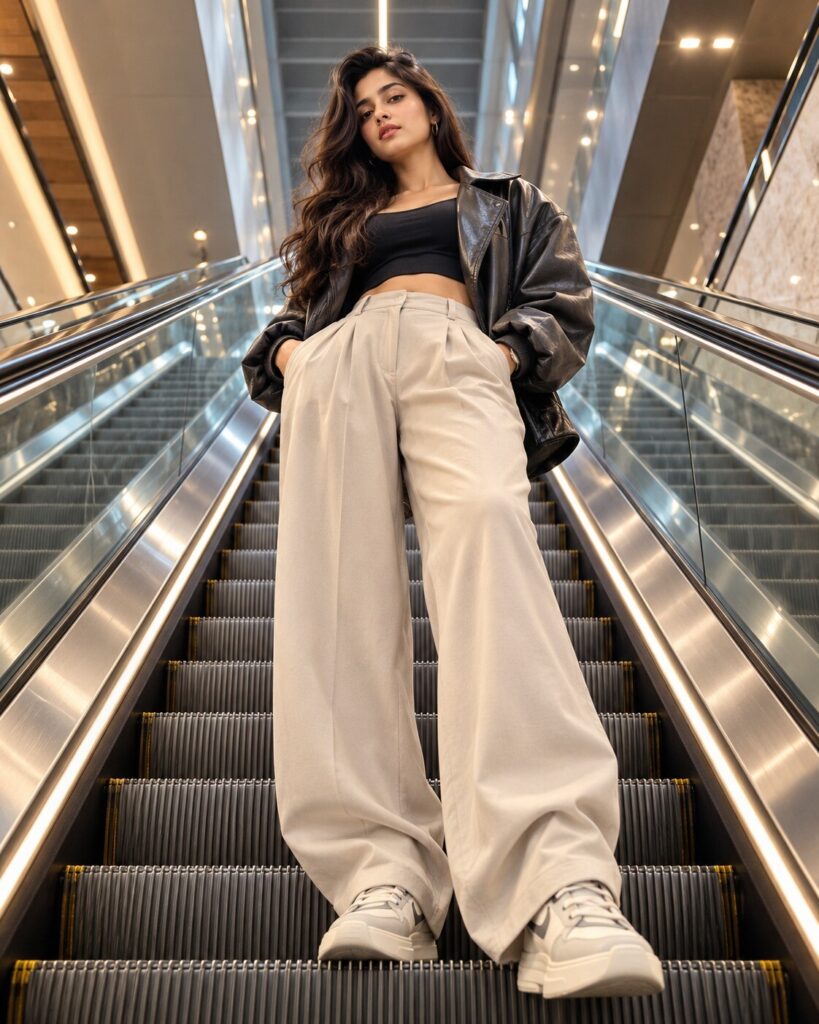
Escalator Rise Luxury Fashion Editorial
♡ 56Transform your reference photo into a dramatic luxury fashion editorial with an extreme low-angle escalator perspective, premium styling and exact face preservation.
#Editorial Fashion#AI fashion#architectural portrait#escalator editorial#fashion photography#luxury fashion
Create a photorealistic luxury fashion editorial from the uploaded reference image. Preserve the exact recognizable facial identity, facial structure, facial proportions, eyes, eyebrows, nose, lips, jawline, cheeks, skin tone, hairline, hairstyle, distinctive facial characteristics, natural age and overall likeness. Place the same person confidently at the midpoint of a long modern escalator, photographed from an extreme low angle at the bottom looking upward. Use strong architectural leading lines, polished metal rails, repeating escalator steps and dramatic spatial depth. Style the subject in contemporary luxury streetwear with an oversized structured jacket, wide-leg tailored trousers, premium sneakers and minimal accessories. Use clean commercial fashion lighting, directional shadows, crisp highlights, realistic skin texture and sophisticated editorial color grading. Keep the face natural and recognizable while creating a powerful fashion-campaign composition.
Create a photorealistic luxury fashion editorial from the uploaded reference image. Preserve the exact recognizable facial identity, facial structure, facial proportions, eyes, eyebrows, nose, lips, jawline, cheeks, skin tone, hairline, hairstyle, distinctive facial characteristics, natural age and overall likeness. Place the same person confidently at the midpoint of a long modern escalator, photographed from an extreme low angle at the bottom looking upward. Use strong architectural leading lines, polished metal rails, repeating escalator steps and dramatic spatial depth. Style the subject in contemporary luxury streetwear with an oversized structured jacket, wide-leg tailored trousers, premium sneakers and minimal accessories. Use clean commercial fashion lighting, directional shadows, crisp highlights, realistic skin texture and sophisticated editorial color grading. Keep the face natural and recognizable while creating a powerful fashion-campaign composition.
Photorealistic luxury fashion campaign using the uploaded reference image as the exact identity reference. Preserve recognizable facial identity, facial structure, facial proportions, eyes, eyebrows, nose, lips, jawline, cheeks, skin tone, hairline, hairstyle, distinctive facial characteristics, natural age and overall likeness. Subject standing confidently on the midpoint of a long modern escalator, photographed from an extreme low angle at the bottom looking upward. Strong geometric perspective, repeating escalator steps, polished metal rails, contemporary luxury streetwear, oversized structured jacket, tailored wide-leg trousers, premium sneakers, confident downward gaze, commercial fashion lighting, crisp highlights, directional shadows, realistic skin texture, controlled wide-angle perspective, premium editorial photography.
Using the uploaded reference image as the exact identity reference, recreate the same person as a premium luxury fashion campaign photographed from the bottom of a futuristic modern escalator. Preserve the person's recognizable facial identity, facial structure, facial proportions, eyes, eyebrows, nose, lips, jawline, cheeks, skin tone, hairline, hairstyle, distinctive facial characteristics, natural age and overall likeness. The subject stands confidently on the escalator midpoint and looks directly toward the camera. Use contemporary luxury streetwear, an oversized structured jacket, wide-leg tailored trousers, premium sneakers and understated accessories. Capture the image from an extreme low angle with strong architectural perspective, repeating escalator steps and polished metal rails. Use crisp commercial fashion lighting, realistic skin pores, directional shadows, refined neutral colors and premium editorial photography quality.
generic face, identity drift, altered facial proportions, changed eyes, changed eyebrows, changed nose, changed lips, changed jawline, changed skin tone, changed hairstyle, changed age, beauty filter, plastic skin, excessive smoothing, extreme wide-angle facial distortion, fisheye distortion, malformed anatomy, extra fingers, missing fingers, warped hands, duplicate limbs, duplicate person, floating clothing, unrealistic escalator geometry, broken perspective, twisted rails, impossible steps, cartoon, anime, illustration, CGI, 3D render, low resolution, oversaturated colors, excessive HDR, fake text, logos, watermark, cluttered background
Works with
✦GPT Image✦Gemini✦Midjourney✦FLUX✦SDXL
Comments