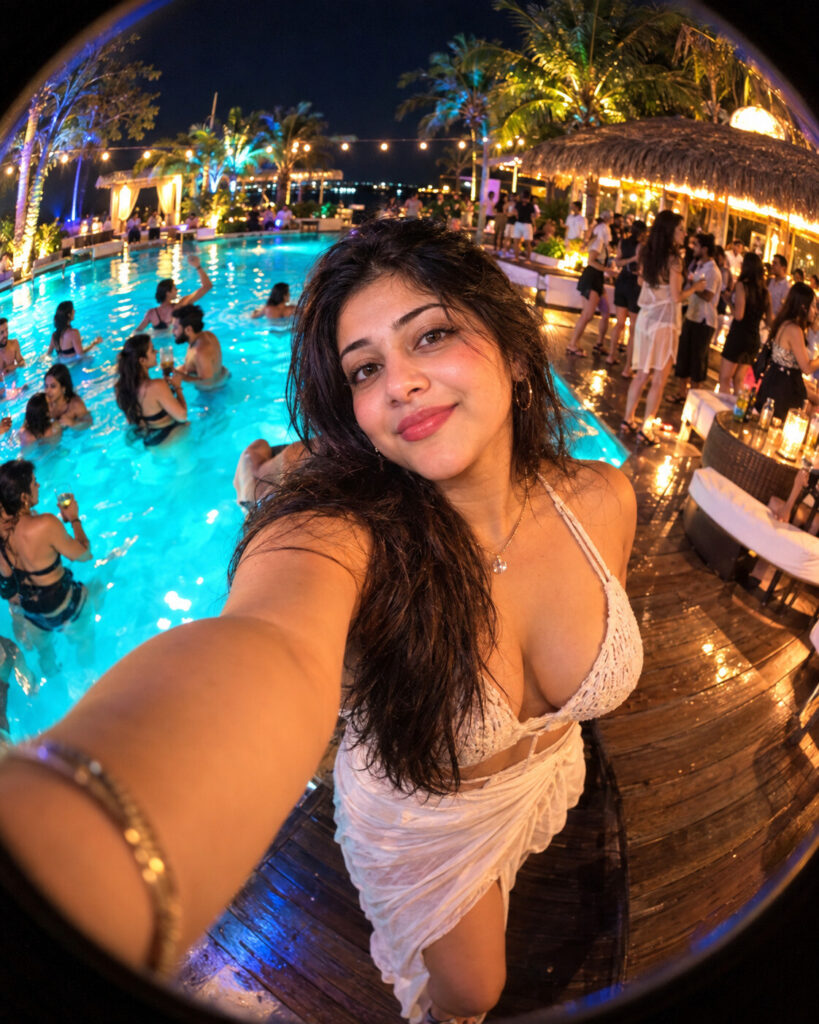
Show You Off – Fisheye Pool-Party Selfie
♡ 12Turn your uploaded portrait into a wide-angle nighttime pool-party selfie with dramatic fisheye distortion while preserving your exact identity.
Create a photorealistic wide-angle action-camera selfie using the uploaded reference image as the exact identity reference. Preserve the same recognizable face, facial structure, proportions, eyes, eyebrows, nose, lips, jawline, cheeks, ears, skin tone, age, hairline, hairstyle and distinctive facial characteristics. The person is holding the camera at arm's length, with their forearm large in the lower foreground and their face centered close to the lens. Place them at a lively nighttime pool party with a glowing turquoise pool, wooden deck, tropical palms, thatched cabana, warm string lights and partygoers dancing behind them. Use strong fisheye barrel distortion, curved horizon, wide environmental perspective, realistic mixed lighting, slight action-camera sensor noise, natural skin texture and candid social-media photography. Keep the subject sharp and the background naturally softer. No text, logos or watermark.
Create a photorealistic wide-angle action-camera selfie using the uploaded reference image as the exact identity reference. Preserve the same recognizable face, facial structure, proportions, eyes, eyebrows, nose, lips, jawline, cheeks, ears, skin tone, age, hairline, hairstyle and distinctive facial characteristics. The person is holding the camera at arm's length, with their forearm large in the lower foreground and their face centered close to the lens. Place them at a lively nighttime pool party with a glowing turquoise pool, wooden deck, tropical palms, thatched cabana, warm string lights and partygoers dancing behind them. Use strong fisheye barrel distortion, curved horizon, wide environmental perspective, realistic mixed lighting, slight action-camera sensor noise, natural skin texture and candid social-media photography. Keep the subject sharp and the background naturally softer. No text, logos or watermark.
Exact uploaded identity, recognizable face, arm's-length selfie perspective, wide fisheye lens, curved horizon, nighttime pool party, turquoise pool, tropical palms, wooden deck, thatched cabana, warm string lights, background dancers, realistic action-camera photography, natural skin texture, subtle digital noise, realistic reflections, candid composition, photorealistic, high detail
Create a photorealistic widescreen fisheye selfie using the uploaded person as the exact identity reference. Preserve the person's recognizable face and natural appearance. Show them holding the camera at arm's length at a vibrant nighttime pool party, with their forearm large in the foreground. Surround them with a glowing turquoise pool, tropical palms, warm string lights, a thatched cabana and a lively background crowd. Use strong barrel distortion, a curved horizon, realistic action-camera optics, natural skin texture and authentic nighttime imperfections.
generic face, different person, identity drift, altered facial structure, changed eyes, changed nose, changed lips, changed jawline, changed cheeks, different skin tone, altered age, changed hairstyle, excessive beauty retouching, plastic skin, cartoon, anime, illustration, CGI appearance, selfie stick, third-person camera, camera floating away, distorted face, extreme facial stretching, malformed hands, extra fingers, missing fingers, extra arms, duplicate person, duplicate face, giant foreground hand, empty party, excessive crowd covering subject, excessive motion blur, unreadable face, flat lighting, daytime, studio background, text, captions, lyrics, logos, watermark, borders
Works with
✦GPT Image✦Gemini image models✦Nano Banana✦Flux✦Midjourney
Comments