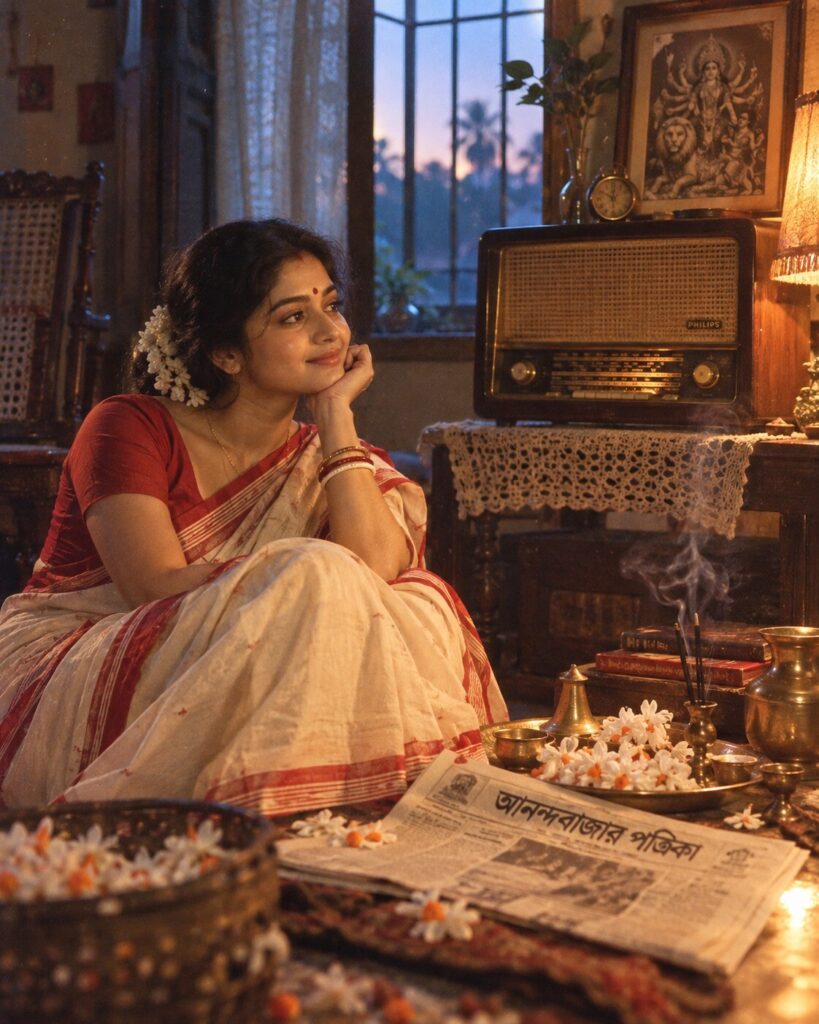
Mahalaya 1975 — The Dawn of Agomoni
♡ 6Turn your photo into a nostalgic 1970s Bengali Mahalaya morning with a vintage radio, shiuli flowers, traditional styling and authentic analog film character.
Use the uploaded reference image as the exact identity anchor and preserve the same recognizable person. Create a photorealistic 1970s Bengali Mahalaya morning inside an authentic Kolkata Bengali home. Include an old wooden radio playing Mahishasuramardini, fresh shiuli flowers, subtle incense smoke, Bengali newspaper, brass puja utensils and period-authentic furniture. Dress the subject in understated 1970s Bengali traditional clothing. Soft pre-dawn window light mixes with a warm household lamp. Create genuine analog film photography with subtle grain, halation, muted colors, gentle contrast and natural skin texture. Evoke the emotional nostalgia of Agomoni and the beginning of Devi Paksha. Vertical 4:5.
Use the uploaded reference image as the exact identity anchor and preserve the same recognizable person. Create a photorealistic 1970s Bengali Mahalaya morning inside an authentic Kolkata Bengali home. Include an old wooden radio playing Mahishasuramardini, fresh shiuli flowers, subtle incense smoke, Bengali newspaper, brass puja utensils and period-authentic furniture. Dress the subject in understated 1970s Bengali traditional clothing. Soft pre-dawn window light mixes with a warm household lamp. Create genuine analog film photography with subtle grain, halation, muted colors, gentle contrast and natural skin texture. Evoke the emotional nostalgia of Agomoni and the beginning of Devi Paksha. Vertical 4:5.
Photorealistic 1970s Bengali Mahalaya morning portrait using the uploaded reference image as the exact identity source. Preserve exact facial identity, facial structure, proportions, eyes, eyebrows, nose, lips, jawline, cheeks, skin tone, hairline, hairstyle, distinctive features and natural age. Authentic middle-class Kolkata Bengali home, old wooden radio playing Mahishasuramardini, fresh shiuli flowers, Bengali newspaper, brass puja utensils, vintage furniture, subtle incense smoke, traditional 1970s Bengali clothing, pre-dawn window light, warm tungsten household lamp, nostalgic Agomoni atmosphere, documentary photography, authentic analog film grain, subtle halation, muted faded colors, natural skin texture, realistic period objects, cinematic depth, vertical 4:5.
Use the uploaded reference photo as the exact identity reference and preserve the person’s recognizable face without changing their identity. Reimagine the photograph as an authentic 1970s Bengali Mahalaya morning in a Kolkata Bengali home. The person is near an old wooden radio playing Mahishasuramardini, surrounded by fresh white shiuli flowers, a Bengali newspaper, brass puja utensils, vintage furniture and subtle incense smoke. Dress the person in understated authentic 1970s Bengali clothing. Use soft blue-gray dawn light through a window combined with a warm household lamp. Make the photograph genuinely resemble a 1970s analog camera exposure with subtle film grain, gentle halation, slightly faded colors, natural skin texture and realistic imperfections. The scene should feel like a treasured family photograph capturing the emotional anticipation of Agomoni. Photorealistic, culturally authentic, vertical 4:5.
different person, altered identity, generic face, face swap, changed facial structure, changed facial proportions, changed eyes, changed nose, changed lips, changed jawline, changed skin tone, changed age, excessive beauty retouching, plastic skin, modern furniture, modern electronics, smartphone, LED lighting, modern clothing, contemporary interior, inaccurate Bengali decor, inaccurate period objects, fake vintage filter, excessive film grain, excessive blur, oversaturated colors, CGI, 3D render, cartoon, anime, illustration, fantasy, deformed hands, extra fingers, extra limbs, duplicate objects, text, logo, watermark
Works with
✦Google Gemini✦ChatGPT image generation✦Midjourney✦FLUX✦SDXL
Comments