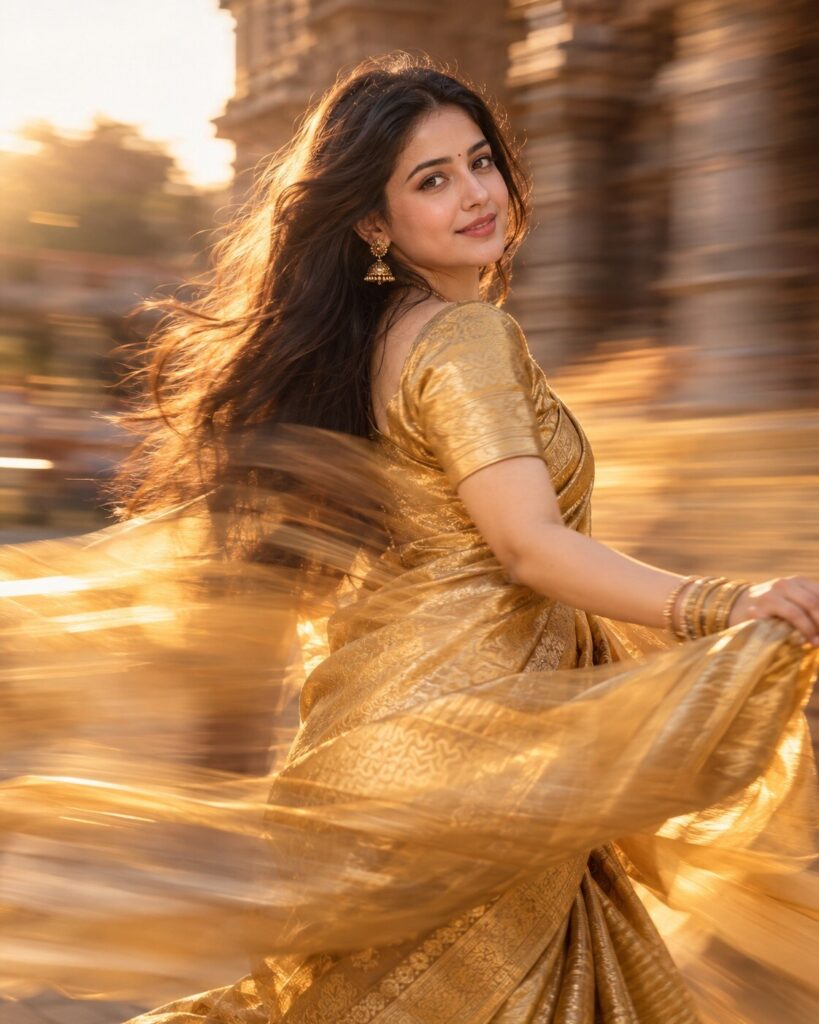
Aesthetic Blurry Saree – Golden Motion-Blur Portrait
♡ 66Create a dreamy golden saree portrait from your uploaded photo using intentional motion blur, warm light, realistic skin and strict identity preservation.
#Traditional/Cultural Portrait#AI photo#golden saree#Indian fashion#long exposure#motion blur portrait
Use the uploaded photo as the exact identity reference. Create a photorealistic golden saree long-exposure portrait of the same person. Preserve recognizable facial identity, facial structure, facial proportions, eyes, eyebrows, nose, lips, jawline, cheeks, skin tone, natural age, hairline, hairstyle and distinctive facial characteristics exactly. Dress the subject in an elegant flowing golden saree with realistic silk texture, refined blouse and subtle traditional jewelry. Create controlled directional motion blur around the saree fabric, loose hair and peripheral background while keeping the face and eyes sharp and recognizable. Warm late-afternoon sunlight, soft golden highlights, natural skin texture, realistic pores, shallow depth of field, gentle heritage backdrop, cinematic photographic composition, authentic long-exposure optical effect, subtle analog grain, natural expression, premium editorial photography.
Use the uploaded photo as the exact identity reference. Create a photorealistic golden saree long-exposure portrait of the same person. Preserve recognizable facial identity, facial structure, facial proportions, eyes, eyebrows, nose, lips, jawline, cheeks, skin tone, natural age, hairline, hairstyle and distinctive facial characteristics exactly. Dress the subject in an elegant flowing golden saree with realistic silk texture, refined blouse and subtle traditional jewelry. Create controlled directional motion blur around the saree fabric, loose hair and peripheral background while keeping the face and eyes sharp and recognizable. Warm late-afternoon sunlight, soft golden highlights, natural skin texture, realistic pores, shallow depth of field, gentle heritage backdrop, cinematic photographic composition, authentic long-exposure optical effect, subtle analog grain, natural expression, premium editorial photography.
Create a highly photorealistic golden saree portrait using the uploaded reference image as the exact identity source. Preserve the persons recognizable facial identity and natural facial proportions. Elegant flowing golden silk saree, traditional refined styling, warm natural light, controlled long-exposure motion blur in the fabric and background, sharp face and eyes, realistic skin texture, subtle jewelry, soft heritage setting, shallow depth of field, natural photographic grain, dreamy editorial atmosphere, authentic camera optics.
Transform the uploaded reference photo into a photorealistic traditional Indian portrait featuring the same recognizable person in an elegant golden silk saree. Preserve the exact facial identity and natural facial features. Create a dreamy long-exposure photography effect with the face and eyes remaining sharp while the flowing saree fabric, loose hair and peripheral background have controlled directional motion blur. Use warm late-afternoon light, realistic silk texture, subtle jewelry, soft heritage architecture, natural skin texture and premium photographic rendering.
generic face, identity drift, different person, altered facial structure, changed facial proportions, different eyes, changed nose, changed lips, changed jawline, altered cheeks, changed skin tone, changed age, changed hairline, different hairstyle, excessive beauty filter, plastic skin, waxy skin, over-smoothed face, blurry face, blurred eyes, face covered by hair, excessive motion blur, digital smear, distorted anatomy, asymmetrical eyes, extra fingers, malformed hands, duplicate person, cartoon, anime, illustration, CGI, 3D render, oversaturated gold, excessive glow, extreme HDR, artificial skin, text, logo, watermark
Works with
✦ChatGPT Images✦Gemini✦Midjourney✦Flux✦SDXL
Comments