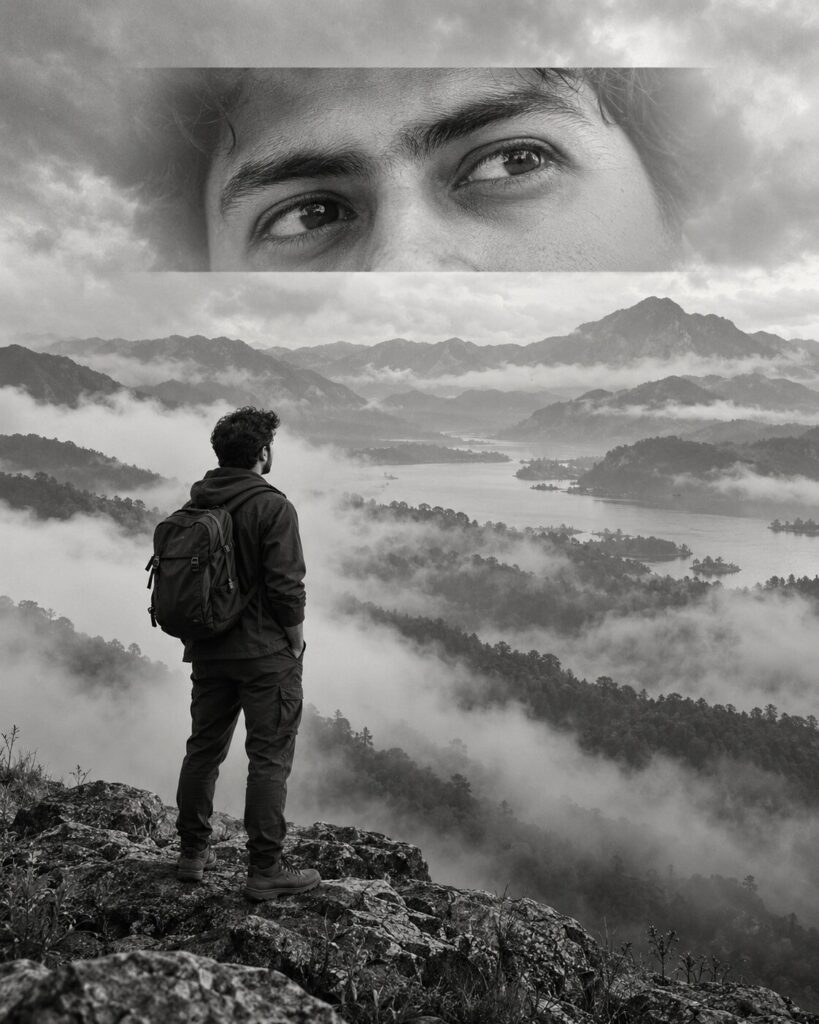
Monochrome Eyes-Inset Cinematic Portrait
♡ 8Create a surreal monochrome cinematic portrait from your uploaded photo, combining a distant environmental scene with a striking close-up of your eyes.
#Surreal Portrait#cinematic photography#conceptual portrait#editorial AI#eye inset#monochrome portrait
Create a photorealistic surreal monochrome environmental portrait using the uploaded reference image as the exact identity anchor. Preserve facial identity, facial structure, facial proportions, eyes, eyebrows, nose, lips, jawline, cheeks, skin tone, hairline, hairstyle, natural age, and distinctive features. Show the recognizable subject standing quietly from behind or in distant three-quarter view before a vast misty mountain landscape. Add a refined horizontal close-up inset of the same person's eyes near the upper center, with exact eye identity and natural skin detail. Blend the inset naturally into the atmospheric landscape. Use soft overcast light, fog, grayscale tonal range, subtle film grain, medium-format photography aesthetics, deep negative space, realistic mountain atmosphere, and sophisticated surreal editorial composition.
Create a photorealistic surreal monochrome environmental portrait using the uploaded reference image as the exact identity anchor. Preserve facial identity, facial structure, facial proportions, eyes, eyebrows, nose, lips, jawline, cheeks, skin tone, hairline, hairstyle, natural age, and distinctive features. Show the recognizable subject standing quietly from behind or in distant three-quarter view before a vast misty mountain landscape. Add a refined horizontal close-up inset of the same person's eyes near the upper center, with exact eye identity and natural skin detail. Blend the inset naturally into the atmospheric landscape. Use soft overcast light, fog, grayscale tonal range, subtle film grain, medium-format photography aesthetics, deep negative space, realistic mountain atmosphere, and sophisticated surreal editorial composition.
(photorealistic:1.3), (exact identity preservation:1.4), (surreal conceptual portrait:1.3), monochrome cinematic photography, same person, misty mountains, distant environmental portrait, integrated eye close-up inset, exact eye structure, realistic skin texture, soft overcast lighting, atmospheric fog, layered landscape, negative space, medium-format photography, subtle analog grain, sophisticated grayscale, editorial fine-art photography
Using the uploaded reference image as the exact identity reference, create a sophisticated surreal monochrome cinematic portrait of the same person standing quietly before a vast mist-covered mountain landscape. Preserve the person's exact recognizable facial identity, facial structure, facial proportions, eyes, eyebrows, nose, lips, jawline, cheeks, skin tone, hairline, hairstyle, natural age, and distinctive facial characteristics. Show the person in a distant environmental view while integrating a horizontal close-up of their exact eyes near the upper center of the composition. The eyes inset must unmistakably belong to the same person and should blend naturally into the atmospheric landscape rather than appearing pasted on. Use soft overcast lighting, layered fog, distant mountains, subtle film grain, realistic skin texture, elegant grayscale tones, generous negative space, refined editorial composition, and authentic medium-format photography aesthetics. Create a contemplative conceptual photograph with realistic texture and seamless visual integration.
generic face, different person, altered identity, identity drift, changed eyes, different eye shape, different eyebrows, altered eyelids, changed nose, changed lips, changed jawline, altered facial proportions, altered skin tone, changed hairstyle, duplicated face, mismatched eyes, mismatched identity between inset and subject, floating eye, pasted-on inset, hard rectangular border, broken composite, distorted anatomy, malformed body, extra limbs, artificial skin, plastic skin, cartoon, anime, CGI, 3D render, excessive sharpening, oversaturated color, excessive contrast, low resolution, blurry eyes, text, captions, watermark, logo
Works with
✦GPT Image✦Google Gemini✦Midjourney✦Flux✦SDXL
Comments