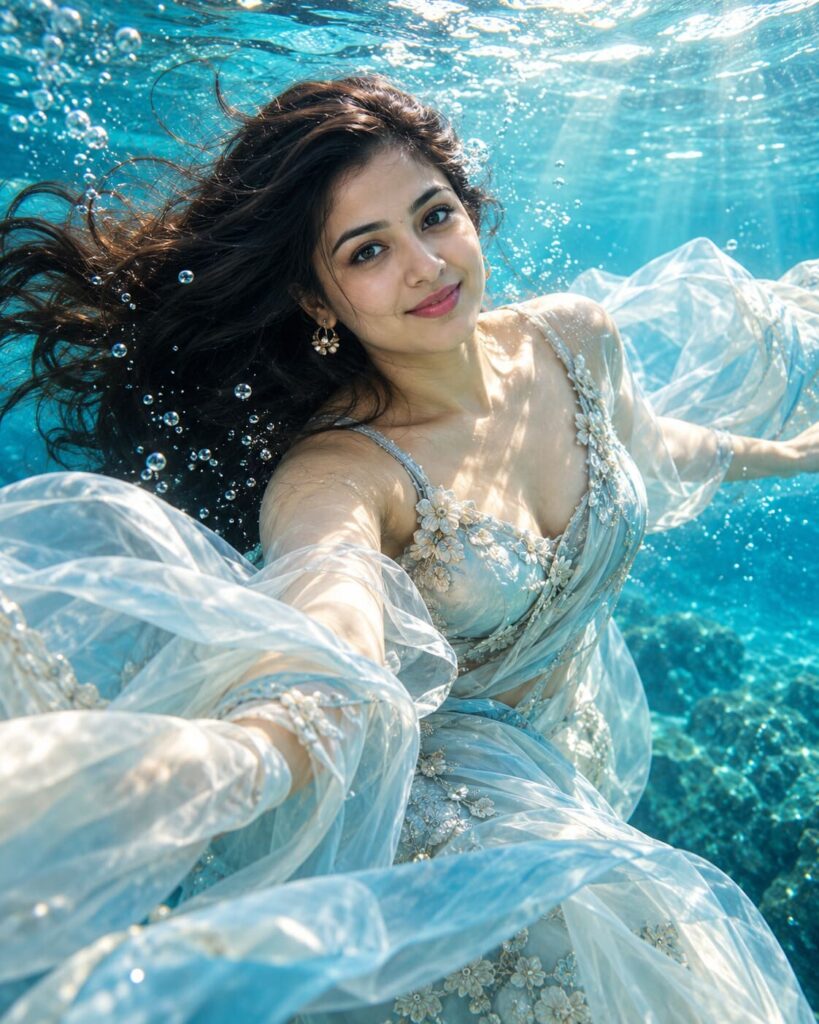
Dreamy Underwater Sunlight Portrait
♡ 11Transform your reference portrait into a cinematic underwater photograph with floating hair, caustic sunlight, bubbles and realistic blue-water atmosphere.
#Surreal Portrait#AI photography#cinematic portrait#dreamy AI photo#ethereal portrait#underwater photography
Create a photorealistic cinematic underwater portrait using the uploaded image as the exact identity reference. Preserve facial identity, facial structure, proportions, eyes, eyebrows, nose, lips, jawline, cheeks, skin tone, hairline, hairstyle, natural age and distinctive facial characteristics. Place the subject peacefully floating beneath clear blue water with naturally drifting hair and elegant flowing neutral clothing. Sunlight enters from above and creates realistic caustic patterns across the face and body. Add subtle bubbles, suspended particles, volumetric rays and believable underwater refraction. Preserve natural skin texture and facial detail. Deep turquoise-blue environmental falloff, sophisticated underwater fashion editorial, calm ethereal mood, realistic photography, vertical 4:5.
Create a photorealistic cinematic underwater portrait using the uploaded image as the exact identity reference. Preserve facial identity, facial structure, proportions, eyes, eyebrows, nose, lips, jawline, cheeks, skin tone, hairline, hairstyle, natural age and distinctive facial characteristics. Place the subject peacefully floating beneath clear blue water with naturally drifting hair and elegant flowing neutral clothing. Sunlight enters from above and creates realistic caustic patterns across the face and body. Add subtle bubbles, suspended particles, volumetric rays and believable underwater refraction. Preserve natural skin texture and facial detail. Deep turquoise-blue environmental falloff, sophisticated underwater fashion editorial, calm ethereal mood, realistic photography, vertical 4:5.
Photorealistic underwater portrait using the uploaded reference image as the exact identity source. Preserve facial identity, facial structure, facial proportions, eyes, eyebrows, nose, lips, jawline, cheeks, skin tone, hairline, hairstyle, natural age and distinctive facial characteristics. Subject floating calmly beneath crystal-clear blue water, natural hair movement, elegant flowing neutral fabric, realistic sunlight caustics, soft volumetric rays, delicate bubbles, suspended particles, believable water refraction, natural skin texture, subtle underwater color absorption, deep turquoise atmospheric background, cinematic underwater fashion photography, vertical 4:5.
Transform the uploaded portrait into a sophisticated photorealistic underwater fashion photograph. Preserve the exact person and their recognizable facial identity, facial structure, proportions, eyes, eyebrows, nose, lips, jawline, cheeks, skin tone, hairline, hairstyle, natural age and distinctive characteristics. Place them calmly floating beneath clear blue water with naturally drifting hair and elegant flowing neutral fabric. Use sunlight entering from the surface to create realistic caustic patterns across the face and clothing. Add delicate bubbles, suspended particles, subtle volumetric light rays and believable underwater refraction. Keep natural skin texture and facial detail visible. Use deep turquoise-blue atmospheric depth and a premium underwater editorial photography aesthetic. The result should look like a genuine professional underwater photograph rather than fantasy art. Vertical 4:5 composition.
generic face, changed identity, facial reconstruction, altered facial proportions, changed eyes, changed eyebrows, changed nose, changed lips, changed jawline, changed cheeks, changed skin tone, changed hairstyle, age alteration, beauty filter, plastic skin, waxy skin, mermaid, fantasy creature, magical glow, excessive sparkles, unrealistic bubbles, frozen hair, distorted anatomy, excessive blue cast, oversaturated cyan, cartoon, anime, illustration, CGI, 3D render, text, watermark, logo
Works with
✦ChatGPT Images 2.5✦Gemini✦Midjourney✦SDXL
Comments