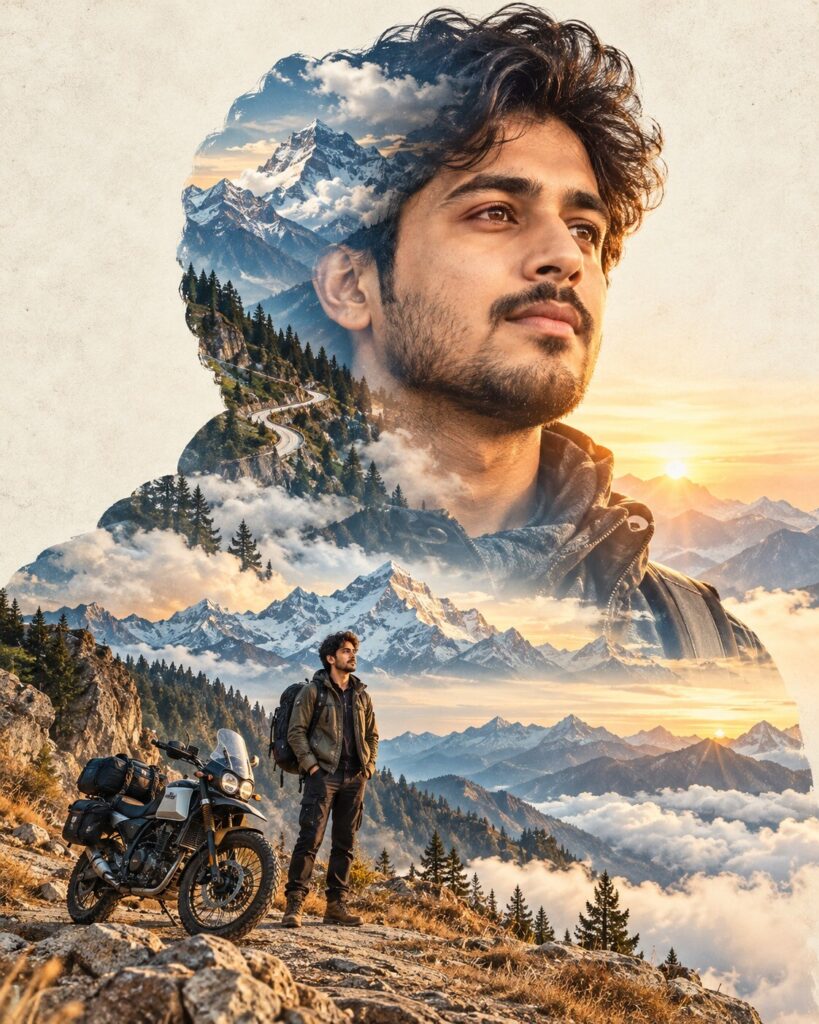
Himalayan Double-Exposure Travel Portrait
♡ 7Turn your reference portrait into a cinematic Himalayan travel poster with mountain landscapes blended through the subject silhouette.
#Surreal Portrait#cinematic AI#double exposure#Himalayan portrait#mountain photography#surreal portrait
Create a premium cinematic double-exposure Himalayan travel poster using the uploaded image as the exact identity reference. Preserve facial identity, facial structure, proportions, eyes, eyebrows, nose, lips, jawline, cheeks, skin tone, hairline, hairstyle, natural age and distinctive facial characteristics. Keep the head-and-shoulders silhouette sharply recognizable. Fill the silhouette with snow-covered Himalayan peaks, pine forests, winding mountain roads, mist and atmospheric clouds. Keep facial features readable. Add a smaller full-body version of the same person beside an adventure motorcycle on a mountain overlook. Use pale golden sunrise light, cool blue shadows and soft mountain mist. Surround the composition with a refined cream travel-poster background, subtle paper texture and restrained grain. Photorealistic landscape blending, cinematic depth, premium tourism campaign aesthetic, vertical 4:5.
Create a premium cinematic double-exposure Himalayan travel poster using the uploaded image as the exact identity reference. Preserve facial identity, facial structure, proportions, eyes, eyebrows, nose, lips, jawline, cheeks, skin tone, hairline, hairstyle, natural age and distinctive facial characteristics. Keep the head-and-shoulders silhouette sharply recognizable. Fill the silhouette with snow-covered Himalayan peaks, pine forests, winding mountain roads, mist and atmospheric clouds. Keep facial features readable. Add a smaller full-body version of the same person beside an adventure motorcycle on a mountain overlook. Use pale golden sunrise light, cool blue shadows and soft mountain mist. Surround the composition with a refined cream travel-poster background, subtle paper texture and restrained grain. Photorealistic landscape blending, cinematic depth, premium tourism campaign aesthetic, vertical 4:5.
Photorealistic cinematic double-exposure travel poster using the uploaded reference image as the exact identity source. Preserve facial identity, facial structure, facial proportions, eyes, eyebrows, nose, lips, jawline, cheeks, skin tone, hairline, hairstyle, natural age and distinctive facial characteristics. Maintain a clean recognizable head-and-shoulders silhouette and fill it naturally with Himalayan snow peaks, pine forests, winding roads, mist and atmospheric clouds while keeping facial features readable. Add a smaller full-body version of the same person beside an adventure motorcycle on a mountain overlook. Pale golden sunrise, cool blue shadows, realistic mountain haze, cream editorial poster background, subtle paper texture, cinematic photographic blending, premium travel campaign, vertical 4:5.
Transform the uploaded portrait into a premium cinematic Himalayan double-exposure travel poster. Preserve the exact person and their recognizable facial identity, facial structure, proportions, eyes, eyebrows, nose, lips, jawline, cheeks, skin tone, hairline, hairstyle, natural age and distinctive facial characteristics. Keep the head-and-shoulders silhouette sharply recognizable. Fill the inside of that silhouette with realistic Himalayan snow peaks, pine forests, winding roads, mist and atmospheric clouds while keeping the facial features readable. Add a smaller full-body version of the same person standing beside a dark adventure motorcycle on a mountain overlook. Use pale golden sunrise light, cool blue shadows and realistic atmospheric depth. Surround everything with a refined cream travel-poster background and subtle printed-paper texture. Make it look like a premium cinematic tourism campaign rather than a generic AI collage. Vertical 4:5 composition.
generic face, changed identity, facial reconstruction, altered facial proportions, changed eyes, changed eyebrows, changed nose, changed lips, changed jawline, changed cheeks, changed skin tone, changed hairstyle, age alteration, unreadable face, landscape covering face, ghosting, double face, inconsistent identity, poorly blended landscape, floating motorcycle, distorted anatomy, excessive typography, logo, watermark, cartoon, anime, illustration, CGI, 3D render, artificial HDR
Works with
✦ChatGPT Images 2.5✦Gemini✦Midjourney✦SDXL
Comments