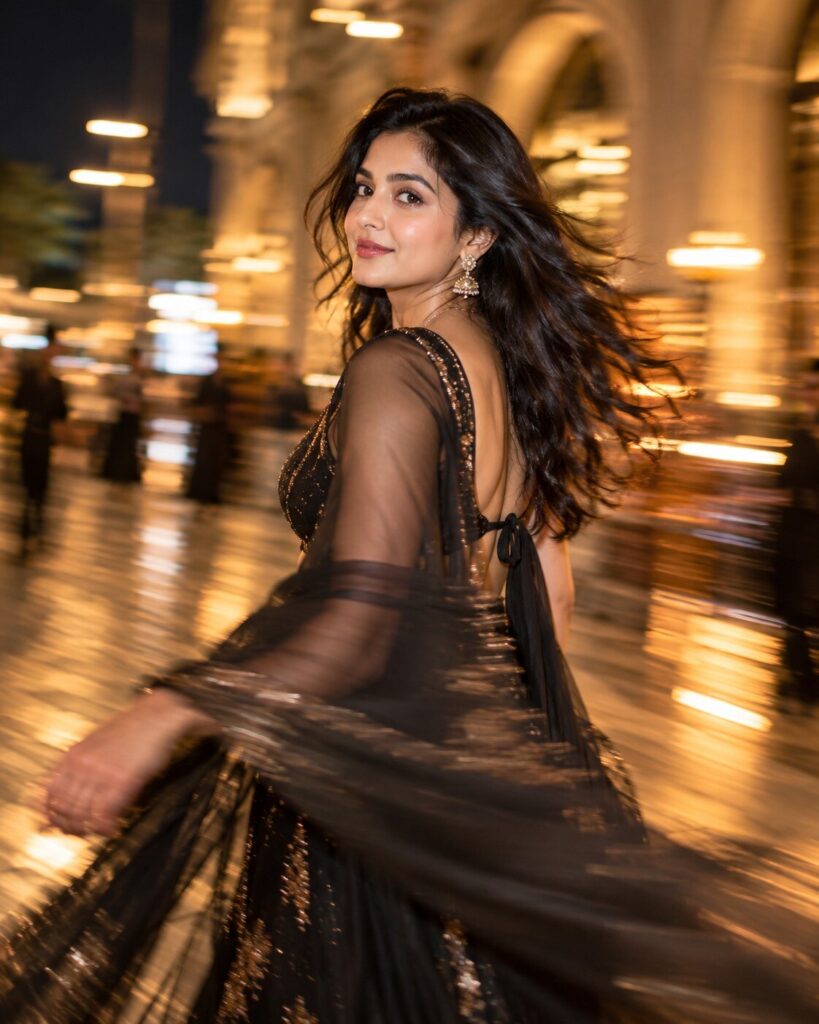
Slow-Shutter Motion Blur Fashion Portrait
♡ 64Create a striking fashion portrait from your reference photo using controlled slow-shutter motion blur while keeping your face sharply recognizable and photorealistic.
Create a photorealistic slow-shutter fashion portrait from the uploaded reference image. Lock the exact identity and preserve recognizable facial identity, facial structure, facial proportions, eyes, eyebrows, nose, lips, jawline, cheeks, skin tone, hairline, hairstyle, distinctive facial characteristics, natural age and overall likeness. Keep the face relatively sharp and recognizable while creating physically realistic directional motion blur around the clothing, hair, arms and background. Use an elegant walking or turning pose, premium contemporary fashion, flowing fabric, shallow depth of field, professional editorial lighting and subtle lateral camera movement. The final image should resemble a real luxury fashion photograph captured at approximately 1/8 to 1/4 second shutter speed, with controlled motion trails and cinematic depth.
Create a photorealistic slow-shutter fashion portrait from the uploaded reference image. Lock the exact identity and preserve recognizable facial identity, facial structure, facial proportions, eyes, eyebrows, nose, lips, jawline, cheeks, skin tone, hairline, hairstyle, distinctive facial characteristics, natural age and overall likeness. Keep the face relatively sharp and recognizable while creating physically realistic directional motion blur around the clothing, hair, arms and background. Use an elegant walking or turning pose, premium contemporary fashion, flowing fabric, shallow depth of field, professional editorial lighting and subtle lateral camera movement. The final image should resemble a real luxury fashion photograph captured at approximately 1/8 to 1/4 second shutter speed, with controlled motion trails and cinematic depth.
Photorealistic high-fashion slow-shutter portrait using the uploaded reference image as the exact identity reference. Preserve recognizable facial identity, facial structure, facial proportions, eyes, eyebrows, nose, lips, jawline, cheeks, skin tone, hairline, hairstyle, distinctive facial characteristics, natural age and overall likeness. Keep the face sharp and readable while clothing, hair edges, arms and background show controlled directional motion blur. Elegant walking pose, flowing luxury fashion fabric, realistic panning movement, 1/8 to 1/4 second shutter aesthetic, shallow depth of field, cinematic directional key light, subtle rim light, natural skin pores, premium editorial photography, sophisticated urban or studio background.
Using the uploaded reference image as the exact identity reference, recreate the same person as a premium high-fashion slow-shutter photograph. Preserve the person's recognizable facial identity, facial structure, facial proportions, eyes, eyebrows, nose, lips, jawline, cheeks, skin tone, hairline, hairstyle, distinctive facial characteristics, natural age and overall likeness. Keep the face sharp and recognizable while the body, clothing, hair and background show elegant directional motion blur created by a realistic slow shutter. Dress the subject in sophisticated contemporary fashion with flowing fabric and capture a natural walking or turning pose. Use cinematic editorial lighting, shallow depth of field, realistic skin texture and professional fashion photography quality. Make the motion physically believable and visually intentional.
generic face, identity drift, altered facial proportions, different eyes, changed nose, changed lips, changed jawline, changed skin tone, changed hairstyle, younger face, older face, beauty filter, plastic skin, completely blurred face, smeared facial features, excessive motion blur, frozen body with artificial blur, random ghosting, duplicate limbs, duplicate face, warped hands, extra fingers, distorted anatomy, excessive long exposure, extreme light trails, excessive chromatic aberration, excessive grain, cartoon, anime, illustration, 3D render, CGI, low resolution, oversharpening, HDR, unrealistic fabric, floating clothing
Works with
✦GPT Image✦Gemini✦Midjourney✦FLUX✦SDXL
Comments