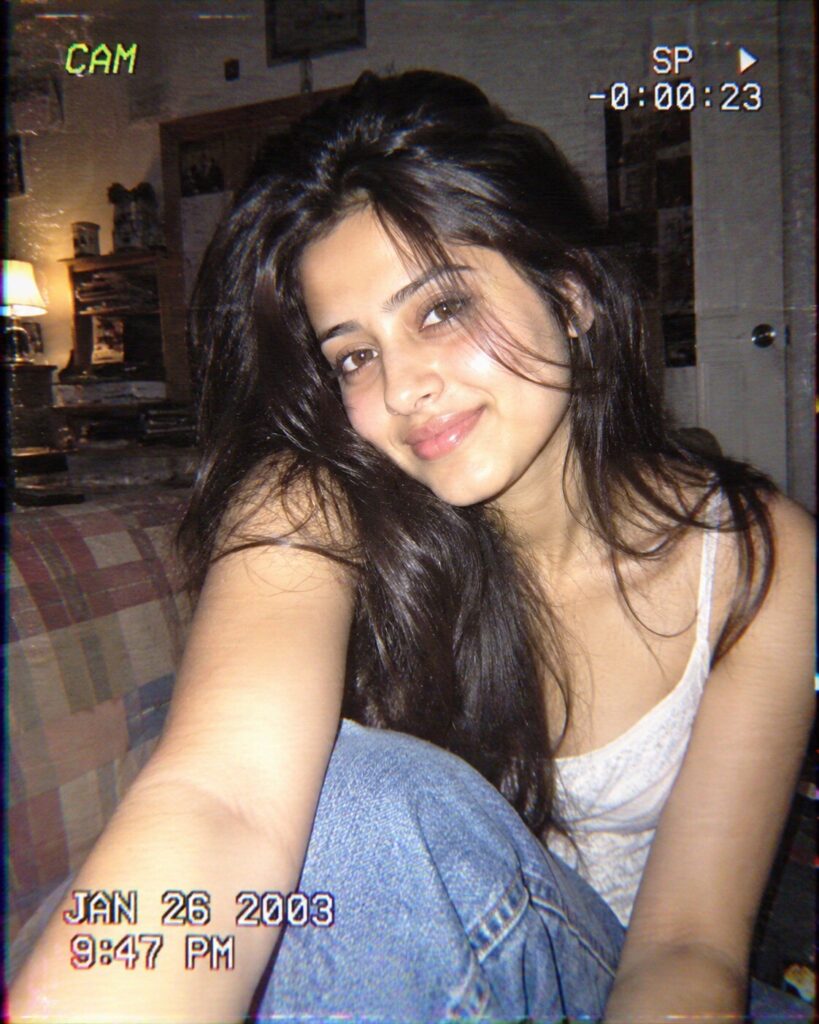
Y2K Camcorder Timestamp Portrait
♡ 71Turn your reference photo into an authentic early-2000s camcorder portrait with timestamp graphics, direct flash, VHS color bleed, soft focus, and realistic consumer-camera imperfections.
Create an authentic early-2000s Y2K camcorder portrait from the uploaded reference image. Lock the subject's identity and preserve recognizable facial structure, facial proportions, eyes, eyebrows, nose, lips, jawline, cheeks, skin tone, hairline, hairstyle, distinctive facial characteristics, natural age, and overall likeness. Use candid handheld framing, direct consumer-camera flash, slight overexposure, soft digital detail, mild motion softness, imperfect white balance, subtle sensor noise, restrained VHS color bleed, faint scan-line texture, light chromatic aberration, compressed blacks, soft highlights, realistic MiniDV artifacts, and a small period-authentic timestamp overlay. Keep the result photographic and believable, like a real early-2000s camcorder frame rather than a modern image with a vintage preset.
Create an authentic early-2000s Y2K camcorder portrait from the uploaded reference image. Lock the subject's identity and preserve recognizable facial structure, facial proportions, eyes, eyebrows, nose, lips, jawline, cheeks, skin tone, hairline, hairstyle, distinctive facial characteristics, natural age, and overall likeness. Use candid handheld framing, direct consumer-camera flash, slight overexposure, soft digital detail, mild motion softness, imperfect white balance, subtle sensor noise, restrained VHS color bleed, faint scan-line texture, light chromatic aberration, compressed blacks, soft highlights, realistic MiniDV artifacts, and a small period-authentic timestamp overlay. Keep the result photographic and believable, like a real early-2000s camcorder frame rather than a modern image with a vintage preset.
Photorealistic early-2000s MiniDV camcorder portrait using the uploaded reference image as the exact identity reference, preserve recognizable facial identity, facial structure, facial proportions, eyes, eyebrows, nose, lips, jawline, cheeks, skin tone, hairline, hairstyle, distinctive facial characteristics, natural age and overall likeness, candid handheld framing, direct consumer flash, mild overexposure, soft digital focus, subtle motion blur, low dynamic range, imperfect white balance, realistic sensor noise, restrained VHS color bleed, faint scan lines, slight chromatic aberration, compressed shadows, soft highlights, small authentic Y2K timestamp overlay, casual early-2000s environment, natural skin texture, believable MiniDV compression, realistic amateur snapshot
Using the uploaded reference image as the exact identity reference, recreate the same adult person as a believable early-2000s consumer camcorder snapshot. Preserve the person's recognizable facial identity, facial structure, facial proportions, eyes, eyebrows, nose, lips, jawline, cheeks, skin tone, hairline, hairstyle, distinctive facial characteristics, natural age, and overall likeness. Place them in a candid Y2K-era environment with direct on-camera flash, mild overexposure, soft digital detail, imperfect white balance, subtle sensor noise, restrained VHS color bleed, faint scan-line texture, realistic compression, and a small authentic early-2000s timestamp in one corner. Make it look like a genuine MiniDV frame rather than a modern photo with a retro filter.
generic face, different person, identity drift, facial restructuring, altered facial proportions, changed eye shape, changed nose, changed lips, changed jawline, changed skin tone, changed hairstyle, younger face, older face, beauty filter, plastic skin, excessive smoothing, modern DSLR look, modern smartphone photography, cinematic Hollywood lighting, perfect studio lighting, extreme HDR, excessive film grain, heavy VHS distortion, extreme scan lines, excessive chromatic aberration, fake timestamp, giant timestamp, unreadable face, warped anatomy, duplicate person, deformed hands, oversaturated colors, orange teal grading, artificial bokeh, cartoon, illustration, painting, 3D render
Works with
✦GPT Image✦Gemini✦Midjourney✦FLUX✦SDXL
Comments