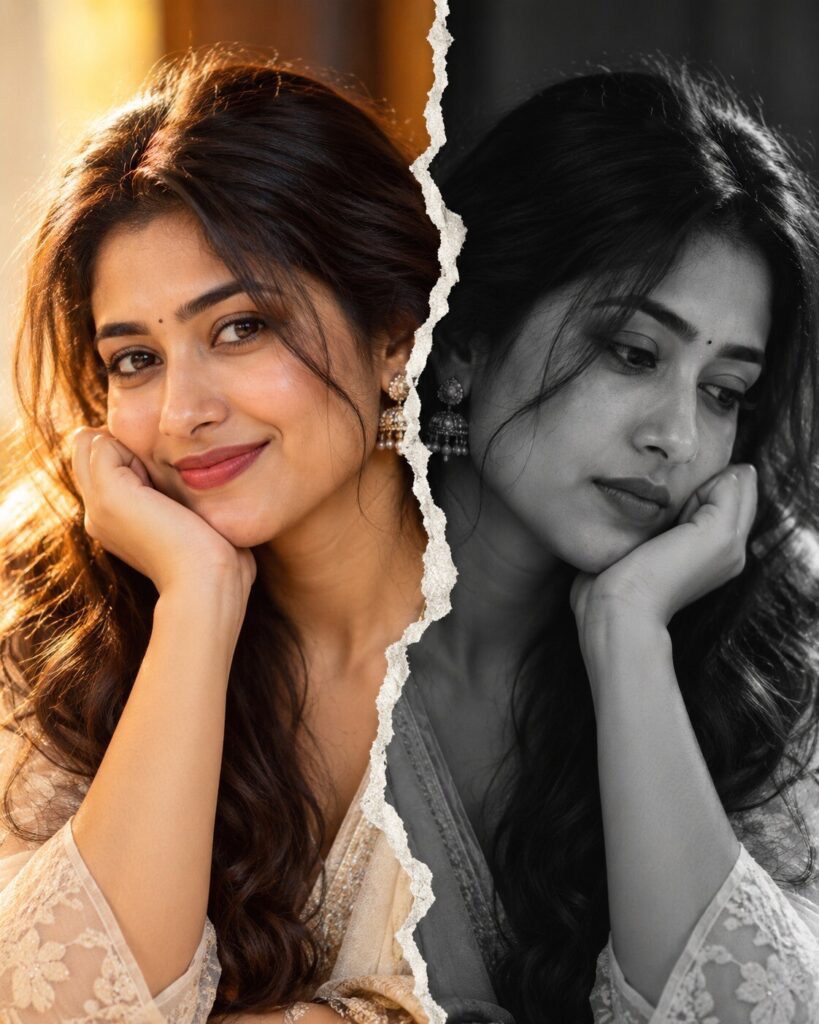
Split-Personality Ripped-Paper Portrait
♡ 9Create a conceptual split portrait from your uploaded photo with two contrasting emotional versions of the same person and exact identity preservation.
#Editorial Portrait#conceptual AI#editorial portrait#emotional portrait#monochrome photography#split portrait
Create a photorealistic conceptual split portrait from the uploaded reference image. Preserve the exact same recognizable person on both halves, including facial structure, proportions, eyes, eyebrows, nose, lips, jawline, cheeks, skin tone, hairline, hairstyle, distinctive features, natural age, and overall likeness. Divide the image vertically with a realistic irregular torn-paper seam. On the left, show a warm joyful version with a subtle genuine smile, golden soft light, natural color, elegant styling, and gentle editorial atmosphere. On the right, show the same person with a quiet introspective expression in stark black-and-white, directional light, deeper shadows, and fine-art photographic mood. Keep the head position, facial geometry, hairstyle, and pose consistent across both halves. Add realistic torn-paper fibers, thickness, curled edges, and subtle seam shadows. Use an 85mm portrait lens, shallow depth of field, realistic skin texture, fine hair detail, minimal studio backgrounds, premium editorial photography, and sophisticated emotional storytelling.
Create a photorealistic conceptual split portrait from the uploaded reference image. Preserve the exact same recognizable person on both halves, including facial structure, proportions, eyes, eyebrows, nose, lips, jawline, cheeks, skin tone, hairline, hairstyle, distinctive features, natural age, and overall likeness. Divide the image vertically with a realistic irregular torn-paper seam. On the left, show a warm joyful version with a subtle genuine smile, golden soft light, natural color, elegant styling, and gentle editorial atmosphere. On the right, show the same person with a quiet introspective expression in stark black-and-white, directional light, deeper shadows, and fine-art photographic mood. Keep the head position, facial geometry, hairstyle, and pose consistent across both halves. Add realistic torn-paper fibers, thickness, curled edges, and subtle seam shadows. Use an 85mm portrait lens, shallow depth of field, realistic skin texture, fine hair detail, minimal studio backgrounds, premium editorial photography, and sophisticated emotional storytelling.
(photorealistic:1.4), (exact identity preservation on both halves:1.5), (conceptual editorial portrait:1.3), split personality portrait, torn paper seam, same person, identical facial geometry, warm smiling half, monochrome introspective half, realistic skin pores, detailed eyes, professional portrait photography, 85mm lens, shallow depth of field, cinematic editorial lighting, realistic paper fibers, premium magazine aesthetic, emotional contrast
Using the uploaded reference image as the exact identity reference, create a sophisticated conceptual editorial portrait of the same person divided vertically by a realistic irregular torn-paper seam. Preserve the exact recognizable identity on both sides, including facial structure, facial proportions, eyes, eyebrows, nose, lips, jawline, cheeks, skin tone, hairline, hairstyle, distinctive facial characteristics, natural age, and overall likeness. The left half shows a warm joyful version of the same person with a subtle genuine smile, warm natural skin tones, soft golden editorial lighting, elegant contemporary styling, and a softly textured cream background. The right half shows the exact same person with a quiet introspective expression in stark monochrome, directional lighting, deeper shadows, and a charcoal-grey background. Keep the head position, facial geometry, hairstyle, and eye alignment consistent across both halves. Create a physically believable torn-paper boundary with irregular fibers, curled edges, paper thickness, and subtle seam shadows. Use an 85mm portrait-camera aesthetic, shallow depth of field, realistic skin pores, individual hair strands, natural eyelashes, restrained film grain, controlled dynamic range, and premium editorial photography. Make the emotional contrast come from expression, lighting, and color rather than changing the person.
generic face, different person on either side, identity mismatch, identity drift, altered facial structure, changed facial proportions, different eyes, different eyebrows, altered nose, changed lips, changed jawline, changed cheeks, changed skin tone, changed hairline, changed hairstyle, duplicate identity, mismatched head position, misaligned eyes, distorted torn paper, clean digital dividing line, hard geometric split, pasted photographs, cartoon, anime, CGI, 3D render, plastic skin, waxy skin, excessive beauty retouching, exaggerated crying, fake tears, distorted anatomy, malformed hands, text, watermark, logo
Works with
✦GPT Image✦Google Gemini✦Midjourney✦Flux✦SDXL
Comments