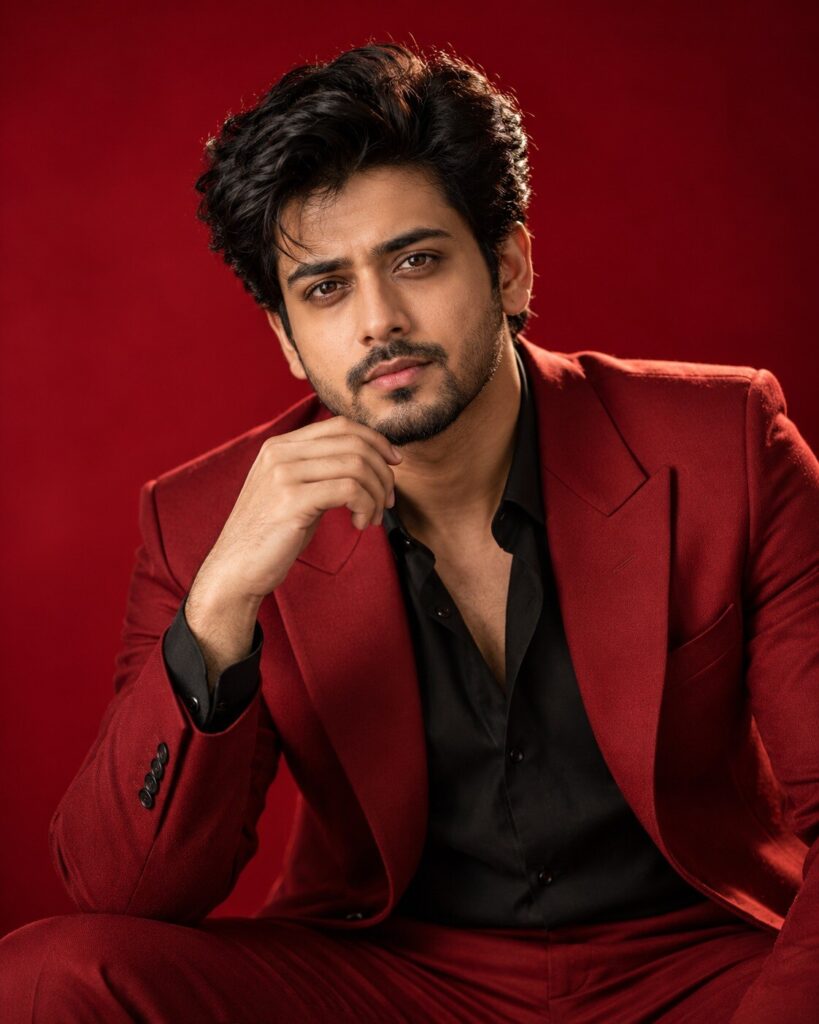
Moody Crimson Red Editorial Portrait
♡ 6Transform your uploaded photo into a luxury crimson-red editorial portrait with sculpted studio lighting, rich shadows, realistic skin and strict identity preservation.
#Editorial Portrait#AI photo prompt#crimson editorial#fashion portrait#identity lock#luxury portrait
Create a photorealistic luxury fashion editorial portrait using the uploaded reference image as the exact identity source. Preserve the same recognizable person, facial identity, facial structure, facial proportions, eyes, eyebrows, nose, lips, jawline, cheeks, skin tone, natural age, hairline, hairstyle and distinctive facial features. Deep crimson-red seamless studio background, sophisticated tailored fashion styling, large parabolic softbox key light, subtle controlled fill, delicate edge separation, sculpted highlights, realistic shadow gradients, natural skin pores and micro-texture, restrained editorial retouching, direct eye contact, confident natural posture, clean magazine composition, premium fashion campaign aesthetic, realistic medium-format optics, subtle film grain, rich crimson and neutral skin-tone palette, highly photorealistic.
Create a photorealistic luxury fashion editorial portrait using the uploaded reference image as the exact identity source. Preserve the same recognizable person, facial identity, facial structure, facial proportions, eyes, eyebrows, nose, lips, jawline, cheeks, skin tone, natural age, hairline, hairstyle and distinctive facial features. Deep crimson-red seamless studio background, sophisticated tailored fashion styling, large parabolic softbox key light, subtle controlled fill, delicate edge separation, sculpted highlights, realistic shadow gradients, natural skin pores and micro-texture, restrained editorial retouching, direct eye contact, confident natural posture, clean magazine composition, premium fashion campaign aesthetic, realistic medium-format optics, subtle film grain, rich crimson and neutral skin-tone palette, highly photorealistic.
Photorealistic luxury editorial portrait of the exact person from the uploaded reference image, strict identity preservation, deep crimson studio background, sophisticated fashion styling, sculpted softbox lighting, controlled shadows, realistic skin texture, natural pores, premium magazine photography, direct eye contact, elegant posture, realistic camera optics, subtle grain, rich crimson color palette, shallow depth of field, highly detailed facial features.
Create a premium photorealistic fashion-editorial portrait from the uploaded reference photo. Preserve the exact identity and recognizable facial characteristics of the person. Place them in a sophisticated crimson-red studio with luxury fashion styling, large softbox lighting, controlled shadows, realistic skin texture and subtle photographic grain. The image should resemble a professionally photographed high-fashion magazine campaign with rich crimson tones and natural skin color.
generic face, different person, identity drift, altered facial structure, changed facial proportions, different eyes, changed nose, changed lips, changed jawline, altered cheeks, changed skin tone, changed age, different hairstyle, altered hairline, excessive beauty filter, plastic skin, wax skin, airbrushed face, artificial skin texture, distorted anatomy, asymmetrical eyes, malformed hands, extra fingers, duplicate person, cartoon, anime, illustration, CGI, 3D render, excessive red glow, neon overload, extreme HDR, crushed shadows, blown highlights, excessive makeup, excessive sharpening, text, logo, watermark
Works with
✦ChatGPT Images✦Gemini✦Midjourney✦Flux✦SDXL
Comments