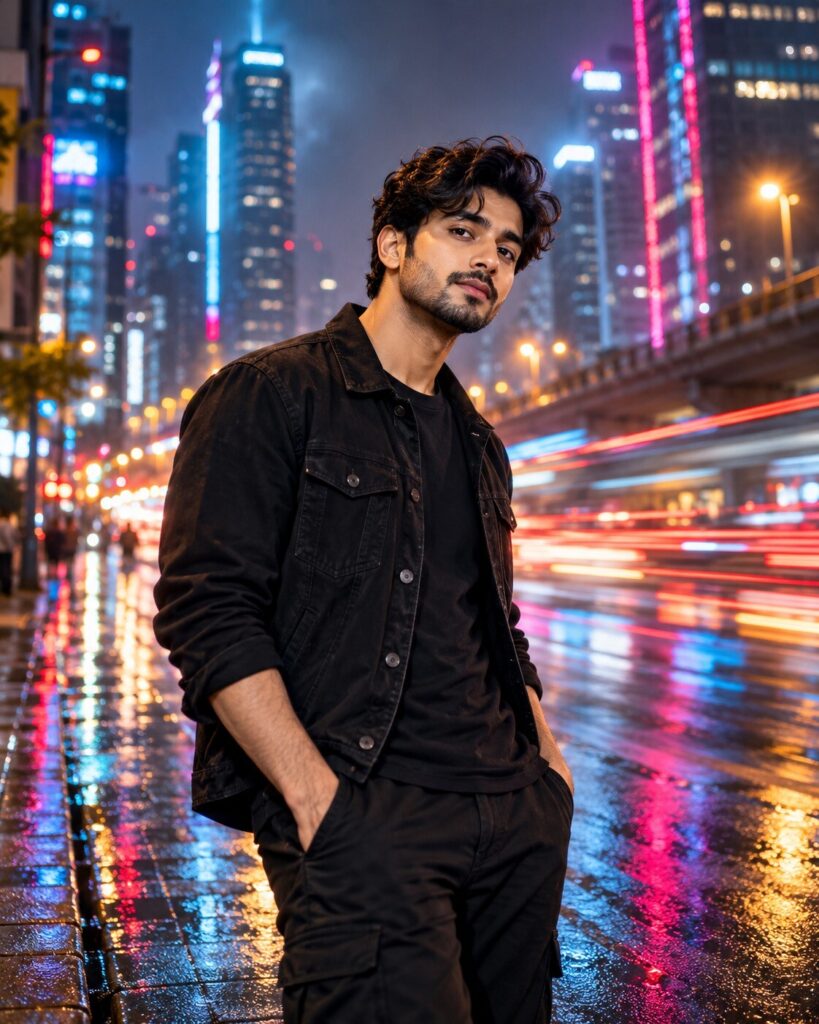
Neon Drift Motion-Blur Portrait
♡ 63Transform a reference portrait into a cinematic neon night scene where the person stays perfectly sharp while the surrounding city dissolves into dynamic light trails.
Use the uploaded image as the primary identity reference. Preserve the person exactly and create a cinematic nighttime urban portrait with the subject perfectly sharp and the surrounding city transformed into controlled neon motion trails, wet reflections, atmospheric haze, realistic skin texture, shallow depth of field, subtle film grain, and premium editorial photography aesthetics.
Use the uploaded image as the primary identity reference. Preserve the person exactly and create a cinematic nighttime urban portrait with the subject perfectly sharp and the surrounding city transformed into controlled neon motion trails, wet reflections, atmospheric haze, realistic skin texture, shallow depth of field, subtle film grain, and premium editorial photography aesthetics.
Photorealistic cinematic nighttime portrait using the uploaded reference image as the exact identity reference, preserve recognizable facial identity and facial structure, eyes, eyebrows, nose, lips, jawline, cheeks, skin tone, hairline, hairstyle, natural age and distinctive facial characteristics, person standing perfectly still and razor sharp, rain-slick urban street, surrounding city dissolving into controlled horizontal neon motion trails, cyan rim light on one side, warm amber-red light on the other, distant headlights, wet pavement reflections, atmospheric haze, realistic skin pores, detailed clothing texture, shallow depth of field, long-exposure photography aesthetic, subtle film grain, premium editorial photography, natural contrast, vertical 4:5 composition.
Edit the uploaded portrait while preserving the persons exact recognizable identity, facial structure, proportions, hairstyle, skin tone, natural age and distinctive facial characteristics. Place the person in a cinematic rainy city at night. Keep the person completely still, crisp and sharply focused while the surrounding city becomes a controlled long-exposure effect with horizontal and gently swirling neon light trails, passing headlights, wet pavement reflections and atmospheric haze. Use subtle cyan illumination on one side of the face and warm amber-red illumination on the other. Preserve realistic skin texture and natural facial detail. Make the effect sophisticated and photographic rather than surreal or artificial. Vertical 4:5 composition, premium editorial photography, subtle film grain, no readable text, no logos, no watermark.
identity change, different person, generic face, facial distortion, altered facial proportions, asymmetrical eyes, malformed eyes, warped nose, distorted lips, changed jawline, changed skin tone, changed hairstyle, excessive beauty retouching, plastic skin, duplicate person, ghosting, double exposure over face, heavy blur on face, motion blur on subject, distorted hands, extra fingers, missing fingers, warped limbs, deformed anatomy, oversaturated neon, excessive bloom, unrealistic light trails, artificial reflections, cartoon, anime, illustration, CGI look, low detail, low resolution, compression artifacts, text, readable signage, logo, watermark
Works with
✦GPT Image✦Midjourney✦FLUX✦SDXL

Comments