AI Glasshouse Botanical Portrait
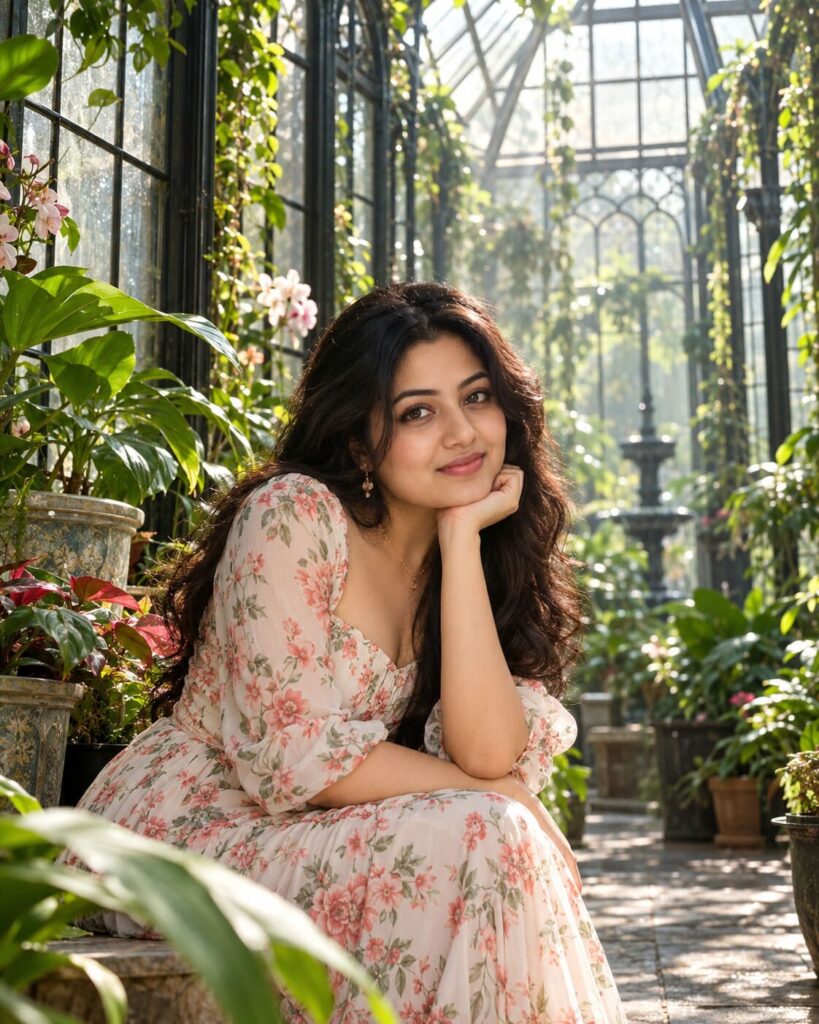
♡ 15Create a lush glasshouse editorial portrait from an uploaded photo with preserved identity, tropical foliage, diffused daylight and realistic botanical atmosphere.
#Environmental Portrait#AI photo editing#botanical portrait#environmental portrait#glasshouse photography#identity preservation
Create a photorealistic luxury botanical editorial portrait using the uploaded reference image as the strict identity anchor. Preserve the exact recognizable face, facial structure, proportions, eyes, eyebrows, nose, lips, cheeks, jawline, chin, skin tone, hairline, hairstyle and natural age. Place the same person inside an elegant glasshouse conservatory filled with lush tropical foliage, climbing vines and botanical specimens. Include tall glass panels, dark metal frames and subtle condensation. Use soft diffused daylight through the glass roof with realistic dappled leaf shadows, subtle humidity and natural atmospheric depth. Preserve realistic skin texture, hair and clothing materials. Premium fashion-editorial photography, natural anatomy, realistic glass reflections, controlled depth of field, no text or watermark. 4:5 portrait.
Create a photorealistic luxury botanical editorial portrait using the uploaded reference image as the strict identity anchor. Preserve the exact recognizable face, facial structure, proportions, eyes, eyebrows, nose, lips, cheeks, jawline, chin, skin tone, hairline, hairstyle and natural age. Place the same person inside an elegant glasshouse conservatory filled with lush tropical foliage, climbing vines and botanical specimens. Include tall glass panels, dark metal frames and subtle condensation. Use soft diffused daylight through the glass roof with realistic dappled leaf shadows, subtle humidity and natural atmospheric depth. Preserve realistic skin texture, hair and clothing materials. Premium fashion-editorial photography, natural anatomy, realistic glass reflections, controlled depth of field, no text or watermark. 4:5 portrait.
Photorealistic luxury botanical environmental portrait, same person from uploaded reference image, strict identity preservation, identical recognizable facial structure and proportions, same eyes, eyebrows, nose, lips, cheeks, jawline, chin, skin tone, hairline, hairstyle and natural age, elegant contemporary outfit, sophisticated glasshouse conservatory, lush tropical plants, broad leaves, climbing vines, botanical specimens, tall glass architecture, dark metal frames, subtle condensation, soft diffused daylight, realistic dappled leaf shadows, gentle humidity, atmospheric depth, realistic leaf translucency, natural light transmission through foliage, realistic skin pores, detailed hair strands, authentic fabric texture, believable glass reflections, premium fashion editorial photography, natural anatomy, high detail, vertical 4:5 composition
Create a photorealistic luxury botanical editorial portrait using the uploaded reference image as the exact identity anchor. Preserve the persons recognizable facial identity, facial structure, facial proportions, face shape, eyes, eyebrows, nose, lips, cheeks, jawline, chin, skin tone, natural age, hairline, hairstyle and distinctive facial characteristics. Do not replace or redesign the face. Keep the same person naturally posed inside an elegant glasshouse conservatory filled with lush tropical foliage, climbing vines and carefully arranged botanical specimens. Include tall glass panels, slim dark metal framing and subtle condensation on portions of the glass. Use soft daylight filtered through the glass roof, creating realistic dappled shadows from leaves and subtle highlights on the subject. Add gentle humidity and atmospheric depth in the background without making the face hazy. Make foliage physically believable with natural leaf texture and translucent areas where sunlight passes through. Use realistic glass reflections, natural skin texture, visible pores, detailed hair and authentic clothing materials. The result should resemble a real high-end fashion editorial photographed inside a private botanical conservatory, not a fantasy jungle or artificial green-screen background. Vertical 4:5 portrait.
different person, different face, identity change, face swap error, generic AI face, altered facial structure, altered facial proportions, changed face shape, changed eyes, changed eyebrows, changed nose, changed lips, changed cheeks, changed jawline, changed chin, changed skin tone, changed hairline, changed hairstyle, changed natural age, excessive beautification, de-aged appearance, plastic skin, waxy skin, artificial foliage, fantasy plants, giant leaves, fake green background, jungle fantasy, unrealistic vegetation, malformed leaves, excessive mist, face obscured by foliage, unrealistic shadows, distorted anatomy, bad hands, extra fingers, extra limbs, duplicate person, CGI, cartoon, anime, illustration, excessive HDR, oversaturated green, text, logo, watermark
Works with
✦GPT Image✦Gemini✦Midjourney✦SDXL

Comments