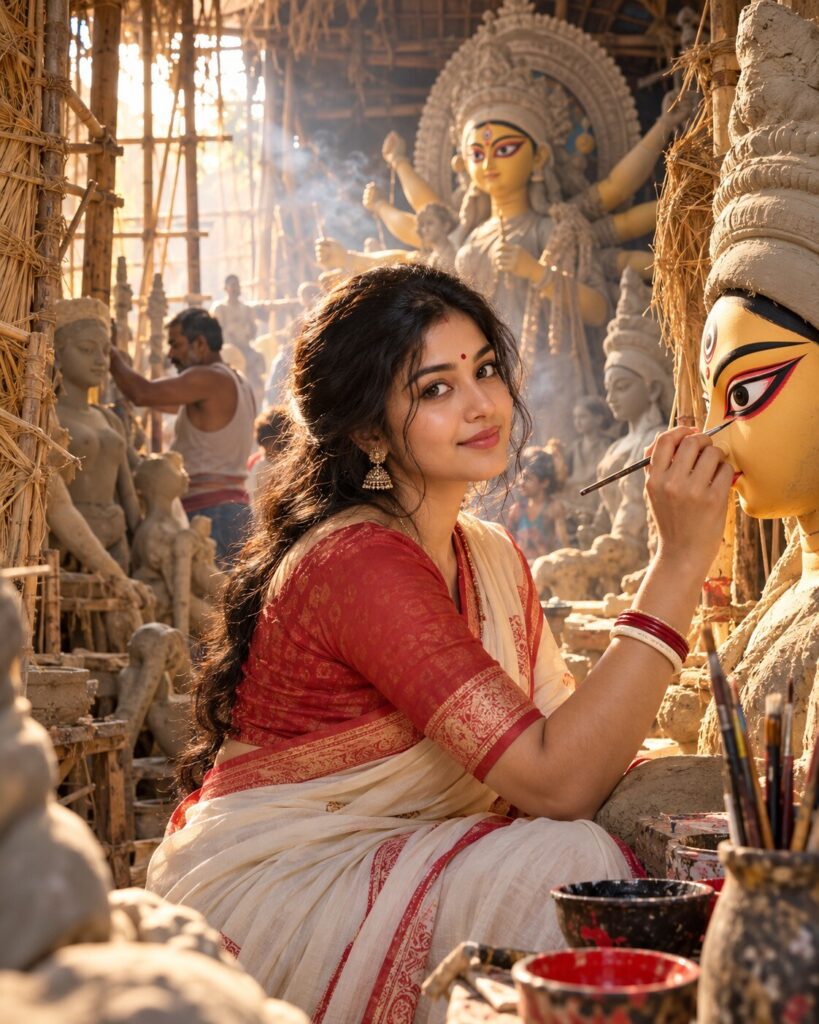
Agomoni — The Moment Maa Opens Her Eyes
♡ 6Create a cinematic Mahalaya portrait inside Kumartuli during Chokh Dan, surrounded by unfinished Durga idols, clay textures and golden morning light.
Use the uploaded reference image as the exact identity anchor. Preserve the person’s recognizable facial identity, facial structure, proportions, eyes, eyebrows, nose, lips, jawline, cheeks, skin tone, hairline, hairstyle, distinctive characteristics and natural age. Create a photorealistic cinematic Mahalaya portrait inside an authentic Kumartuli clay artisan workshop during Chokh Dan. Surround the subject with unfinished Durga idols, bamboo frameworks, straw structures, clay textures and sculpting tools. Show a Durga idol in the background with freshly painted eyes as the symbolic centerpiece. Dress the subject in elegant Bengali traditional clothing. Warm early-morning sunlight enters through the workshop, revealing subtle dust and incense haze. Natural skin texture, realistic fabric and clay detail, cinematic depth, documentary editorial photography, emotional Agomoni atmosphere, vertical 4:5.
Use the uploaded reference image as the exact identity anchor. Preserve the person’s recognizable facial identity, facial structure, proportions, eyes, eyebrows, nose, lips, jawline, cheeks, skin tone, hairline, hairstyle, distinctive characteristics and natural age. Create a photorealistic cinematic Mahalaya portrait inside an authentic Kumartuli clay artisan workshop during Chokh Dan. Surround the subject with unfinished Durga idols, bamboo frameworks, straw structures, clay textures and sculpting tools. Show a Durga idol in the background with freshly painted eyes as the symbolic centerpiece. Dress the subject in elegant Bengali traditional clothing. Warm early-morning sunlight enters through the workshop, revealing subtle dust and incense haze. Natural skin texture, realistic fabric and clay detail, cinematic depth, documentary editorial photography, emotional Agomoni atmosphere, vertical 4:5.
Photorealistic cinematic Mahalaya Chokh Dan portrait using the uploaded reference image as the exact identity source. Preserve exact recognizable facial identity, facial structure, proportions, eyes, eyebrows, nose, lips, jawline, cheeks, skin tone, hairline, hairstyle, distinctive characteristics and natural age. Authentic Kumartuli Kolkata artisan workshop, unfinished Durga idols, bamboo and straw structures, clay-covered surfaces, sculpting tools, freshly painted Durga eyes in the background, elegant Bengali traditional clothing, warm morning sunlight, subtle dust and incense haze, natural skin pores, realistic fabric and clay textures, professional documentary photography, 85mm portrait lens, shallow depth of field, cinematic lighting and color grading, authentic Bengali Agomoni atmosphere, vertical 4:5.
Use the uploaded reference photo as the exact identity reference and preserve the person’s recognizable identity without changing their face. Create a photorealistic cinematic Mahalaya portrait inside a real Kumartuli clay artisan workshop in Kolkata during Chokh Dan. Place the same person naturally among unfinished Durga idols, bamboo frameworks, straw structures, clay-covered surfaces and traditional sculpting tools. In the background, show a magnificent Durga idol whose eyes have just been hand-painted for Chokh Dan. The eyes must look authentic and hand-crafted, not supernatural or glowing. Dress the person in elegant Bengali traditional clothing. Use warm early-morning sunlight streaming through the workshop, with subtle dust and incense haze. Preserve realistic skin texture, fabric texture and clay detail. Make it look like a premium documentary photograph taken by a professional photographer in Kumartuli. Vertical 4:5.
different person, altered identity, generic face, face swap, changed facial structure, changed facial proportions, changed eyes, changed eyebrows, changed nose, changed lips, changed jawline, changed cheeks, changed skin tone, changed age, beauty filter, plastic skin, excessive makeup, supernatural glowing eyes, fantasy goddess, CGI, 3D render, cartoon, anime, illustration, artificial workshop, modern studio, incorrect Durga idol anatomy, duplicated arms, extra limbs, extra fingers, malformed hands, modern electronics, western clothing, garba, dandiya, oversaturated colors, text, logo, watermark
Works with
✦Google Gemini✦ChatGPT image generation✦Midjourney✦FLUX✦SDXL


Comments