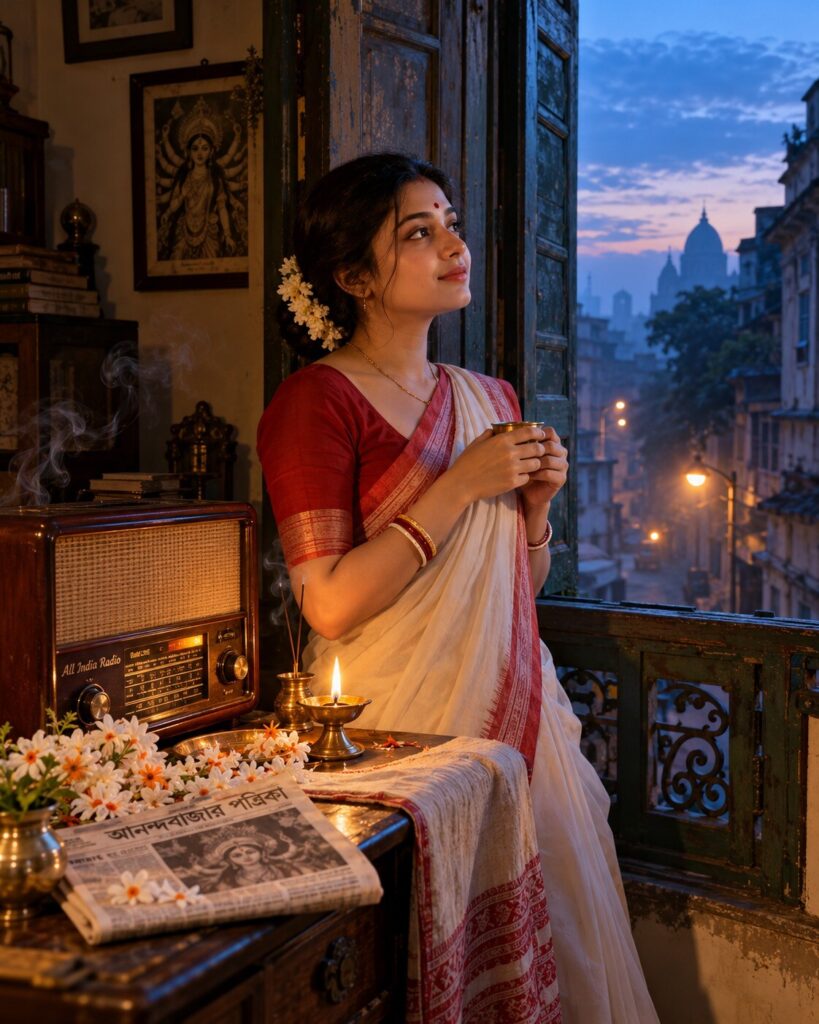
Mahalaya 4 AM — When Kolkata Awakens
♡ 6Create a cinematic Mahalaya portrait inside an old North Kolkata home at 4 AM, with an antique radio, shiuli flowers and blue dawn light.
Use the uploaded reference image as the exact identity anchor. Preserve the person’s recognizable facial identity, facial structure, proportions, eyes, eyebrows, nose, lips, jawline, cheeks, skin tone, hairline, hairstyle, distinctive features and natural age. Create a photorealistic cinematic Mahalaya 4 AM portrait inside an old North Kolkata Bengali home. The subject stands beside an open wooden window overlooking a quiet pre-dawn Kolkata lane. A vintage wooden radio playing Mahishasuramardini sits on a nearby table beside fresh shiuli flowers, a brass diya and a folded Bengali newspaper. Cool blue dawn light enters through the window while the diya creates a subtle warm glow on the subject. Add delicate incense smoke, realistic old-house textures, authentic Bengali clothing and atmospheric depth. Evoke Agomoni, Bengali nostalgia and the quiet anticipation of Mahalaya morning. Premium editorial photography, realistic skin texture, natural expression, vertical 4:5.
Use the uploaded reference image as the exact identity anchor. Preserve the person’s recognizable facial identity, facial structure, proportions, eyes, eyebrows, nose, lips, jawline, cheeks, skin tone, hairline, hairstyle, distinctive features and natural age. Create a photorealistic cinematic Mahalaya 4 AM portrait inside an old North Kolkata Bengali home. The subject stands beside an open wooden window overlooking a quiet pre-dawn Kolkata lane. A vintage wooden radio playing Mahishasuramardini sits on a nearby table beside fresh shiuli flowers, a brass diya and a folded Bengali newspaper. Cool blue dawn light enters through the window while the diya creates a subtle warm glow on the subject. Add delicate incense smoke, realistic old-house textures, authentic Bengali clothing and atmospheric depth. Evoke Agomoni, Bengali nostalgia and the quiet anticipation of Mahalaya morning. Premium editorial photography, realistic skin texture, natural expression, vertical 4:5.
Photorealistic cinematic Mahalaya 4 AM portrait using the uploaded reference image as the exact identity source. Preserve exact facial identity, facial structure, facial proportions, eyes, eyebrows, nose, lips, jawline, cheeks, skin tone, hairline, hairstyle, distinctive features and natural age. Old North Kolkata Bengali heritage home, open wooden window, quiet pre-dawn Kolkata lane outside, antique wooden radio playing Mahishasuramardini, fresh shiuli flowers, brass diya, folded Bengali newspaper, authentic Bengali traditional clothing, cool blue dawn light, warm diya illumination across the subject, subtle incense smoke, realistic old-house textures, natural skin pores, realistic fabric fibers, cinematic editorial photography, 50mm portrait lens, shallow depth of field, atmospheric haze, emotional Agomoni mood, vertical 4:5.
Use the uploaded reference photo as the exact identity reference and preserve the person’s recognizable facial identity without changing their face. Create a photorealistic cinematic portrait of the same person during Mahalaya at 4 AM inside an old North Kolkata Bengali heritage home. The person stands beside an open traditional wooden window overlooking a quiet sleeping Kolkata lane. Nearby, an authentic vintage tabletop radio is playing Mahishasuramardini. On the wooden table are fresh white shiuli flowers, a small brass diya and a folded Bengali newspaper. Dress the person in elegant authentic Bengali traditional clothing. Cool blue pre-dawn light enters through the window while the diya produces a subtle warm golden glow across the person’s face. Add delicate incense smoke and realistic old-house textures. The mood should feel intimate, nostalgic, spiritual and deeply Bengali, evoking Agomoni and the anticipation of Durga Puja. Make the image look like a premium real cinematic photograph, with natural skin texture and realistic materials. Vertical 4:5.
different person, altered identity, generic face, face swap, changed facial structure, changed facial proportions, changed eyes, changed eyebrows, changed nose, changed lips, changed jawline, changed cheeks, changed skin tone, changed age, beauty filter, plastic skin, excessive smoothing, modern apartment, modern electronics, smartphone, LED lighting, futuristic Kolkata, western clothing, inaccurate Bengali clothing, fantasy, CGI, 3D render, cartoon, anime, illustration, artificial radio, supernatural glow, excessive fog, excessive grain, oversaturated colors, deformed hands, extra fingers, duplicate person, text, logo, watermark
Works with
✦Google Gemini✦ChatGPT image generation✦Midjourney✦FLUX✦SDXL

Comments