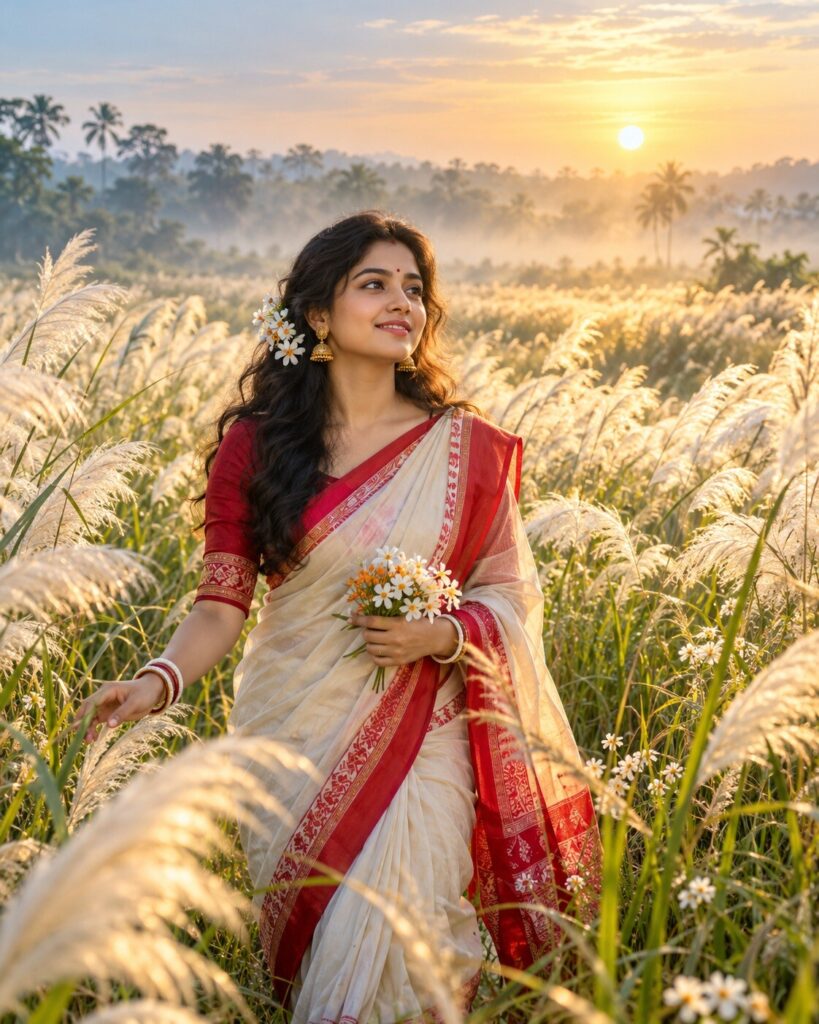
Agomoni — Where the Kash Flowers Whisper
♡ 7Create a cinematic Bengali Agomoni portrait in a vast kashphool field with autumn mist, golden sunrise and elegant traditional styling.
Use the uploaded reference image as the exact identity anchor. Preserve the person’s recognizable facial identity, facial structure, proportions, eyes, eyebrows, nose, lips, jawline, cheeks, skin tone, hairline, hairstyle, distinctive features and natural age. Create a photorealistic cinematic Agomoni portrait in a vast Bengal kashphool field during autumn sunrise. The subject wears elegant authentic Bengali traditional clothing and walks naturally among tall white kans grass moving gently in the breeze. Add soft morning mist, distant green vegetation, pale blue sky, subtle shiuli flowers and warm golden sunlight passing through the grass. Convey peaceful anticipation and the feeling of Maa Durga returning home. Natural skin texture, realistic textile detail, cinematic depth and premium editorial photography. Vertical 4:5.
Use the uploaded reference image as the exact identity anchor. Preserve the person’s recognizable facial identity, facial structure, proportions, eyes, eyebrows, nose, lips, jawline, cheeks, skin tone, hairline, hairstyle, distinctive features and natural age. Create a photorealistic cinematic Agomoni portrait in a vast Bengal kashphool field during autumn sunrise. The subject wears elegant authentic Bengali traditional clothing and walks naturally among tall white kans grass moving gently in the breeze. Add soft morning mist, distant green vegetation, pale blue sky, subtle shiuli flowers and warm golden sunlight passing through the grass. Convey peaceful anticipation and the feeling of Maa Durga returning home. Natural skin texture, realistic textile detail, cinematic depth and premium editorial photography. Vertical 4:5.
Photorealistic cinematic Agomoni portrait using the uploaded reference image as the exact identity reference. Preserve exact recognizable facial identity, facial structure, proportions, eyes, eyebrows, nose, lips, jawline, cheeks, skin tone, hairline, hairstyle, distinctive features and natural age. Vast Bengal kashphool field during early autumn sunrise, subject walking naturally through tall white kans grass, elegant authentic Bengali traditional attire, subtle shiuli flowers, soft morning mist, distant green vegetation, pale blue sky, warm golden sunlight filtering through grass, realistic wind in hair and clothing, natural skin pores, authentic textile fibers, cinematic atmospheric depth, premium Indian editorial photography, realistic lens characteristics, shallow depth of field, vertical 4:5.
Use the uploaded reference photo as the exact identity reference and preserve the person’s recognizable identity without changing the face. Create a photorealistic cinematic Agomoni portrait of the same person walking through a vast Bengal kashphool field at autumn sunrise. The person wears elegant authentic Bengali traditional clothing with realistic woven texture. Surround them with tall white kans grass moving gently in the morning breeze, soft mist, distant green vegetation and a pale blue sky. Add a few subtle shiuli flowers in the foreground. Warm golden sunlight should pass through the grass and create delicate natural rim lighting. The mood should express peaceful anticipation, nostalgia and the feeling that Maa Durga is returning home. Keep the face sharp and natural with realistic skin texture. Make the image look like a premium outdoor editorial photograph taken in real Bengal. Vertical 4:5.
different person, altered identity, generic face, face swap, changed facial structure, changed facial proportions, changed eyes, changed eyebrows, changed nose, changed lips, changed jawline, changed cheeks, changed skin tone, changed age, beauty filter, plastic skin, excessive smoothing, fantasy goddess, supernatural glow, artificial flower field, excessive flowers, inaccurate Bengali clothing, western clothing, CGI, 3D render, cartoon, anime, illustration, artificial sky, excessive lens flare, oversaturated colors, distorted hands, extra fingers, extra limbs, duplicate person, text, logo, watermark
Works with
✦Google Gemini✦ChatGPT image generation✦Midjourney✦FLUX✦SDXL



Comments