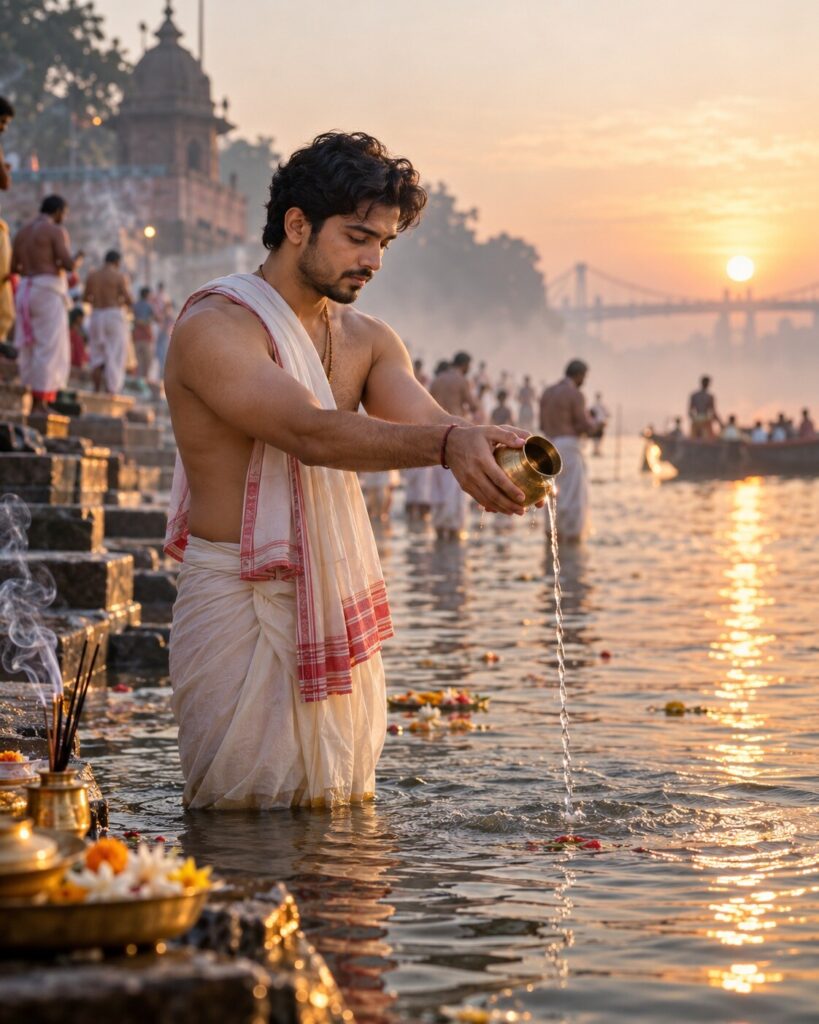
Mahalaya Tarpan — Dawn of Remembrance
♡ 6Create a cinematic Mahalaya Tarpan portrait beside the Ganges with sacred dawn light, river mist, brass vessels and authentic Bengali styling.
Use the uploaded reference image as the exact identity anchor. Preserve the person’s recognizable facial identity, facial structure, proportions, eyes, eyebrows, nose, lips, jawline, cheeks, skin tone, hairline, hairstyle, distinctive features and natural age. Create a photorealistic cinematic Mahalaya Tarpan portrait beside the Ganges at dawn. The subject stands naturally in shallow water performing Tarpan with an authentic brass vessel. Dress the subject in traditional Bengali clothing. Add cool morning mist, subtle incense smoke, realistic water ripples and reflections, distant worshippers and soft golden sunlight appearing on the horizon. Create a solemn, peaceful and deeply Bengali atmosphere of remembrance and the beginning of Devi Paksha. Documentary editorial photography, realistic skin and fabric texture, cinematic atmospheric depth, vertical 4:5.
Use the uploaded reference image as the exact identity anchor. Preserve the person’s recognizable facial identity, facial structure, proportions, eyes, eyebrows, nose, lips, jawline, cheeks, skin tone, hairline, hairstyle, distinctive features and natural age. Create a photorealistic cinematic Mahalaya Tarpan portrait beside the Ganges at dawn. The subject stands naturally in shallow water performing Tarpan with an authentic brass vessel. Dress the subject in traditional Bengali clothing. Add cool morning mist, subtle incense smoke, realistic water ripples and reflections, distant worshippers and soft golden sunlight appearing on the horizon. Create a solemn, peaceful and deeply Bengali atmosphere of remembrance and the beginning of Devi Paksha. Documentary editorial photography, realistic skin and fabric texture, cinematic atmospheric depth, vertical 4:5.
Photorealistic cinematic Mahalaya Tarpan portrait using the uploaded reference image as the exact identity reference. Preserve exact facial identity, facial structure, proportions, eyes, eyebrows, nose, lips, jawline, cheeks, skin tone, hairline, hairstyle, distinctive features and natural age. Subject standing ankle-deep in the Ganges at dawn performing Tarpan with an authentic brass vessel, traditional Bengali clothing, solemn peaceful expression, cool blue-gray mist above water, subtle incense smoke, warm sunrise horizon, realistic water ripples and reflections, distant worshippers, authentic river steps, natural seasonal flowers, realistic skin pores and wet fabric, documentary editorial photography, cinematic atmospheric depth, natural color grading, vertical 4:5.
Use the uploaded reference photo as the exact identity reference and preserve the person’s recognizable identity without changing their face. Create a photorealistic cinematic Mahalaya Tarpan portrait beside the Ganges at dawn. The same person stands naturally in shallow river water performing Tarpan with a simple traditional brass vessel. Dress them in authentic Bengali traditional clothing with realistic fabric texture. Add cool morning mist over the river, subtle incense smoke, realistic water ripples and reflections, stone river steps and a few distant worshippers softly blurred in the background. The first warm golden sunlight should appear along the horizon and softly illuminate the person’s face. Keep the mood solemn, peaceful, reflective and culturally authentic, expressing remembrance and the beginning of Devi Paksha. Make it look like a premium documentary photograph captured in real Bengal. Vertical 4:5.
different person, altered identity, generic face, face swap, changed facial structure, changed facial proportions, changed eyes, changed eyebrows, changed nose, changed lips, changed jawline, changed cheeks, changed skin tone, changed age, beauty filter, plastic skin, excessive smoothing, fantasy deity, supernatural glow, glowing water, artificial river, excessive decoration, excessive flowers, theatrical pose, inaccurate ritual objects, inaccurate Bengali clothing, western clothing, CGI, 3D render, cartoon, anime, illustration, oversaturated colors, deformed hands, extra fingers, extra limbs, duplicate people, text, logo, watermark
Works with
✦Google Gemini✦ChatGPT image generation✦Midjourney✦FLUX✦SDXL

Comments