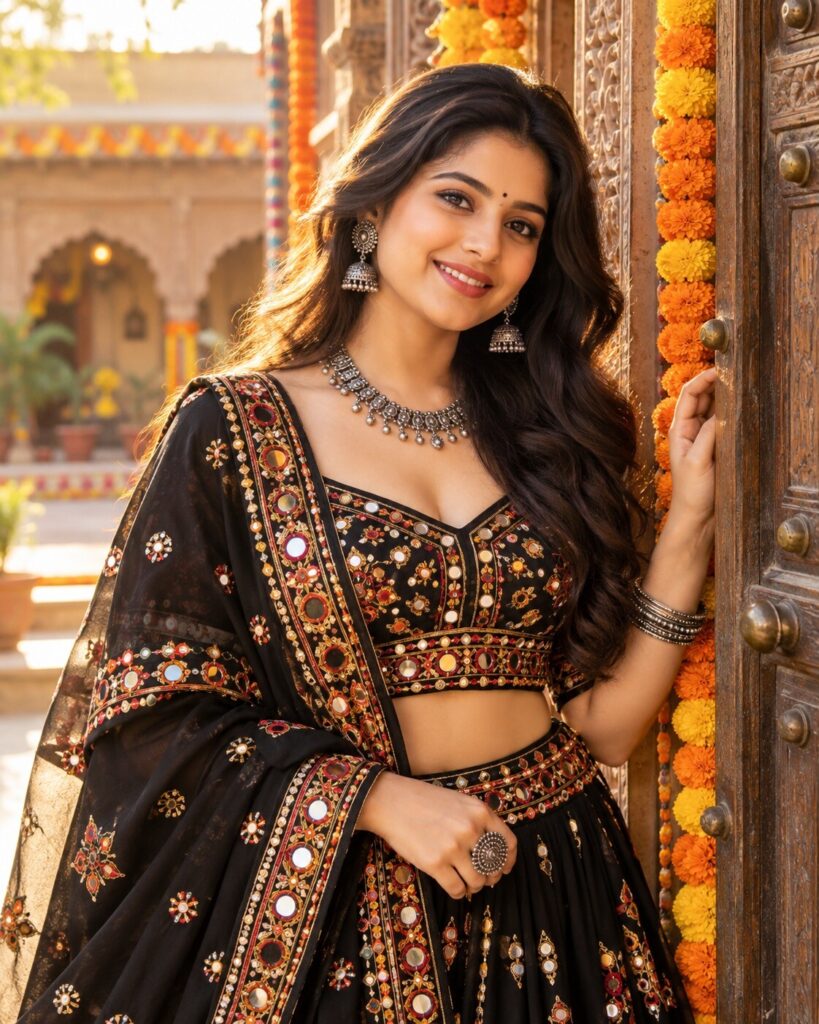
Golden-Hour Garba Muse – Gujarati Festive Fashion Portrait
♡ 12Create a Gujarati Garba fashion portrait featuring black-and-gold mirror work, Kutchi embroidery, oxidized-silver jewelry, marigolds, and warm golden-hour light.
#Cinematic Portrait Scenes#AI Photo Prompts#Garba Fashion#Gujarati Portrait#Kutchi Embroidery#Mirror Work
Transform the uploaded reference photo into a photorealistic Gujarati Garba fashion portrait. Preserve the subject’s exact recognizable facial identity, facial structure and proportions, eyes, eyebrows, nose, lips, jawline, cheeks, skin tone, hairline, hairstyle, distinctive features, natural age, and overall likeness. Do not substitute a generic face. Style the subject in a black chaniya choli with antique-gold Kutchi embroidery, mirror work, a flowing dupatta, and tasteful oxidized-silver jewelry. Pose the subject naturally beside a carved Gujarati doorway decorated with marigold garlands. Use warm golden-hour sunlight, soft facial illumination, realistic skin texture, detailed embroidery, natural hands, and a softly blurred courtyard. Elegant editorial portrait, waist-up framing, vertical 4:5, one image only.
Transform the uploaded reference photo into a photorealistic Gujarati Garba fashion portrait. Preserve the subject’s exact recognizable facial identity, facial structure and proportions, eyes, eyebrows, nose, lips, jawline, cheeks, skin tone, hairline, hairstyle, distinctive features, natural age, and overall likeness. Do not substitute a generic face. Style the subject in a black chaniya choli with antique-gold Kutchi embroidery, mirror work, a flowing dupatta, and tasteful oxidized-silver jewelry. Pose the subject naturally beside a carved Gujarati doorway decorated with marigold garlands. Use warm golden-hour sunlight, soft facial illumination, realistic skin texture, detailed embroidery, natural hands, and a softly blurred courtyard. Elegant editorial portrait, waist-up framing, vertical 4:5, one image only.
High-detail photorealistic Gujarati Garba fashion portrait using the uploaded reference photo as the authoritative identity reference. Preserve the subject’s recognizable facial identity, facial structure, proportions, eyes, eyebrows, nose, lips, jawline, cheeks, skin tone, natural texture, hairline, hairstyle, distinctive characteristics, natural age, and likeness. Black Gujarati chaniya choli with intricate antique-gold Kutchi embroidery and realistic mirror work, flowing dupatta, oxidized-silver earrings and bangles. Natural confident pose beside a carved traditional doorway decorated with marigold garlands. Warm golden-hour sunlight, soft facial illumination, subtle golden rim light, realistic skin pores, authentic textile detail, natural hands, shallow depth of field, refined editorial color grading, waist-up portrait, vertical 4:5.
Edit the uploaded photo into one photorealistic Gujarati Garba fashion portrait. Preserve the person’s original recognizable identity, facial structure and proportions, eyes, eyebrows, nose, lips, jawline, cheeks, skin tone, hairline, hairstyle, distinctive facial features, natural age, and overall likeness. Do not replace or redesign the face. Dress the subject in an elegant black Gujarati chaniya choli with antique-gold Kutchi embroidery, detailed mirror work, and a flowing dupatta. Add tasteful oxidized-silver jewelry. Place the subject beside a traditional carved Gujarati doorway decorated with marigold garlands and subtle festive details. Use warm late-afternoon sunlight, golden rim light, natural skin texture, realistic embroidery and jewelry, anatomically correct hands, and a softly blurred courtyard. Frame the subject from the waist upward with the face clearly visible. Vertical 4:5. No text, watermark, or collage.
identity change, generic face, face replacement, altered facial structure, changed facial proportions, changed eyes, changed eyebrows, changed nose, changed lips, changed jawline, changed cheeks, altered skin tone, changed hairline, changed hairstyle, changed age, excessive beautification, plastic skin, airbrushed texture, asymmetrical eyes, blurry face, extra fingers, missing fingers, fused fingers, malformed hands, unnatural arms, distorted body proportions, inaccurate Kutchi embroidery, broken mirror work, unrealistic mirror reflections, floating jewelry, distorted earrings, stiff fabric, unnatural folds, costume-like styling, harsh shadows, blown highlights, cropped head, blurry face, cartoon, painting, illustration, text, logo, watermark, collage, split screen
Works with
✦ChatGPT image generation✦Google Gemini image generation✦Midjourney✦Stable Diffusion XL



Comments