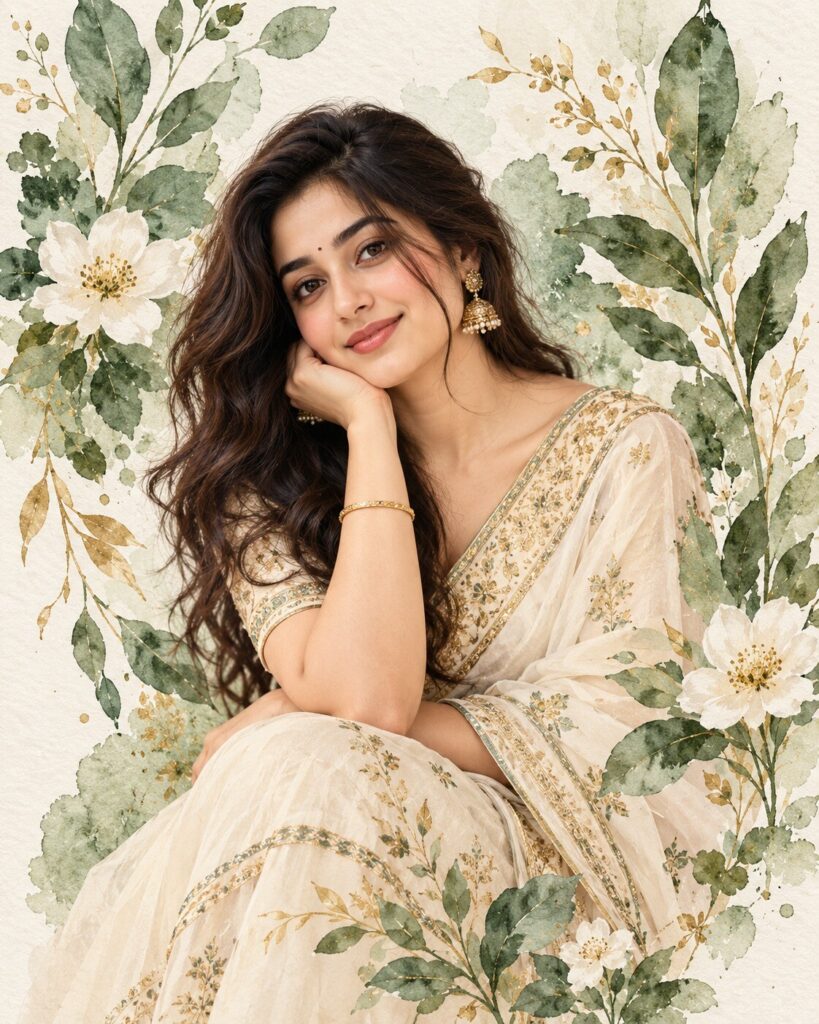
Botanical Watercolor Saree Portrait
♡ 9Transform a reference portrait into an elegant fashion portrait blending realistic identity with delicate botanical watercolor textures and an ivory saree.
Use the uploaded image as the exact identity reference. Preserve the persons recognizable facial identity and distinctive characteristics. Dress them in an elegant ivory saree with muted-gold detailing and surround them with sage-green botanical watercolor leaves and delicate white flowers. Keep the face photorealistic while the surrounding botanical elements transition into refined watercolor brushwork, soft paper texture and premium Indian fashion-editorial styling.
Use the uploaded image as the exact identity reference. Preserve the persons recognizable facial identity and distinctive characteristics. Dress them in an elegant ivory saree with muted-gold detailing and surround them with sage-green botanical watercolor leaves and delicate white flowers. Keep the face photorealistic while the surrounding botanical elements transition into refined watercolor brushwork, soft paper texture and premium Indian fashion-editorial styling.
Photorealistic Indian fashion portrait using the uploaded reference image as the exact identity reference. Preserve recognizable facial identity, facial structure, eyes, eyebrows, nose, lips, jawline, cheeks, skin tone, hairline, hairstyle, natural age and distinctive facial characteristics. Person wearing an elegant ivory saree with muted-gold zari detailing and subtle botanical embroidery. Photorealistic face and upper body surrounded by sophisticated botanical watercolor elements, sage-green leaves, delicate white flowers, fine stems and translucent watercolor washes. Soft diffused studio lighting, warm natural skin highlights, realistic skin pores, individual hair strands, detailed fabric texture, subtle handmade paper texture, delicate pigment variation, restrained ivory sage green muted gold and blush palette, premium Indian fashion editorial photography, shallow depth of field, vertical 4:5 composition.
Transform the uploaded portrait into a premium Indian fashion editorial while preserving the persons exact recognizable identity, facial structure, proportions, skin tone, hairstyle, natural age and distinctive facial characteristics. Dress the person in an elegant ivory saree with delicate muted-gold zari details and subtle botanical embroidery. Keep the face and upper body photorealistic and sharply detailed. Surround the person with hand-painted botanical watercolor leaves, fine stems and delicate white flowers in sage green, ivory and muted gold tones. Allow some watercolor foliage to frame the shoulders but never cover the face. Use soft diffused studio lighting, warm natural highlights, realistic skin texture, detailed hair strands and believable saree fabric. Let the background gradually transition from photographic softness into refined watercolor brushwork with subtle handmade paper texture and natural pigment variation. Sophisticated, minimal, graceful Indian fashion editorial, vertical 4:5 composition, no text, logos or watermark.
identity change, different person, generic face, facial distortion, altered facial proportions, asymmetrical eyes, malformed eyes, warped nose, distorted lips, changed jawline, changed skin tone, changed hairstyle, changed age, painted face, watercolor skin, excessive beauty retouching, plastic skin, cartoon, anime, illustration, excessive foliage, flowers covering face, oversaturated colors, cluttered composition, distorted saree, malformed hands, extra fingers, deformed anatomy, duplicate person, low detail, low resolution, compression artifacts, text, logo, watermark
Works with
✦GPT Image✦Midjourney✦FLUX✦SDXL
Comments