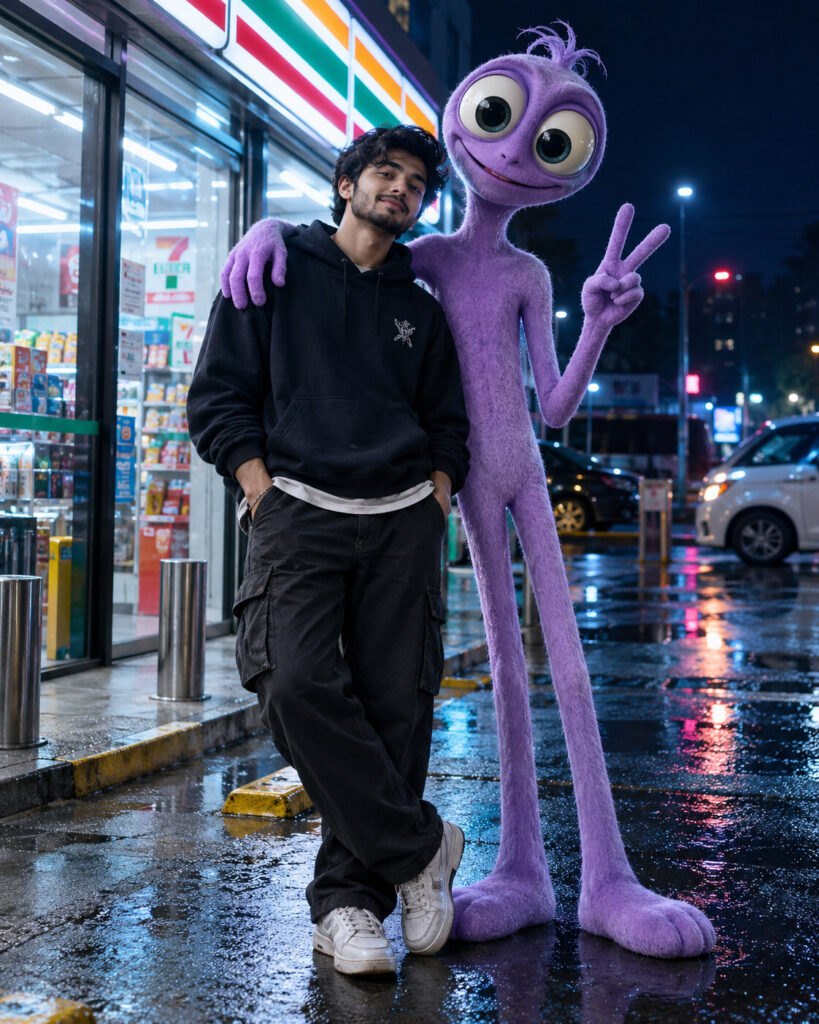
Cartoon Companion Weirdcore Reality Portrait
♡ 6Turn your reference photo into a surreal real-world portrait featuring an uncanny cartoon companion with matched lighting, scale, shadows and cinematic realism.
Create a photorealistic surreal portrait using the uploaded image as the exact identity reference. Preserve facial identity, facial structure, proportions, eyes, eyebrows, nose, lips, jawline, cheeks, skin tone, hairline, hairstyle, natural age and distinctive facial characteristics. Keep the person realistic and unchanged. Add a tall slender pastel-purple 3D cartoon companion with oversized expressive eyes and a friendly but uncanny smile. Make the companion physically present beside the subject with correct scale, ground contact, perspective, depth and matching shadows. Set the scene outside a convenience store at night with cool blue ambient light, soft fluorescent storefront illumination, wet pavement reflections and restrained neon glow. Natural skin texture, realistic clothing, cinematic smartphone photography, subtle weirdcore mood, photorealistic, vertical 4:5.
Create a photorealistic surreal portrait using the uploaded image as the exact identity reference. Preserve facial identity, facial structure, proportions, eyes, eyebrows, nose, lips, jawline, cheeks, skin tone, hairline, hairstyle, natural age and distinctive facial characteristics. Keep the person realistic and unchanged. Add a tall slender pastel-purple 3D cartoon companion with oversized expressive eyes and a friendly but uncanny smile. Make the companion physically present beside the subject with correct scale, ground contact, perspective, depth and matching shadows. Set the scene outside a convenience store at night with cool blue ambient light, soft fluorescent storefront illumination, wet pavement reflections and restrained neon glow. Natural skin texture, realistic clothing, cinematic smartphone photography, subtle weirdcore mood, photorealistic, vertical 4:5.
Photorealistic surreal AI photo edit using the uploaded reference image as the exact identity source. Preserve facial identity, facial structure, facial proportions, eyes, eyebrows, nose, lips, jawline, cheeks, skin tone, hairline, hairstyle, natural age and distinctive features. Keep the human completely realistic. Add a tall slender pastel-purple 3D cartoon mascot beside the subject with oversized expressive eyes and a friendly uncanny smile. Correct physical scale, feet firmly touching the pavement, accurate perspective, matching illumination and matching shadow direction. Nighttime convenience store, cool blue ambient light, soft fluorescent storefront glow, subtle wet pavement reflections, restrained neon, realistic skin texture, authentic smartphone-camera detail, cinematic weirdcore mood, natural depth, vertical 4:5.
Transform the uploaded photograph into a believable real-life surreal photo while preserving the exact person and their recognizable facial identity, facial structure, facial proportions, eyes, eyebrows, nose, lips, jawline, cheeks, skin tone, hairline, hairstyle, natural age and distinctive facial characteristics. Keep the human photographic and realistic. Add a tall slender pastel-purple 3D cartoon companion standing naturally beside the person outside a small convenience store at night. Give the companion oversized expressive eyes and a friendly but subtly uncanny smile. Make it physically believable through correct scale, ground contact, perspective, depth, lighting and shadows. Use cool blue night ambience, soft fluorescent storefront illumination, slight wet pavement reflections and restrained neon glow. Preserve realistic skin texture and authentic photographic imperfections. Vertical 4:5 composition.
generic face, changed identity, facial reconstruction, altered facial proportions, changed eyes, changed eyebrows, changed nose, changed lips, changed jawline, changed cheeks, changed skin tone, changed hairstyle, age alteration, beauty filter, plastic skin, waxy skin, sticker effect, flat overlay, floating character, incorrect scale, missing ground contact, mismatched perspective, mismatched lighting, mismatched shadows, CGI human, cartoon human, anime, illustration, excessive neon, distorted anatomy, duplicate person, extra limbs, text, watermark, logo
Works with
✦ChatGPT Images 2.5✦Gemini✦Midjourney✦SDXL
Comments