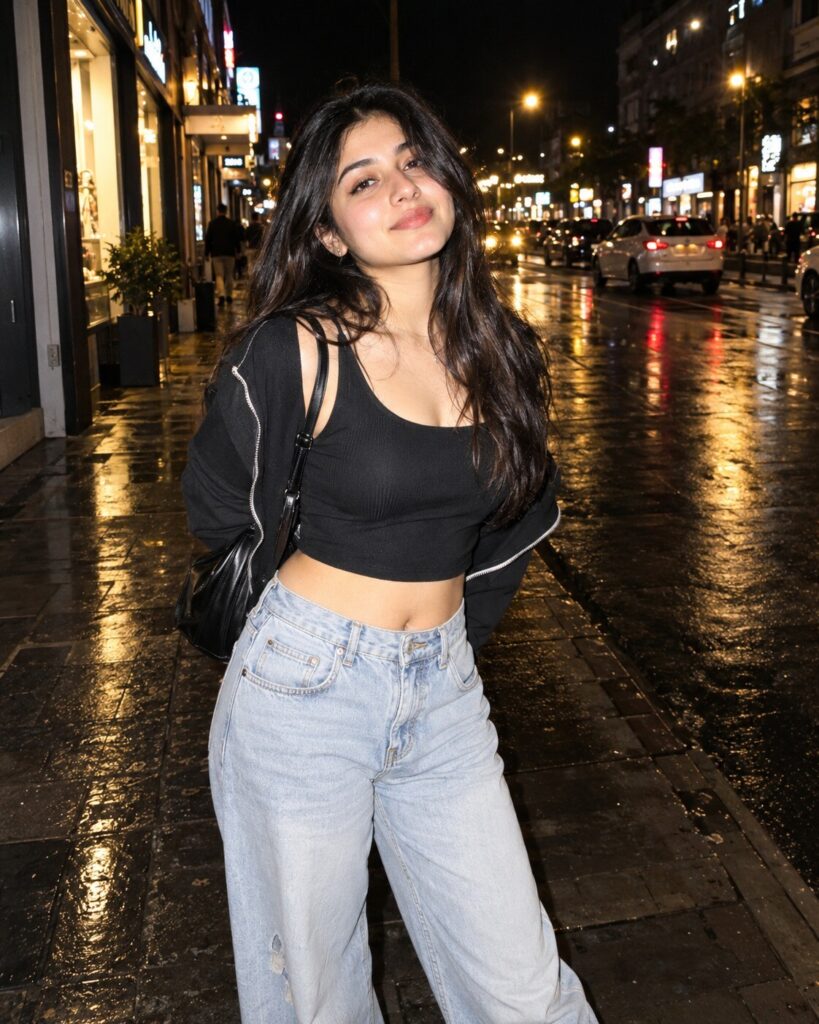
Direct-Flash Night Streetwear Portrait
♡ 6Transform a reference photo into a candid night streetwear portrait with hard direct flash, deep urban shadows, reflective surfaces and contemporary editorial photography.
Uploaded reference photo, exact identity preservation, contemporary night street portrait, direct on-camera flash, modern streetwear, candid expression, hard flash shadows, deep urban background, reflective pavement, storefront lights, subtle grain, documentary fashion photography, realistic skin texture, spontaneous framing, photorealistic, 4:5.
Uploaded reference photo, exact identity preservation, contemporary night street portrait, direct on-camera flash, modern streetwear, candid expression, hard flash shadows, deep urban background, reflective pavement, storefront lights, subtle grain, documentary fashion photography, realistic skin texture, spontaneous framing, photorealistic, 4:5.
Photorealistic contemporary night street portrait based on the uploaded reference image. Lock the subject's identity and preserve exact facial geometry, eyes, eyebrows, nose, lips, jawline, cheeks, skin tone, natural age, hairline, hairstyle and distinctive features. Modern streetwear styling, candid pose, direct on-camera flash, bright crisp subject against a darker urban background, hard realistic shadow, wet pavement reflections, storefront illumination, distant bokeh, natural skin texture, realistic clothing fibers, subtle photographic grain, authentic documentary-fashion aesthetic, imperfect spontaneous framing, 35mm perspective, 4:5.
Transform the uploaded reference photograph into a contemporary direct-flash night streetwear portrait. Preserve the exact identity and recognizable likeness of the person, including facial structure, facial proportions, eyes, eyebrows, nose, lips, jawline, cheeks, skin tone, natural age, hairline, hairstyle and distinctive facial characteristics. Place the subject naturally on an urban street at night in modern streetwear. Use strong direct camera flash to illuminate the subject sharply while the background falls into deep realistic shadow. Include storefront lights, pavement reflections and distant city activity. Create hard but believable flash shadows, crisp skin detail, realistic clothing texture and candid imperfect framing. The final photograph should feel spontaneous and contemporary, like a professional street-fashion photographer captured it during a night out. Avoid retro decade styling. Vertical 4:5.
generic face, different person, altered identity, facial reconstruction, changed facial proportions, different eyes, different nose, different lips, altered jawline, changed skin tone, younger face, older face, plastic skin, excessive beauty retouching, waxy skin, distorted anatomy, extra fingers, missing fingers, malformed hands, duplicated limbs, floating feet, artificial pose, studio backdrop, softbox lighting, excessive beauty lighting, excessive bokeh, fake city, warped buildings, distorted cars, duplicate people, unreadable text, excessive HDR, oversaturation, vintage 1980s styling, camcorder timestamp, disposable-camera aesthetic, cartoon, illustration, CGI, watermark, logo
Works with
✦GPT Image 2.5✦GPT Image 2✦Gemini image models✦Midjourney✦FLUX
Comments