Geometric Shawl Street Portrait
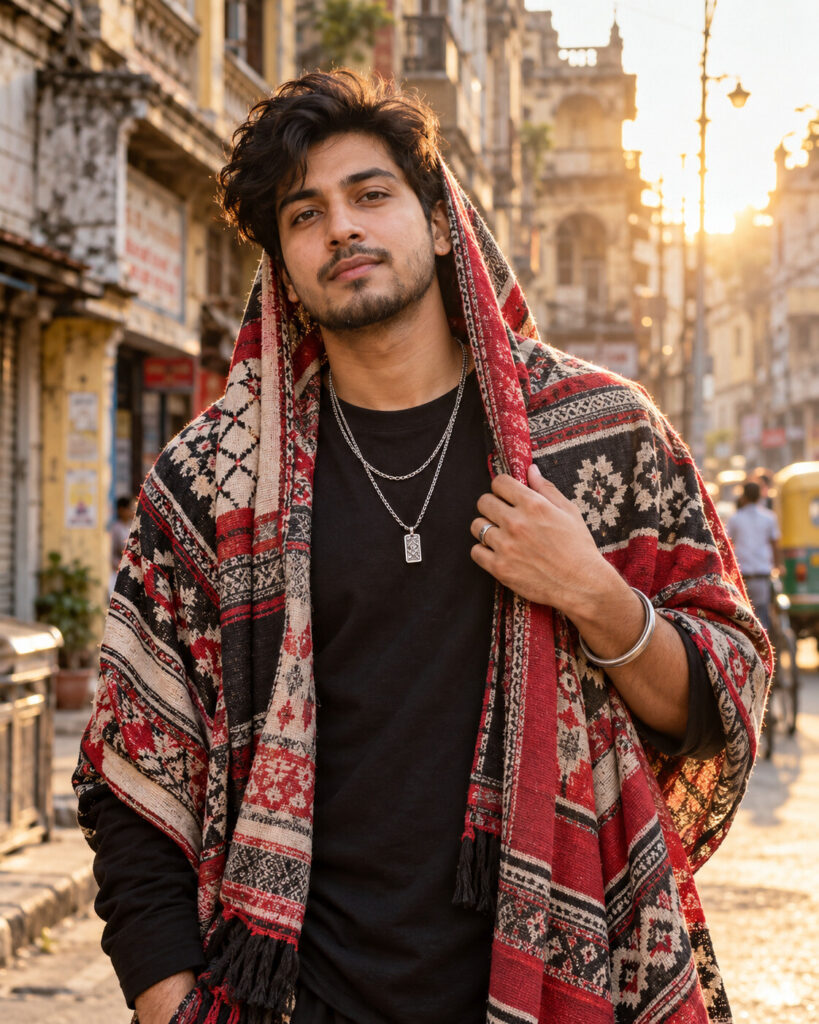
♡ 12Create a gritty cinematic street-fashion portrait from your uploaded photo with a bold geometric shawl, layered jewelry and warm golden-hour light.
Create a photorealistic South Asian street-fashion portrait using the uploaded reference image as the exact identity reference. Preserve the same recognizable face, facial structure, proportions, eyes, eyebrows, nose, lips, jawline, cheeks, ears, skin tone, natural age, hairline, hairstyle and distinctive features. Keep the face natural and unchanged. Dress the subject in a black crew-neck shirt with a large red, cream and charcoal geometric woven shawl draped over the head and shoulders, layered metallic chains, a simple ring and traditional metal wrist bangle. Use a gritty historic urban street with aged buildings, storefronts, balconies and distant vehicles. Warm golden-hour sunlight creates a soft rim around the subject. Professional street-fashion photography, 50mm lens, realistic skin texture, detailed woven fabric, natural hands, shallow depth of field, subtle film grain, rich cinematic contrast, confident calm expression, vertical 4:5 composition.
Create a photorealistic South Asian street-fashion portrait using the uploaded reference image as the exact identity reference. Preserve the same recognizable face, facial structure, proportions, eyes, eyebrows, nose, lips, jawline, cheeks, ears, skin tone, natural age, hairline, hairstyle and distinctive features. Keep the face natural and unchanged. Dress the subject in a black crew-neck shirt with a large red, cream and charcoal geometric woven shawl draped over the head and shoulders, layered metallic chains, a simple ring and traditional metal wrist bangle. Use a gritty historic urban street with aged buildings, storefronts, balconies and distant vehicles. Warm golden-hour sunlight creates a soft rim around the subject. Professional street-fashion photography, 50mm lens, realistic skin texture, detailed woven fabric, natural hands, shallow depth of field, subtle film grain, rich cinematic contrast, confident calm expression, vertical 4:5 composition.
Exact uploaded identity, recognizable face, unchanged facial proportions, natural skin texture, South Asian street-fashion portrait, black shirt, geometric red cream charcoal shawl, layered chains, metal wrist bangle, historic urban street, golden-hour sunlight, realistic fabric folds, detailed jewelry, natural hands, cinematic background blur, professional DSLR photography, subtle film grain, realistic skin and hair, premium editorial quality
Create a premium photorealistic street-fashion portrait using the uploaded photo as the exact identity reference. Preserve the person's face, skin tone, age, hairstyle and distinctive facial features exactly. Dress the same person in a black shirt with a bold red, cream and charcoal geometric woven shawl draped over the head and shoulders, layered chains, a metal wrist bangle and tasteful ring. Place them on a gritty historic urban street during warm golden hour. Use realistic woven fabric, natural skin texture, cinematic sunlight, professional 50mm photography and a softly blurred background.
generic face, different person, identity drift, altered facial structure, changed eyes, changed nose, changed lips, changed jawline, changed cheeks, different skin tone, altered age, changed hairstyle, excessive beauty retouching, celebrity resemblance, public figure resemblance, cartoon, anime, illustration, CGI appearance, plastic skin, distorted hands, extra fingers, fused fingers, extra limbs, duplicate person, duplicate face, malformed jewelry, floating shawl, impossible fabric folds, fake tattoo, excessive tattoo coverage, modern studio background, excessive blur, overprocessed HDR, text, captions, logo, watermark, border
Works with
✦GPT Image✦Gemini image models✦Nano Banana✦Flux✦Midjourney
Comments