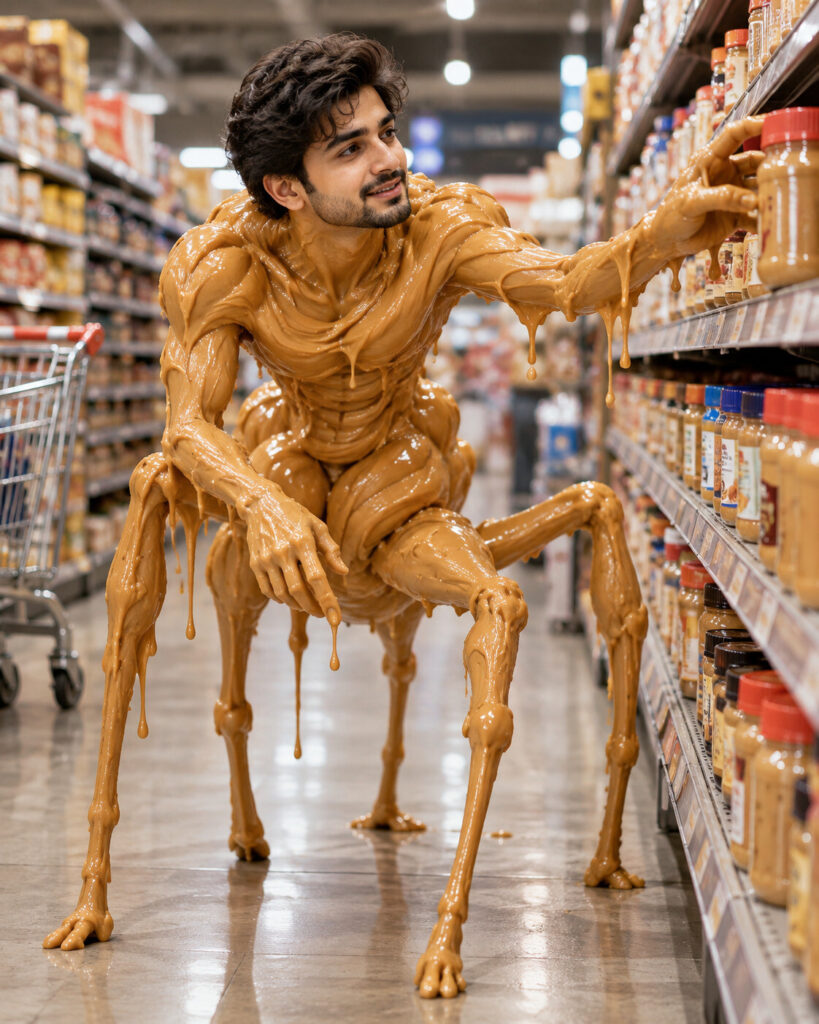
Give Me Peanut Butter Please – Surreal Humanoid
♡ 14Turn your uploaded portrait into a bizarre photorealistic peanut-butter humanoid while keeping your exact facial identity recognizable.
#Surreal Portrait#absurd creature#AI meme#peanut butter humanoid#surreal portrait#surreal transformation
Create a surreal photorealistic peanut-butter humanoid using the uploaded reference image. Preserve the exact same recognizable face, facial structure, proportions, eyes, eyebrows, nose, lips, jawline, cheeks, ears, skin tone, age and distinctive features. Keep the face completely human and identifiable. Transform only the body into glossy creamy peanut butter with realistic thick folds, sticky drips and wet highlights. Give the creature long thin insect-like legs and believable humanoid anatomy. Place it in a modern supermarket aisle reaching toward a peanut-butter jar. Cinematic realism, realistic contact shadows, physically accurate reflections, detailed peanut-butter texture, natural environment, absurd surreal comedy, no text, no watermark.
Create a surreal photorealistic peanut-butter humanoid using the uploaded reference image. Preserve the exact same recognizable face, facial structure, proportions, eyes, eyebrows, nose, lips, jawline, cheeks, ears, skin tone, age and distinctive features. Keep the face completely human and identifiable. Transform only the body into glossy creamy peanut butter with realistic thick folds, sticky drips and wet highlights. Give the creature long thin insect-like legs and believable humanoid anatomy. Place it in a modern supermarket aisle reaching toward a peanut-butter jar. Cinematic realism, realistic contact shadows, physically accurate reflections, detailed peanut-butter texture, natural environment, absurd surreal comedy, no text, no watermark.
Exact reference identity, recognizable human face, realistic eyes and skin, unchanged facial proportions, surreal peanut-butter humanoid body, creamy glossy food texture, viscous drips, sticky folds, long thin insect-like legs, supermarket aisle, peanut-butter jars, cinematic realism, physically based lighting, realistic reflections, detailed material texture, photorealistic photography, high detail
Transform the uploaded person into a bizarre photorealistic peanut-butter humanoid. Keep the person's face exactly recognizable and human, preserving their facial structure, eyes, nose, lips, jawline, skin tone and distinctive features. Make the body glossy creamy peanut butter with dripping folds and long thin surreal legs. Place the creature in a realistic grocery store reaching toward a peanut-butter jar. Make it look like a real photograph of an impossible creature.
generic face, different person, identity drift, altered facial structure, changed eyes, changed nose, changed lips, changed jawline, changed cheeks, different skin tone, different age, distorted face, melted face, food covering face, peanut butter replacing facial features, cartoon, anime, illustration, plastic skin, low detail, blurry face, deformed anatomy, extra limbs, extra fingers, duplicate face, duplicate person, floating body, disconnected head, unrealistic material, flat texture, text, caption, logo, watermark, brand label, extra people, cluttered composition
Works with
✦GPT Image✦Gemini image models✦Nano Banana✦Flux✦Midjourney

Comments