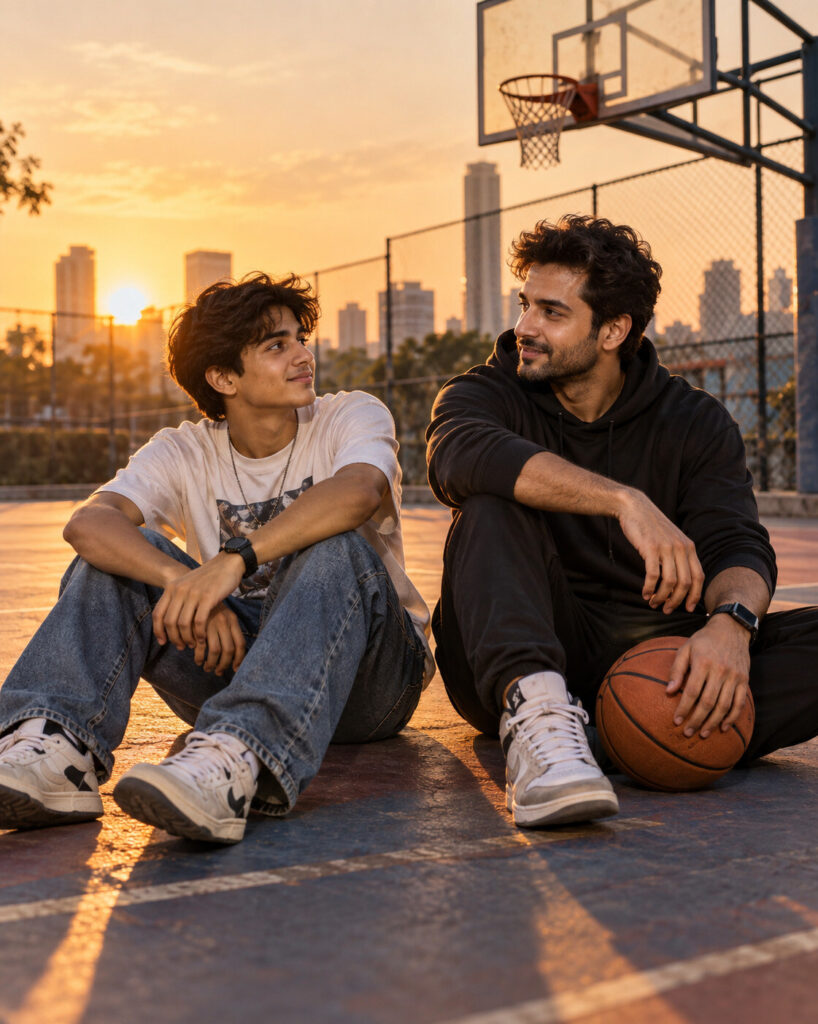
Meet Your Younger Self AI Duet Portrait
♡ 11Merge your current and younger reference photos into one cinematic scene while preserving both identities, ages, expressions and photographic realism.
Create one photorealistic photograph showing the person from the uploaded reference image at two different stages of life together. Preserve the exact recognizable identity of the current version and create a naturally younger version approximately 15 years earlier while maintaining the same fundamental facial structure and distinctive features. Place both versions on the same urban basketball court at golden hour, looking toward each other with subtle amused expressions. Match camera perspective, focal length, lighting, color temperature, depth and shadows across both figures. Give the current version contemporary clothing and the younger version believable period-appropriate casual clothing. Natural skin texture, realistic anatomy, authentic fabrics, long warm shadows, subtle atmospheric haze, cinematic storytelling, one coherent photograph, no collage or split screen, vertical 4:5.
Create one photorealistic photograph showing the person from the uploaded reference image at two different stages of life together. Preserve the exact recognizable identity of the current version and create a naturally younger version approximately 15 years earlier while maintaining the same fundamental facial structure and distinctive features. Place both versions on the same urban basketball court at golden hour, looking toward each other with subtle amused expressions. Match camera perspective, focal length, lighting, color temperature, depth and shadows across both figures. Give the current version contemporary clothing and the younger version believable period-appropriate casual clothing. Natural skin texture, realistic anatomy, authentic fabrics, long warm shadows, subtle atmospheric haze, cinematic storytelling, one coherent photograph, no collage or split screen, vertical 4:5.
Photorealistic two-era identity portrait using the uploaded reference image as the exact identity source. Preserve the current person's facial identity, facial structure, proportions, eyes, eyebrows, nose, lips, jawline, cheeks, skin tone, hairline, hairstyle, natural age and distinctive characteristics. Create a naturally younger version approximately 15 years earlier while maintaining the same fundamental identity. Place both versions together on one urban basketball court at golden hour. Match perspective, focal length, lighting, color temperature, depth and shadows. Current version wears contemporary casual clothing; younger version wears believable earlier-era clothing. Natural skin texture, realistic anatomy, realistic fabrics, long warm shadows, atmospheric haze, cinematic storytelling, one coherent photograph, vertical 4:5.
Using the uploaded reference image, create a single realistic photograph showing the same person at two different ages together. Preserve the exact current identity, facial structure, proportions, eyes, eyebrows, nose, lips, jawline, cheeks, skin tone, hairline, hairstyle and distinctive facial characteristics. Create a naturally younger version approximately 15 years younger without turning them into a different person. Place both versions together on an urban basketball court during golden hour, looking at each other with subtle amused expressions. Match the same camera angle, perspective, focal length, lighting direction, color temperature and shadows so they appear to have been photographed simultaneously. Give them age-appropriate clothing for their respective eras. Natural skin texture, realistic anatomy and authentic photography. The result must be one seamless photograph, not a collage or split screen. Vertical 4:5.
generic face, changed identity, identity drift, blended faces, averaged facial features, different person, incorrect age, facial reconstruction, altered facial proportions, changed eyes, changed eyebrows, changed nose, changed lips, changed jawline, changed skin tone, inconsistent hairstyle, mismatched lighting, mismatched shadows, floating feet, split screen, collage, duplicated body, extra limbs, distorted anatomy, plastic skin, beauty filter, CGI, 3D render, cartoon, anime, illustration, text, watermark, logo
Works with
✦ChatGPT Images 2.5✦Gemini✦Midjourney✦SDXL
Comments