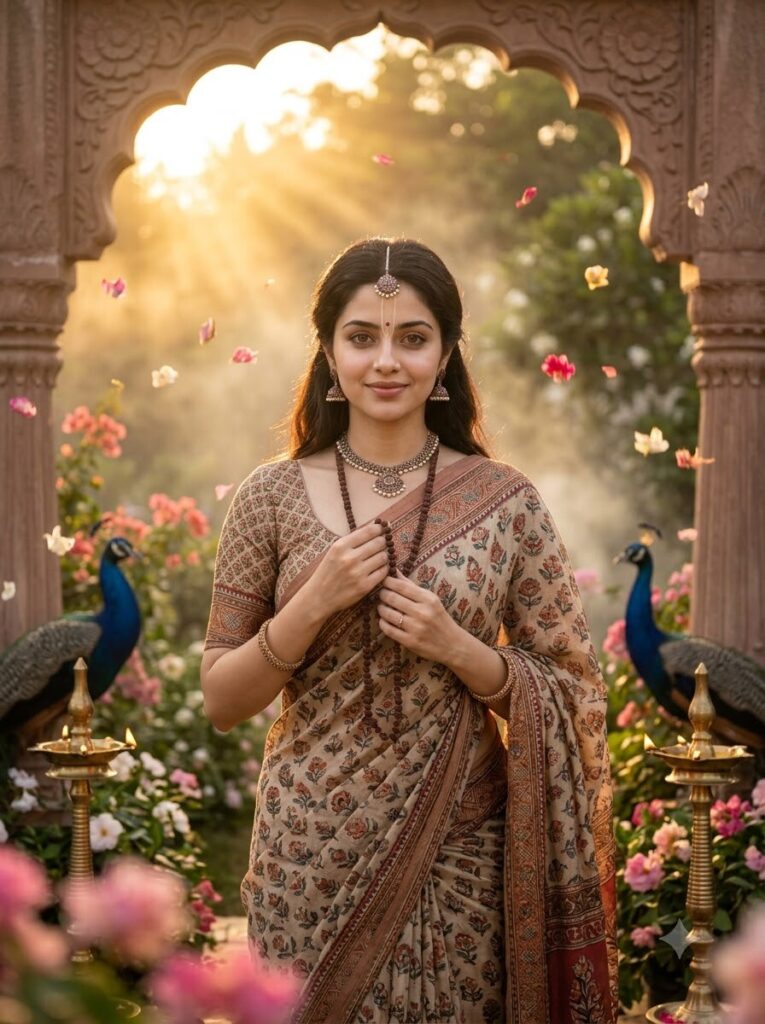
Vrindavan Divine Garden Portrait
♡ 9Transform a reference portrait into an elegant Vrindavan-inspired devotional scene with flowers, soft golden light, traditional styling and cinematic realism.
#Traditional/Cultural Portrait#devotional portrait#floral portrait#Indian cultural#Radha Ashtami#traditional portrait
Use the uploaded image as the exact identity reference. Preserve the persons recognizable facial identity and distinctive features. Create an elegant Vrindavan-inspired devotional portrait with traditional Indian attire, delicate jewelry, floral adornments, lush flowering gardens, warm golden sunrise light, flower petals, atmospheric mist, cinematic depth of field and premium photorealistic editorial photography.
Use the uploaded image as the exact identity reference. Preserve the persons recognizable facial identity and distinctive features. Create an elegant Vrindavan-inspired devotional portrait with traditional Indian attire, delicate jewelry, floral adornments, lush flowering gardens, warm golden sunrise light, flower petals, atmospheric mist, cinematic depth of field and premium photorealistic editorial photography.
Photorealistic Vrindavan-inspired devotional portrait using the uploaded reference image as the exact identity reference. Preserve recognizable facial identity, facial structure, eyes, eyebrows, nose, lips, jawline, cheeks, skin tone, hairline, hairstyle, natural age and distinctive facial characteristics. Elegant traditional Indian attire in pastel pink, ivory and soft gold, delicate jewelry, subtle floral adornments, lush flowering garden with jasmine, roses and lotus flowers, soft Indian architectural details, golden sunrise light through trees, floating flower petals, atmospheric mist, volumetric rays, realistic skin texture, detailed fabrics, shallow depth of field, natural bokeh, subtle analog film grain, peaceful reverent atmosphere, premium editorial photography, vertical 4:5.
Transform the uploaded portrait into a photorealistic devotional editorial portrait inspired by the gardens of Vrindavan while preserving the persons exact recognizable identity, facial structure, proportions, skin tone, hairstyle, natural age and distinctive facial characteristics. Dress the person in elegant traditional Indian clothing using pastel pink, ivory and soft gold fabrics with delicate jewelry and tasteful floral adornments. Place them in a lush garden containing jasmine, roses, lotus flowers and soft green foliage, with subtle traditional Indian architecture in the background. Use warm golden sunrise light filtering through trees, floating flower petals, gentle mist and soft volumetric rays. Keep the persons face realistic, natural and sharply recognizable. Use cinematic shallow depth of field, soft bokeh, detailed fabric texture, realistic skin and restrained film grain. Peaceful, graceful and reverent mood, premium editorial photography, vertical 4:5 composition, no text, logos or watermark.
identity change, different person, generic face, facial distortion, altered facial proportions, asymmetrical eyes, malformed eyes, warped nose, distorted lips, changed jawline, changed skin tone, changed hairstyle, changed age, excessive beauty retouching, plastic skin, excessive makeup, exaggerated fantasy effects, excessive jewelry, duplicate person, ghosting, distorted hands, extra fingers, malformed anatomy, cartoon, anime, illustration, painting, CGI, artificial skin, oversaturated colors, harsh lighting, low detail, low resolution, compression artifacts, text, logo, watermark
Works with
✦GPT Image✦Midjourney✦FLUX✦SDXL
Comments