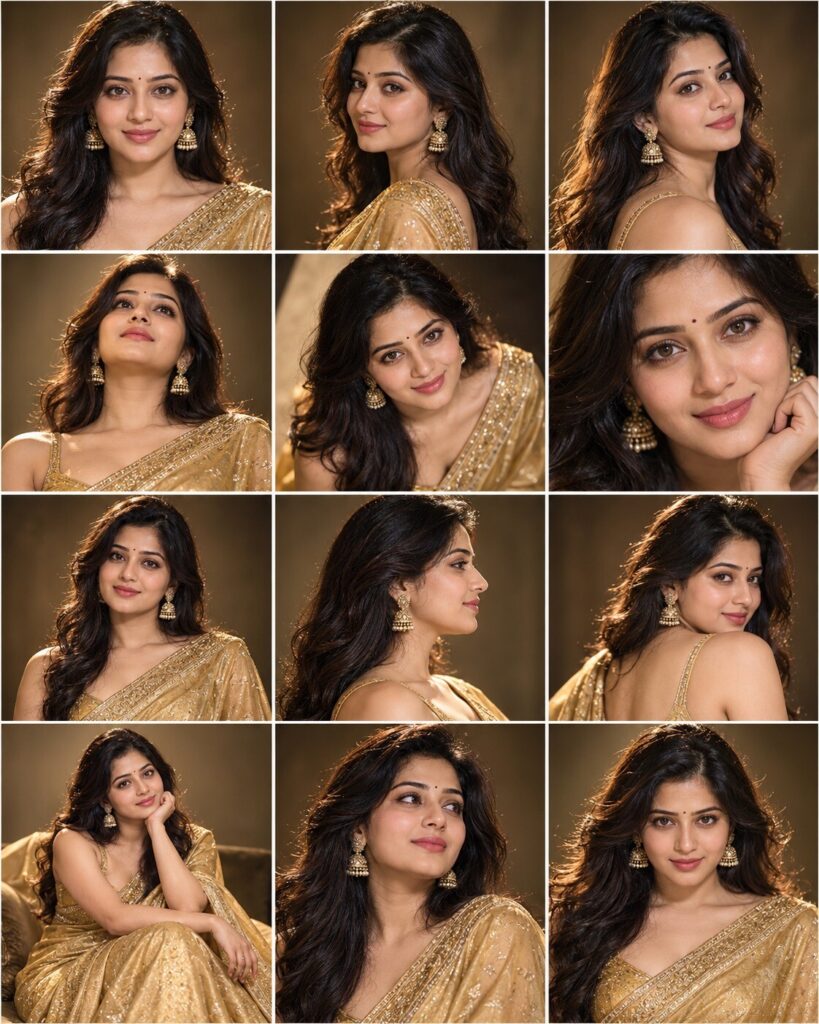
12-Angle Cinematic Photoshoot Contact Sheet
♡ 10Create a professional 3x4 cinematic contact sheet from one uploaded photo with 12 camera angles, expressions and compositions while preserving exact identity.
#Editorial Portrait#12 angle portrait#AI photography#cinematic photoshoot#contact sheet#editorial portrait
Create a premium 12-frame cinematic contact sheet from the uploaded reference image. The exact same person must appear in all twelve frames with strict identity preservation. Preserve facial identity, facial structure, proportions, eyes, eyebrows, nose, lips, jawline, cheeks, skin tone, age, hairline, hairstyle and distinctive facial details. Generate exactly 12 different photographic viewpoints: frontal headshot, left three-quarter, right three-quarter, low angle, elevated angle, close-up, medium portrait, profile, over-the-shoulder, seated portrait, candid gaze-away and dramatic centered portrait. Maintain identical wardrobe, hairstyle and facial identity across every frame. Professional editorial photography, realistic skin pores, natural hair texture, premium optics, shallow depth of field, controlled cinematic lighting, subtle film grain, cohesive color grade. Arrange as a clean 3x4 contact sheet with perfectly aligned frames, equal gutters and consistent visual quality.
Create a premium 12-frame cinematic contact sheet from the uploaded reference image. The exact same person must appear in all twelve frames with strict identity preservation. Preserve facial identity, facial structure, proportions, eyes, eyebrows, nose, lips, jawline, cheeks, skin tone, age, hairline, hairstyle and distinctive facial details. Generate exactly 12 different photographic viewpoints: frontal headshot, left three-quarter, right three-quarter, low angle, elevated angle, close-up, medium portrait, profile, over-the-shoulder, seated portrait, candid gaze-away and dramatic centered portrait. Maintain identical wardrobe, hairstyle and facial identity across every frame. Professional editorial photography, realistic skin pores, natural hair texture, premium optics, shallow depth of field, controlled cinematic lighting, subtle film grain, cohesive color grade. Arrange as a clean 3x4 contact sheet with perfectly aligned frames, equal gutters and consistent visual quality.
Create a realistic 3x4 contact sheet containing exactly 12 professional cinematic portraits of the same person from the uploaded reference image. Preserve the exact recognizable identity in every frame. Vary camera angles and portrait compositions while keeping the same wardrobe, hairstyle, facial anatomy and photographic environment. Premium editorial photography, realistic skin texture, natural lighting, shallow depth of field, professional optics, cohesive color grading and perfectly aligned contact-sheet layout.
Create a professional cinematic 3x4 contact sheet containing exactly 12 portraits of the same person from the uploaded reference image. Preserve the exact facial identity and natural appearance in every frame. Show twelve distinct camera angles and portrait compositions while maintaining consistent wardrobe, hairstyle and environment. Use realistic professional photography, natural skin texture, cinematic soft lighting, shallow depth of field and cohesive color grading. The result should look like an authentic photographers contact sheet.
identity drift, different person between frames, generic face, inconsistent face, altered facial structure, changed facial proportions, different eyes, different nose, different lips, changed jawline, changed cheeks, changed skin tone, changed age, changed hairstyle, changed hairline, inconsistent wardrobe, inconsistent accessories, duplicated pose, identical frames, fewer than 12 frames, more than 12 frames, incorrect grid, 2x6 grid, 4x3 grid, irregular panels, uneven spacing, overlapping panels, distorted faces, asymmetrical eyes, malformed hands, extra fingers, duplicate limbs, cartoon, anime, illustration, CGI, 3D render, plastic skin, excessive beauty retouching, oversharpening, extreme HDR, text, captions, labels, logos, watermark
Works with
✦ChatGPT Images✦Gemini✦Midjourney✦Flux✦SDXL

Comments