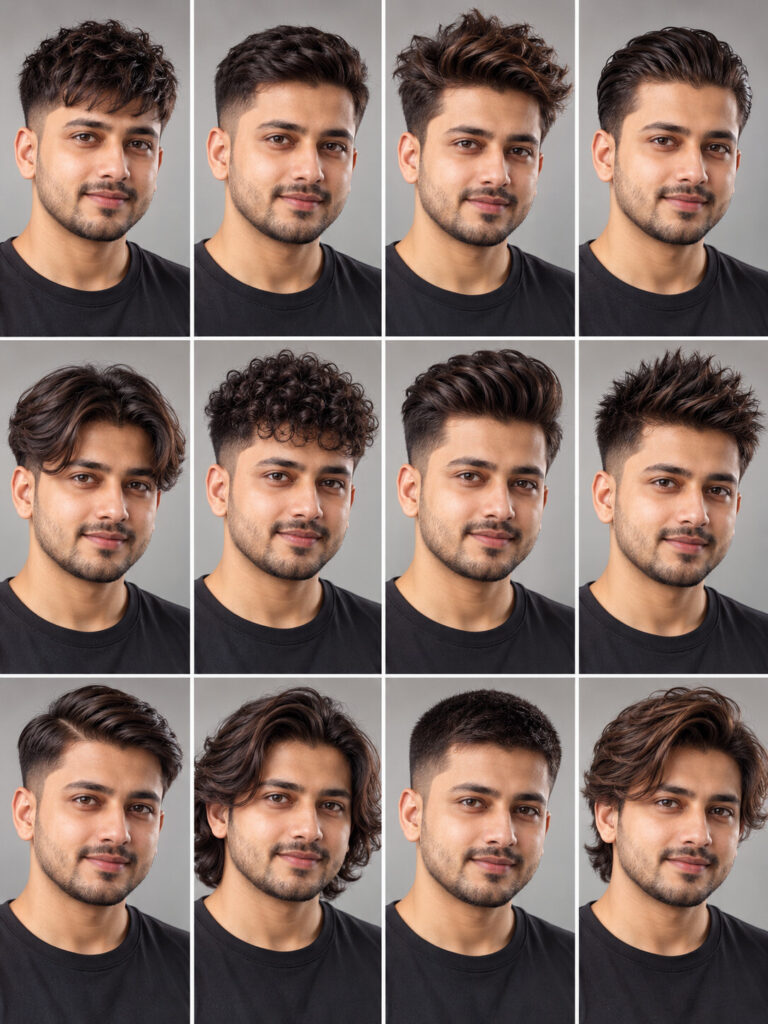
12-Look Hairstyle Identity Grid
♡ 7Create a polished 3x4 hairstyle catalog from your uploaded portrait while keeping your exact facial identity consistent across every hairstyle variation.
Create a photorealistic 3x4 hairstyle transformation grid using the uploaded reference image as the exact identity reference. Preserve the same person's recognizable facial identity, facial structure, facial proportions, eyes, eyebrows, nose, lips, jawline, cheeks, ears, skin tone, natural age, hairline and distinctive facial characteristics in every panel. Keep the same head angle, expression, camera framing, background and lighting. Change only the hairstyle. Show 12 distinct modern hairstyles: textured crop, low taper fade, messy quiff, slick back, middle-part curtains, curly top fade, pompadour, spiky textured cut, classic side part, long wavy hair, clean crew cut and medium layered flow. Arrange all twelve looks in a precise 3x4 equal-cell grid. Realistic hair strands, natural density, believable hairline integration, premium salon photography, clean neutral studio background, consistent portrait lighting, realistic skin texture, no text or watermark.
Create a photorealistic 3x4 hairstyle transformation grid using the uploaded reference image as the exact identity reference. Preserve the same person's recognizable facial identity, facial structure, facial proportions, eyes, eyebrows, nose, lips, jawline, cheeks, ears, skin tone, natural age, hairline and distinctive facial characteristics in every panel. Keep the same head angle, expression, camera framing, background and lighting. Change only the hairstyle. Show 12 distinct modern hairstyles: textured crop, low taper fade, messy quiff, slick back, middle-part curtains, curly top fade, pompadour, spiky textured cut, classic side part, long wavy hair, clean crew cut and medium layered flow. Arrange all twelve looks in a precise 3x4 equal-cell grid. Realistic hair strands, natural density, believable hairline integration, premium salon photography, clean neutral studio background, consistent portrait lighting, realistic skin texture, no text or watermark.
Photorealistic portrait grid, same reference person in every cell, exact identity preservation, consistent face and head shape, twelve hairstyle variations, realistic hair texture, textured crop, low taper fade, messy quiff, slick back, middle part, curly fade, pompadour, spiky cut, side part, long waves, crew cut, layered flow, neutral studio background, soft beauty lighting, consistent camera angle, sharp facial detail, natural skin, realistic hairline, clean 3x4 layout
Using the uploaded photo as the exact identity reference, create a realistic 3x4 hairstyle inspiration grid showing the same person with twelve different modern hairstyles. Preserve the person's recognizable face, facial proportions, skin tone, age, expression and natural likeness exactly while changing only the hair. Keep every panel consistently framed and professionally lit.
generic face, different person, identity drift, altered facial structure, changed eyes, changed nose, changed lips, changed jawline, changed cheeks, different skin tone, changed age, altered hairline, distorted face, asymmetrical eyes, duplicate face, inconsistent face, inconsistent head shape, different expression, different camera angle, different lighting, unrealistic wig, pasted hair, floating hair, plastic skin, excessive retouching, cartoon, illustration, anime, low resolution, blurry face, bad anatomy, deformed features, extra person, duplicate person, text, labels, captions, logo, watermark, borders, cluttered layout, overlapping panels
Works with
✦GPT Image✦Gemini image models✦Nano Banana✦Midjourney✦Flux
Comments