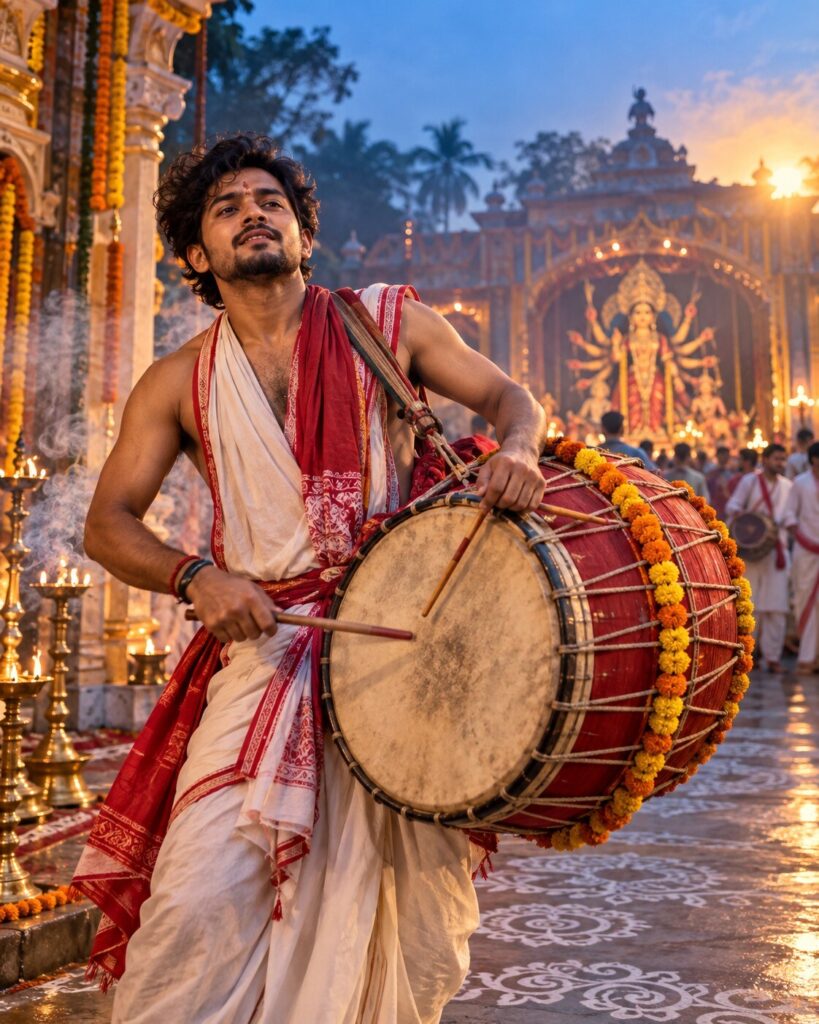
Agomoni Dhak — The First Beat of Puja
♡ 6Create a cinematic Agomoni portrait with a traditional Bengali dhak, dramatic movement, incense haze and atmospheric pre-dawn Puja lighting.
Use the uploaded reference image as the exact identity anchor. Preserve the person’s recognizable facial identity, facial structure, proportions, eyes, eyebrows, nose, lips, jawline, cheeks, skin tone, hairline, hairstyle, distinctive features and natural age. Transform the person into a photorealistic Bengali dhaki playing a traditional dhak during Agomoni before sunrise. Place them in an authentic Durga Puja courtyard with subtle alpana, marigold garlands, brass lamps and a distant pandal. Capture a powerful rhythmic beat with natural movement in the drum strap and clothing. Add delicate dhuno smoke, cool blue dawn ambience and dramatic warm golden sunlight from the side. Preserve realistic skin, textile, leather and wood textures. Premium cinematic documentary photography, energetic but culturally authentic, vertical 4:5.
Use the uploaded reference image as the exact identity anchor. Preserve the person’s recognizable facial identity, facial structure, proportions, eyes, eyebrows, nose, lips, jawline, cheeks, skin tone, hairline, hairstyle, distinctive features and natural age. Transform the person into a photorealistic Bengali dhaki playing a traditional dhak during Agomoni before sunrise. Place them in an authentic Durga Puja courtyard with subtle alpana, marigold garlands, brass lamps and a distant pandal. Capture a powerful rhythmic beat with natural movement in the drum strap and clothing. Add delicate dhuno smoke, cool blue dawn ambience and dramatic warm golden sunlight from the side. Preserve realistic skin, textile, leather and wood textures. Premium cinematic documentary photography, energetic but culturally authentic, vertical 4:5.
Photorealistic cinematic Bengali dhaki action portrait using the uploaded reference image as the exact identity reference. Preserve exact facial identity, facial structure, proportions, eyes, eyebrows, nose, lips, jawline, cheeks, skin tone, hairline, hairstyle, distinctive features and natural age. Subject playing an authentic traditional Bengali dhak during Agomoni before sunrise, realistic wood and leather drum, natural cloth straps, traditional Bengali dhaki clothing, powerful but anatomically correct rhythmic pose, authentic Durga Puja courtyard, subtle alpana, marigold garlands, brass lamps, distant pandal, delicate dhuno smoke, cool blue dawn atmosphere, warm golden side light, realistic skin pores, fabric and drum texture, cinematic documentary photography, 85mm portrait lens, shallow depth of field, natural color grading, vertical 4:5.
Use the uploaded reference photo as the exact identity reference and preserve the person’s recognizable identity without changing their face. Create a photorealistic cinematic portrait of the same person as a traditional Bengali dhaki during Agomoni, playing a large authentic dhak in a Durga Puja courtyard just before sunrise. Capture a powerful rhythmic beat with a natural expressive pose, realistic drum straps and subtle movement in the clothing. Dress the person in authentic Bengali dhaki clothing. Include subtle alpana patterns, marigold garlands, brass lamps, incense and dhuno smoke, and a distant Puja pandal. Use cool blue pre-dawn light mixed with dramatic warm golden sunlight from the side. Preserve realistic skin texture, fabric, leather and wood detail. The mood should feel energetic, devotional and emotionally powerful, like a premium cinematic documentary photograph from the moment Puja begins. Vertical 4:5.
different person, altered identity, generic face, face swap, changed facial structure, changed facial proportions, changed eyes, changed eyebrows, changed nose, changed lips, changed jawline, changed cheeks, changed skin tone, changed age, beauty filter, plastic skin, excessive smoothing, fantasy, supernatural glow, glowing drum, electronic drum, modern musical equipment, western clothing, inaccurate Bengali clothing, artificial festival set, CGI, 3D render, cartoon, anime, illustration, distorted hands, extra fingers, extra limbs, duplicate drum, excessive motion blur, oversaturated colors, text, logo, watermark
Works with
✦Google Gemini✦ChatGPT image generation✦Midjourney✦FLUX✦SDXL

Comments