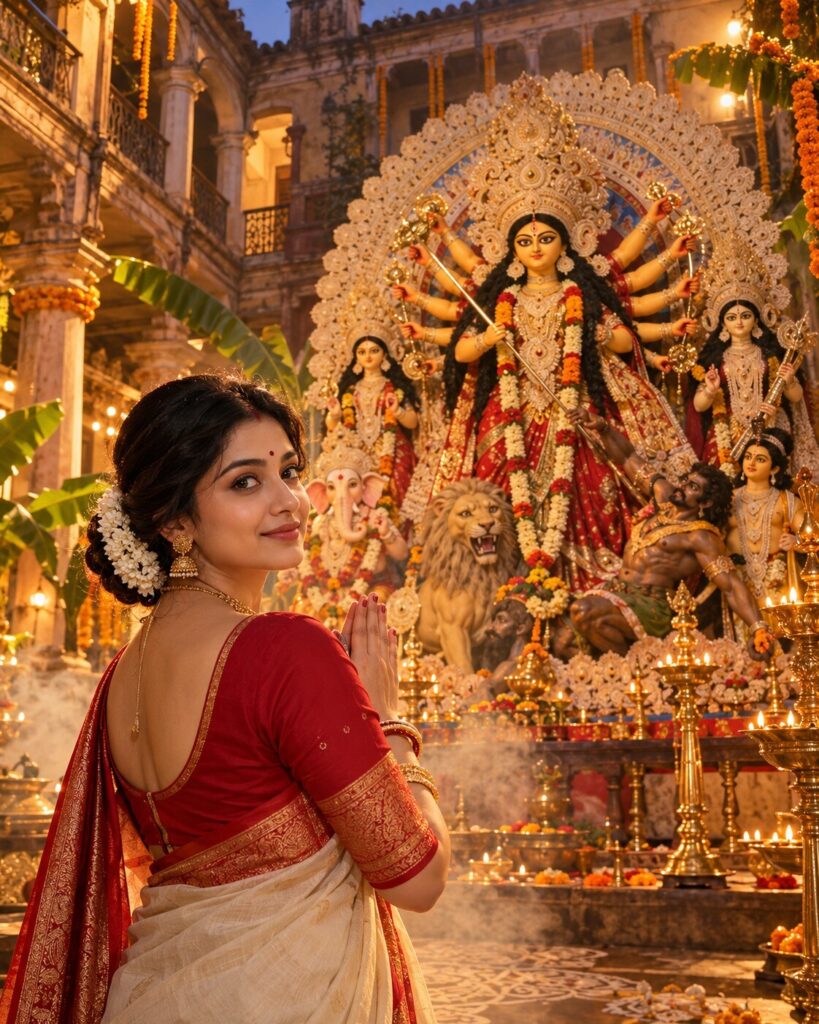
Agomoni — Maa Has Come Home
♡ 7Create a cinematic Agomoni portrait with Maa Durga inside a grand Bengali zamindar bari, surrounded by dhunuchi smoke, alpana and festive warmth.
Use the uploaded reference image as the exact identity anchor. Preserve the person’s recognizable facial identity, facial structure, proportions, eyes, eyebrows, nose, lips, jawline, cheeks, skin tone, hairline, hairstyle, distinctive features and natural age. Create a photorealistic cinematic Agomoni portrait inside an ancestral Bengali zamindar bari Puja courtyard. The subject stands respectfully before a magnificent traditional Maa Durga idol with Lakshmi, Saraswati, Kartik and Ganesha, lion and Mahishasura. Include authentic Bengali idol craftsmanship, traditional sari, detailed crown and jewelry. Surround the scene with heritage columns, old balconies, alpana, marigold garlands, banana leaves, brass lamps, shiuli flowers and subtle dhunuchi smoke. Dress the reference subject in elegant Bengali traditional clothing. Use warm golden evening light with atmospheric smoke and natural shadows. Convey the emotional feeling of Maa Durga returning home. Premium cinematic documentary photography, realistic skin, fabric, clay and architectural textures, vertical 4:5.
Use the uploaded reference image as the exact identity anchor. Preserve the person’s recognizable facial identity, facial structure, proportions, eyes, eyebrows, nose, lips, jawline, cheeks, skin tone, hairline, hairstyle, distinctive features and natural age. Create a photorealistic cinematic Agomoni portrait inside an ancestral Bengali zamindar bari Puja courtyard. The subject stands respectfully before a magnificent traditional Maa Durga idol with Lakshmi, Saraswati, Kartik and Ganesha, lion and Mahishasura. Include authentic Bengali idol craftsmanship, traditional sari, detailed crown and jewelry. Surround the scene with heritage columns, old balconies, alpana, marigold garlands, banana leaves, brass lamps, shiuli flowers and subtle dhunuchi smoke. Dress the reference subject in elegant Bengali traditional clothing. Use warm golden evening light with atmospheric smoke and natural shadows. Convey the emotional feeling of Maa Durga returning home. Premium cinematic documentary photography, realistic skin, fabric, clay and architectural textures, vertical 4:5.
Photorealistic cinematic Agomoni portrait using the uploaded reference image as the exact identity source. Preserve exact facial identity, facial structure, proportions, eyes, eyebrows, nose, lips, jawline, cheeks, skin tone, hairline, hairstyle, distinctive characteristics and natural age. Subject standing respectfully before an authentic traditional Maa Durga idol inside an ancestral Bengali zamindar bari courtyard, traditional Durga composition with Lakshmi, Saraswati, Kartik and Ganesha, lion and Mahishasura, ornate crown, traditional sari and jewelry, heritage columns, aged walls, wooden balconies, alpana, marigold garlands, banana leaves, brass lamps, shiuli flowers, subtle dhunuchi smoke, elegant Bengali traditional clothing, warm golden evening light, realistic clay and painted details, natural skin texture, cinematic documentary photography, 85mm lens, atmospheric depth, vertical 4:5.
Use the uploaded reference photo as the exact identity reference and preserve the person’s recognizable identity without changing their face. Create a photorealistic cinematic Agomoni portrait inside an authentic ancestral Bengali zamindar bari courtyard during Durga Puja. The same person stands respectfully before a magnificent traditional Maa Durga idol. The idol should have a serene traditional Bengali appearance, ornate crown, traditional red-and-cream sari and detailed jewelry, accompanied naturally by Lakshmi, Saraswati, Kartik and Ganesha, with the lion and Mahishasura composition. Surround the courtyard with old Bengali architecture, tall columns, aged walls, wooden balconies, traditional alpana, marigold garlands, banana leaves, brass lamps and subtle shiuli flowers. Add gentle dhunuchi smoke catching warm golden evening light. Dress the person in elegant Bengali traditional clothing. The expression should communicate devotion, warmth and the emotional feeling of welcoming Maa home. Make the photograph look like a premium real Indian editorial photograph with realistic skin, fabric, clay and architectural textures. Vertical 4:5.
different person, altered identity, generic face, face swap, changed facial structure, changed facial proportions, changed eyes, changed eyebrows, changed nose, changed lips, changed jawline, changed cheeks, changed skin tone, changed age, beauty filter, plastic skin, fantasy goddess, glowing deity, supernatural aura, floating idol, incorrect Durga anatomy, extra arms, missing arms, malformed hands, missing accompanying deities, duplicate idols, modern pandal, western clothing, inaccurate Bengali architecture, excessive decoration, CGI, 3D render, cartoon, anime, illustration, artificial smoke, excessive lens flare, oversaturated colors, text, logo, watermark
Works with
✦Google Gemini✦ChatGPT image generation✦Midjourney✦FLUX✦SDXL




Comments