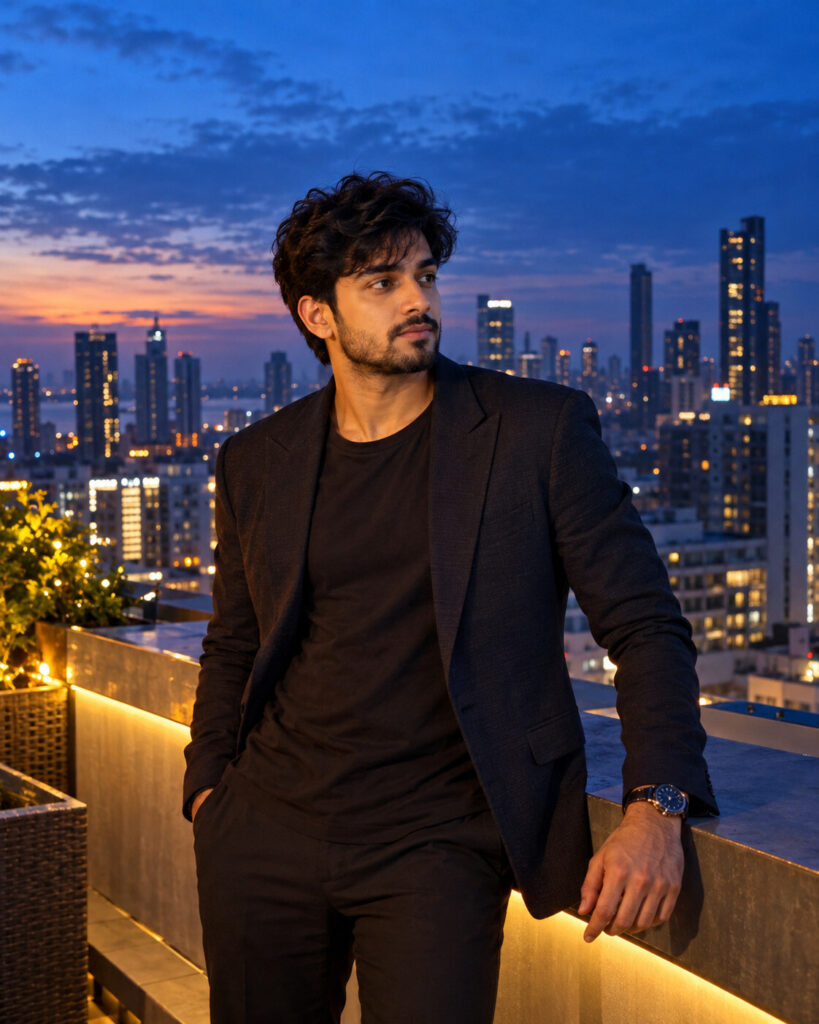
Cinematic Blue Hour Rooftop Editorial Portrait
♡ 14Transform your reference portrait into a cinematic blue-hour rooftop editorial with realistic skin, city lights, atmospheric depth and premium fashion photography.
#Cinematic Portrait Scenes#AI photography#blue hour portrait#cinematic portrait#city portrait#fashion editorial
Create a premium cinematic blue-hour rooftop editorial portrait using the uploaded image as the exact identity reference. Preserve facial identity, facial structure, proportions, eyes, eyebrows, nose, lips, jawline, cheeks, skin tone, hairline, hairstyle, natural age and distinctive facial characteristics. Place the subject on a sophisticated city rooftop immediately after sunset. Use deep cobalt-blue ambient light, subtle warm city-window illumination, realistic cinematic contrast, atmospheric haze, natural skin texture, controlled highlights and believable shadows. Contemporary editorial fashion styling, confident relaxed pose, realistic fabric texture, distant city skyline, shallow but believable depth, high-end full-frame photography, sophisticated cinematic mood, photorealistic, vertical 4:5.
Create a premium cinematic blue-hour rooftop editorial portrait using the uploaded image as the exact identity reference. Preserve facial identity, facial structure, proportions, eyes, eyebrows, nose, lips, jawline, cheeks, skin tone, hairline, hairstyle, natural age and distinctive facial characteristics. Place the subject on a sophisticated city rooftop immediately after sunset. Use deep cobalt-blue ambient light, subtle warm city-window illumination, realistic cinematic contrast, atmospheric haze, natural skin texture, controlled highlights and believable shadows. Contemporary editorial fashion styling, confident relaxed pose, realistic fabric texture, distant city skyline, shallow but believable depth, high-end full-frame photography, sophisticated cinematic mood, photorealistic, vertical 4:5.
Photorealistic cinematic blue-hour rooftop editorial portrait using the uploaded reference image as the identity source. Preserve exact facial identity, facial structure, facial proportions, eyes, eyebrows, nose, lips, jawline, cheeks, skin tone, hairline, hairstyle, natural age and distinctive facial characteristics. Sophisticated city rooftop immediately after sunset, deep blue ambient sky, subtle warm city lights, contemporary editorial fashion styling, natural skin texture, realistic fabric, atmospheric haze, controlled highlights, believable shadows, professional full-frame photography, realistic depth separation, cinematic contrast, premium fashion editorial, vertical 4:5.
Transform the uploaded portrait into a premium cinematic fashion photograph taken on a sophisticated city rooftop during blue hour. Preserve the exact person and their recognizable facial identity, facial structure, proportions, eyes, eyebrows, nose, lips, jawline, cheeks, skin tone, hairline, hairstyle, natural age and distinctive features. Use deep blue post-sunset ambient light mixed with subtle warm city lights, realistic skin texture, atmospheric depth, natural shadows, refined contemporary clothing and a confident relaxed editorial pose. The image should look like a genuine high-end professional photograph rather than an AI illustration. Vertical 4:5 composition.
generic face, changed identity, facial distortion, altered facial proportions, changed eyes, changed nose, changed lips, changed jawline, changed skin tone, changed hairstyle, age alteration, plastic skin, waxy skin, beauty filter, excessive retouching, CGI, 3D render, cartoon, anime, illustration, artificial skyline, excessive neon, extreme HDR, oversharpening, excessive bokeh, unrealistic lighting, distorted anatomy, duplicate person, extra limbs, text, watermark, logo
Works with
✦ChatGPT Images✦Gemini✦Midjourney✦SDXL

Comments