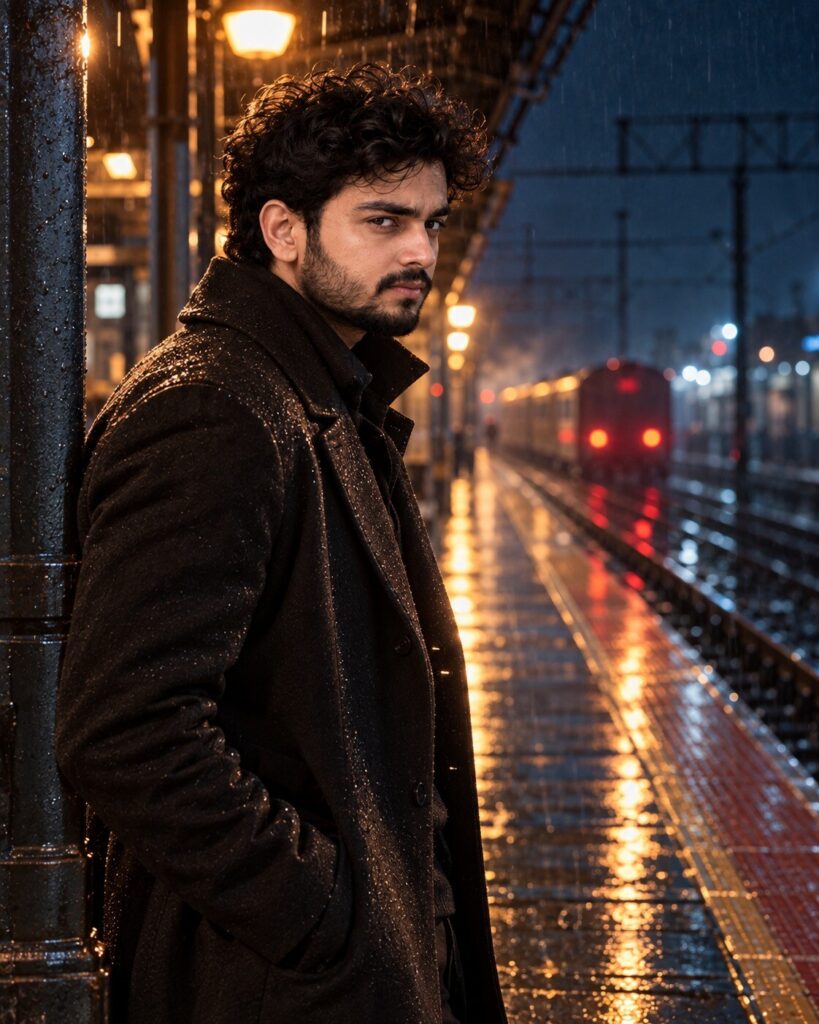
Cinematic Character Introduction Portrait
♡ 11Turn your reference portrait into a cinematic character-introduction frame with dramatic lighting, atmospheric depth and premium film still realism.
#Cinematic Portrait Scenes#AI photography#character intro#cinematic portrait#movie still#rainy night
Create a premium cinematic character-introduction portrait using the uploaded image as the exact identity reference. Preserve facial identity, facial structure, proportions, eyes, eyebrows, nose, lips, jawline, cheeks, skin tone, hairline, hairstyle, natural age and distinctive facial characteristics. Place the subject on a rain-soaked urban railway platform at night immediately after a train has departed. The subject pauses beneath an overhead station light and looks toward the camera with a calm, confident, mysterious expression. Dark charcoal trench coat, realistic fabric, wet reflective platform, distant train lights, subtle steam and atmospheric rain. Warm practical light on one side of the face, cool blue ambient shadows and subtle rim light. Natural skin texture, believable rain droplets, realistic depth of field, restrained anamorphic highlights, cinematic contrast and sophisticated thriller-film color grading. No poster text or logos. Photorealistic vertical 4:5 film still.
Create a premium cinematic character-introduction portrait using the uploaded image as the exact identity reference. Preserve facial identity, facial structure, proportions, eyes, eyebrows, nose, lips, jawline, cheeks, skin tone, hairline, hairstyle, natural age and distinctive facial characteristics. Place the subject on a rain-soaked urban railway platform at night immediately after a train has departed. The subject pauses beneath an overhead station light and looks toward the camera with a calm, confident, mysterious expression. Dark charcoal trench coat, realistic fabric, wet reflective platform, distant train lights, subtle steam and atmospheric rain. Warm practical light on one side of the face, cool blue ambient shadows and subtle rim light. Natural skin texture, believable rain droplets, realistic depth of field, restrained anamorphic highlights, cinematic contrast and sophisticated thriller-film color grading. No poster text or logos. Photorealistic vertical 4:5 film still.
Photorealistic cinematic character-introduction portrait using the uploaded reference image as the exact identity source. Preserve facial identity, facial structure, facial proportions, eyes, eyebrows, nose, lips, jawline, cheeks, skin tone, hairline, hairstyle, natural age and distinctive facial characteristics. Subject on a rain-soaked urban railway platform at night after a train departure, calm confident mysterious expression, dark charcoal trench coat, wet reflective floor, distant train lights, subtle steam and rain. Warm practical key light, cool blue ambient shadows, subtle rim light, natural skin texture, realistic rain droplets, believable depth of field, restrained anamorphic highlights, cinematic thriller grading, premium film-still realism, vertical 4:5.
Transform the uploaded portrait into a premium cinematic film still showing the exact same person as the lead character in their first appearance. Preserve their exact recognizable facial identity, facial structure, proportions, eyes, eyebrows, nose, lips, jawline, cheeks, skin tone, hairline, hairstyle, natural age and distinctive characteristics. Place them on a rain-soaked urban railway platform at night just after a train has departed. They pause beneath an overhead station light and look toward the camera with a calm, confident and slightly mysterious expression. Dress them in a dark charcoal trench coat with realistic fabric texture. Include wet reflective tiles, distant railway lights, subtle steam and atmospheric rain. Use warm practical light on one side of the face, cool blue ambient shadows and a subtle rim light. Preserve realistic skin texture and natural anatomy. Create sophisticated cinematic depth, restrained lens highlights and realistic film-still color grading. Make it feel like an expensive contemporary thriller scene rather than a poster. Vertical 4:5.
generic face, changed identity, facial reconstruction, altered facial proportions, changed eyes, changed eyebrows, changed nose, changed lips, changed jawline, changed cheeks, changed skin tone, changed hairstyle, age alteration, beauty filter, plastic skin, superhero costume, fantasy character, excessive rain, excessive fog, artificial train, fake reflections, extreme blue grading, excessive lens flare, poster design, title text, credits, logo, cartoon, anime, illustration, CGI, 3D render, distorted anatomy, duplicate person, extra limbs, watermark
Works with
✦ChatGPT Images 2.5✦Gemini✦Midjourney✦SDXL



Comments