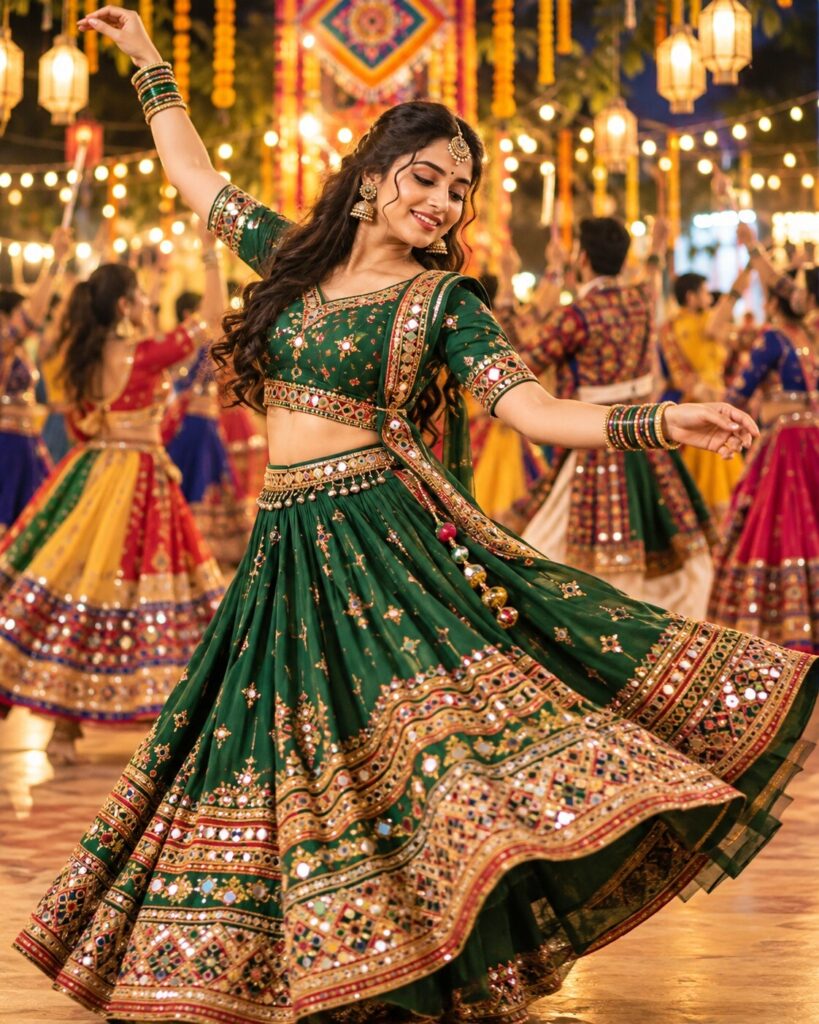
The Living Garba Circle – Dynamic Navratri Dance Portrait
♡ 13Transform your photo into a dynamic Garba dance portrait with emerald mirror-work fashion, flowing fabric, traditional dancers, and cinematic Navratri lights.
#Cinematic Portrait Scenes#AI Photo Prompts#Festival Photography#Garba Dance#Gujarati Fashion#Mirror Work
Transform the uploaded reference photo into a photorealistic Navratri Garba dance portrait. Preserve the subject’s exact recognizable identity, facial structure and proportions, eyes, eyebrows, nose, lips, jawline, cheeks, skin tone, hairline, hairstyle, distinctive features, natural age, and overall likeness. Never substitute a generic face. Style the subject in an emerald-green and antique-gold Gujarati outfit with mirror work, embroidery, traditional jewelry, and flowing fabric. Show a graceful Garba dance pose with adult dancers forming a colorful circular group in the background. Add marigold garlands, lanterns, warm fairy lights, and festive decorations. Keep the lead face sharp, hands anatomically correct, textiles realistic, and background softly blurred. Cinematic lighting, professional photography, vertical 4:5, one image only.
Transform the uploaded reference photo into a photorealistic Navratri Garba dance portrait. Preserve the subject’s exact recognizable identity, facial structure and proportions, eyes, eyebrows, nose, lips, jawline, cheeks, skin tone, hairline, hairstyle, distinctive features, natural age, and overall likeness. Never substitute a generic face. Style the subject in an emerald-green and antique-gold Gujarati outfit with mirror work, embroidery, traditional jewelry, and flowing fabric. Show a graceful Garba dance pose with adult dancers forming a colorful circular group in the background. Add marigold garlands, lanterns, warm fairy lights, and festive decorations. Keep the lead face sharp, hands anatomically correct, textiles realistic, and background softly blurred. Cinematic lighting, professional photography, vertical 4:5, one image only.
High-detail photorealistic cinematic portrait of an adult Indian lead dancer at a traditional Navratri Garba celebration. Use the uploaded reference photo as the authoritative identity reference. Preserve the person’s recognizable facial identity, facial structure, proportions, eyes, eyebrows, nose, lips, jawline, cheeks, skin tone, hairline, hairstyle, distinctive characteristics, age, and likeness. Emerald-green and antique-gold Gujarati festive clothing with mirror-work embroidery, flowing dupatta, and traditional jewelry. Graceful Garba dance gesture with natural arm positions and realistic fabric motion. Circular group of adult dancers in varied colorful Gujarati outfits in the background. Marigold garlands, lanterns, festive lights, warm cinematic illumination, natural skin texture, anatomically correct hands, sharp foreground face, shallow depth of field, realistic photography, vertical 4:5.
Edit the uploaded photo into one photorealistic Navratri Garba dance portrait. Preserve the person’s original recognizable identity, facial structure and proportions, eyes, eyebrows, nose, lips, jawline, cheeks, skin tone, hairline, hairstyle, distinctive features, natural age, and overall likeness. Do not replace their face with a generic person. Dress the subject in an emerald-green Gujarati festive outfit with antique-gold embroidery, mirror work, traditional jewelry, and a flowing dupatta. Show the subject performing a graceful Garba dance step in the foreground, with a circular group of adult dancers wearing colorful traditional Gujarati outfits behind them. Decorate the venue with marigold garlands, lanterns, and warm festive lights. Keep the lead subject’s face sharp and unobstructed, with realistic hands, natural body proportions, authentic textiles, warm cinematic lighting, and a softly blurred background. Frame the subject from the knees upward with the head and arms visible. Vertical 4:5. No text, watermark, or collage.
identity change, generic face, face replacement, altered facial structure, altered facial proportions, changed eyes, changed eyebrows, changed nose, changed lips, changed jawline, changed cheeks, altered skin tone, changed hairline, changed hairstyle, changed age, excessive beautification, plastic skin, airbrushed texture, asymmetrical eyes, blurry face, extra fingers, missing fingers, fused fingers, malformed hands, twisted limbs, distorted anatomy, unnatural dance gesture, duplicated lead dancer, repeated identical faces, tangled background dancers, warped mirror work, distorted fabric, floating jewelry, unrealistic fabric motion, cropped head, cut-off arms, face obscured, overexposure, oversaturation, cartoon, painting, illustration, text, logo, watermark, collage, split screen
Works with
✦ChatGPT image generation✦Google Gemini image generation✦Midjourney✦Stable Diffusion XL

Comments