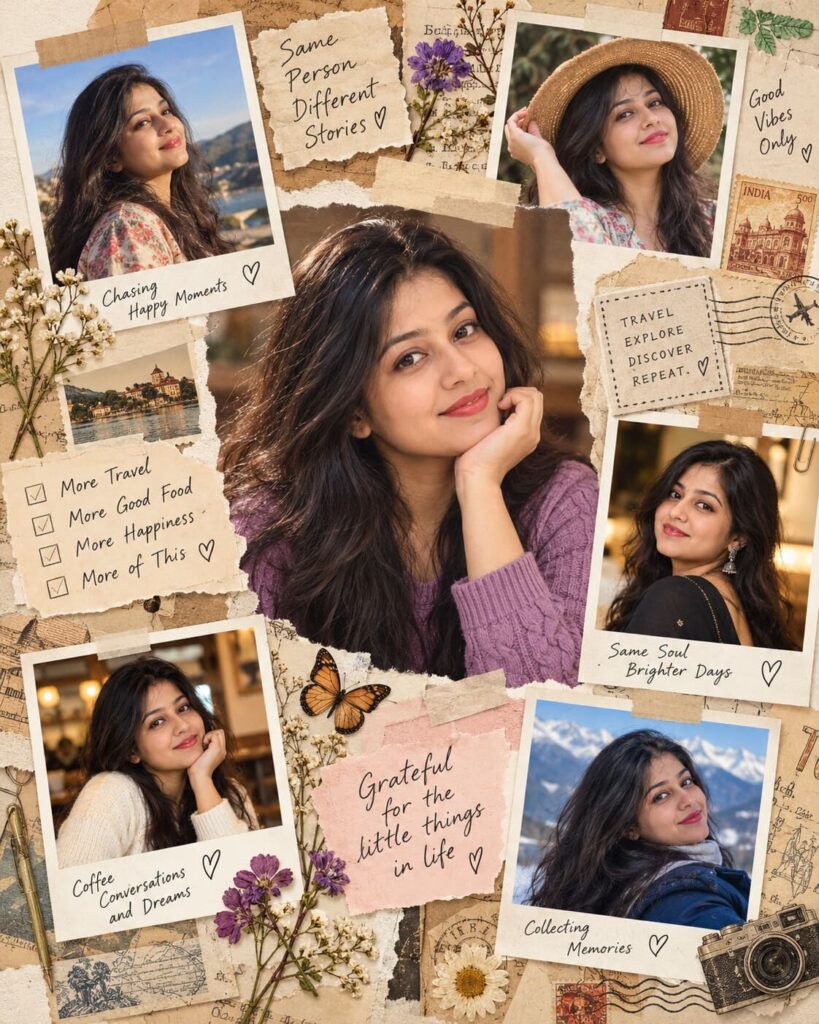
Scrapbook Memory Collage Portrait
♡ 15Turn a reference portrait into a tactile scrapbook memory board combining realistic photos, torn paper, Polaroid frames, handwritten notes and nostalgic craft details.
#Travel Photography#editorial portrait#memory board#nostalgic aesthetic#paper collage#Polaroid aesthetic
Use the uploaded photograph as the authoritative identity reference. Preserve the persons recognizable facial identity and create a premium handmade scrapbook memory collage with a sharp central portrait, smaller consistent photo snapshots, Polaroid frames, torn cream paper, masking tape, postage stamps, pressed flowers, handwritten journal fragments, realistic paper shadows, warm editorial lighting and subtle analog grain.
Use the uploaded photograph as the authoritative identity reference. Preserve the persons recognizable facial identity and create a premium handmade scrapbook memory collage with a sharp central portrait, smaller consistent photo snapshots, Polaroid frames, torn cream paper, masking tape, postage stamps, pressed flowers, handwritten journal fragments, realistic paper shadows, warm editorial lighting and subtle analog grain.
Photorealistic handmade scrapbook memory collage using the uploaded reference image as the exact identity source. Preserve recognizable facial identity, facial structure, eyes, eyebrows, nose, lips, jawline, cheeks, skin tone, hairline, hairstyle, natural age and distinctive facial characteristics. Large sharp central portrait surrounded by smaller photographs of the same person with consistent identity. Warm cream scrapbook paper, torn paper edges, Polaroid frames, beige masking tape, postage stamps, pressed dried flowers, handwritten journal fragments, subtle pencil marks, realistic paper fibers, folds and contact shadows, warm window light, muted beige and brown palette, dusty green accents, subtle analog film grain, premium editorial photography, tactile physical collage, vertical 4:5 composition.
Transform the uploaded portrait into a premium handmade scrapbook memory collage while preserving the persons exact recognizable identity, facial structure, proportions, hairstyle, skin tone, natural age and distinctive facial characteristics. Make the person the central visual anchor with one large photorealistic portrait and several smaller photographs showing the same recognizable person. Arrange the images on warm cream textured scrapbook paper with torn edges, Polaroid-style frames, beige masking tape, postage stamps, pressed dried flowers, handwritten journal fragments and subtle pencil marks. Make the paper layers physically believable with realistic folds, fibers, thickness and soft contact shadows. Use warm natural window light, muted cream, beige, brown and dusty green tones, subtle analog grain and a sophisticated editorial mood. Vertical 4:5 composition, realistic photography, no logos, no watermark and no readable brand text.
identity change, different person, generic face, inconsistent face, facial distortion, altered facial proportions, asymmetrical eyes, malformed eyes, warped nose, distorted lips, changed jawline, changed skin tone, changed hairstyle, excessive beauty retouching, plastic skin, duplicate face, unnatural expressions, low detail, blurry central portrait, flat digital collage, clean vector collage, artificial paper, missing shadows, excessive clutter, oversaturated colors, cartoon, anime, illustration, CGI, deformed hands, extra fingers, malformed anatomy, logo, watermark, brand name, unreadable text, excessive typography
Works with
✦GPT Image✦Midjourney✦FLUX✦SDXL

Comments